SpotifySpotify
Playback operations
Playback information and key operation
KW-V140BT/KW-V240BT
Spotify
KW-V340BT
Spotify
You can also operate Spotify with a remote controller,
RM-RK258*1.
You can only control play, pause and skip with the
remote controller.
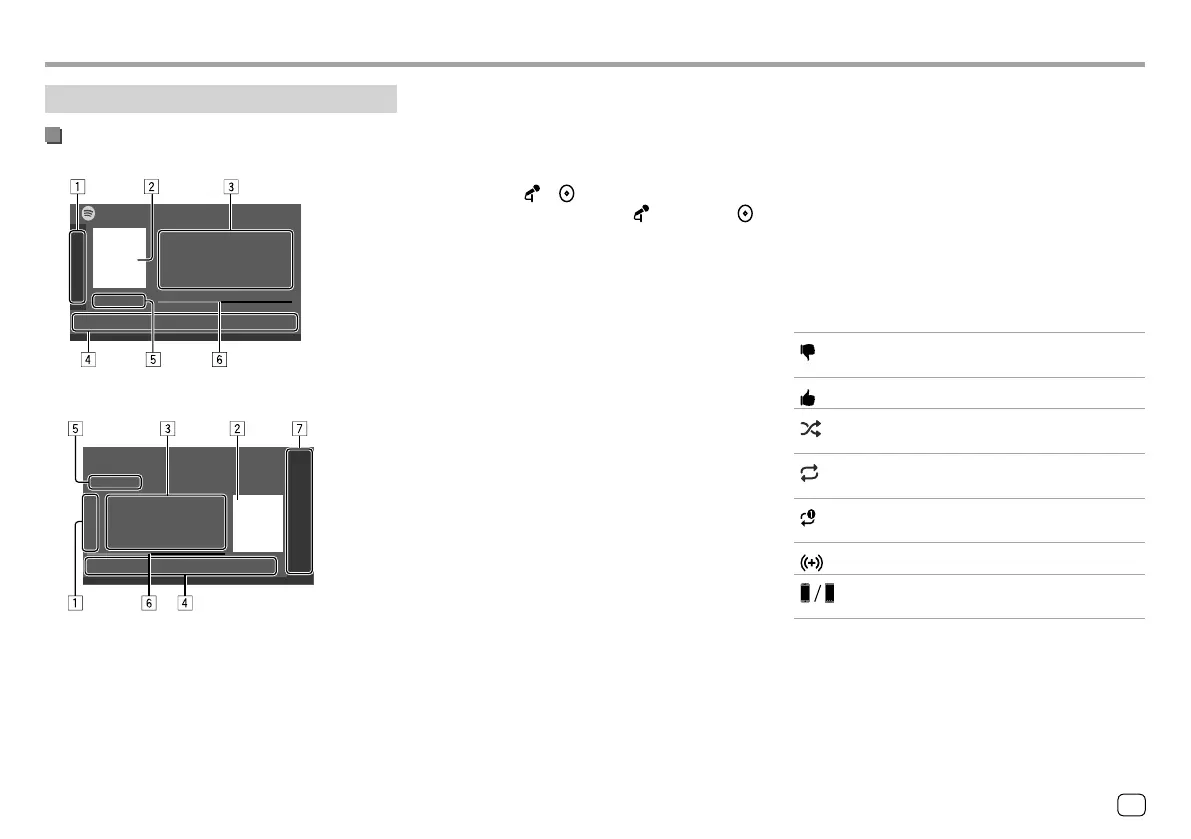
1 Displays/hides other available operation keys*2
2 Picture data
3 Track information
• Touching [
H] scrolls the text if not all of the text
is shown.
• Touching [ ] /[ ] changes the displayed
information between artist ( ) and album ( ).
4 Operation keys*2
5 Playing time/playback status
6 Progress bar
7 Only for KW-V340BT: Playback source items shown
on the Home screen.
• Touching the playback source item changes the
playback source.
*1 For KW-V140BT/KW-V240BT Region 1/KW-V340BT: Purchase
optional remote controller, RM-RK258.
*2 See the following “Operation keys on source control screen”.
Operation keys on source control screen
• The following explanations state the operation keys
for KW-V240BT, unless stated otherwise.
• The appearance of the operation keys may differ,
however the similar operation keys have the same
operations.
• See also “Common operation keys on source control
screen” on page 8.
Touching the operation keys performs the following
actions:
1
[ ]*1
Thumbs down to the current track and
skips to the next track.
[
]*1
Registers the current track as a favorite.
[
]*2 *3
Activates/deactivates the shuffle
playback mode.
[
]*2
Repeats all tracks/cancels the repeat
playback.
[
]*2 *3
Repeats the current track/cancels the
repeat playback.
[
]
Creates a new station.
[
]
Switches the device on <Smartphone
Setup> screen. (Page 46)
*1 Not available for tracks in a playlist.
*2 Not available for tracks in the Radio.
*3 Available only for premium account users.
31ENGLISH
ENKW-V2018STKR.indb31ENKW-V2018STKR.indb31 2017/05/259:042017/05/259:04



 To Next Page