SettingsSettings
<Sound Effect>
Adjust the sound effect.
<Loudness>
Adjusts loudness.
• OFF (Initial)/Low/High
<Bass Boost>
Selects the bass boost level.
• OFF (Initial)/Level 1/Level 2/Level 3/Level 4/
Level5
<Volume Link EQ>
Reduces the driving noise by raising the bandwidth.
• OFF (Initial)/ON
<Space Enhancement>*1
Virtually enhances the sound space using the Digital
Signal Processor (DSP) system. Select the enhance
level.
• OFF (Initial)/Small/Medium/Large
<K2>*2
Restores the sound lost due to audio compression to a
realistic sound.
• OFF/ON (Initial)
<Sound Response>
Virtually makes the sound more realistic using the
Digital Signal Processor (DSP) system. Select the sound
level.
• OFF (Initial)/Level 1/Level 2/Level 3
<Sound Lift>
Moves the center of the sound to the lower or higher
point. Select the height.
• OFF (Initial)/Low/Middle/High
*1 You cannot change the setting when “Tuner” is selected as the
source.
*2 This function works only when “DISC”/ “USB”/ “iPod”/
“Android™” is selected as the source.
<Fader/Balance>
Touch [J]/[K]/[H]/[I] or drag the mark to adjust.
<Fader>
Adjusts the front and rear speaker output balance.
When using a two-speaker system, set the fader to the
center (0).
• F15 to R15 (Initial: 0)
<Balance>
Adjusts the left and right speaker output balance.
• L15 to R15 (Initial: 0)
To clear the adjustment: Touch [Center].
<Speaker/X’over>
Preparation:
Before making the adjustment for <Speaker/X'over>,
select the appropriate crossover network mode
according to the speaker system (2-way speaker
system or 3-way speaker system).
1 Turn off the AV source.
On the Home screen, touch as follows:
2 Display the <X’over Network> screen.
On the monitor panel, press the following buttons
at the same time:
• For KW-V140BT/KW-V240BT: and EQ
• For KW-V340BT: and
3 Select the crossover network mode.
[2way] Select this when 2-way system
speakers are used (front/rear).
[3way] Select this when 3-way system
speakers are used (tweeter/mid
range/woofer).
A confirmation message appears. Touch [Yes].
Setting the speakers and crossover
frequency
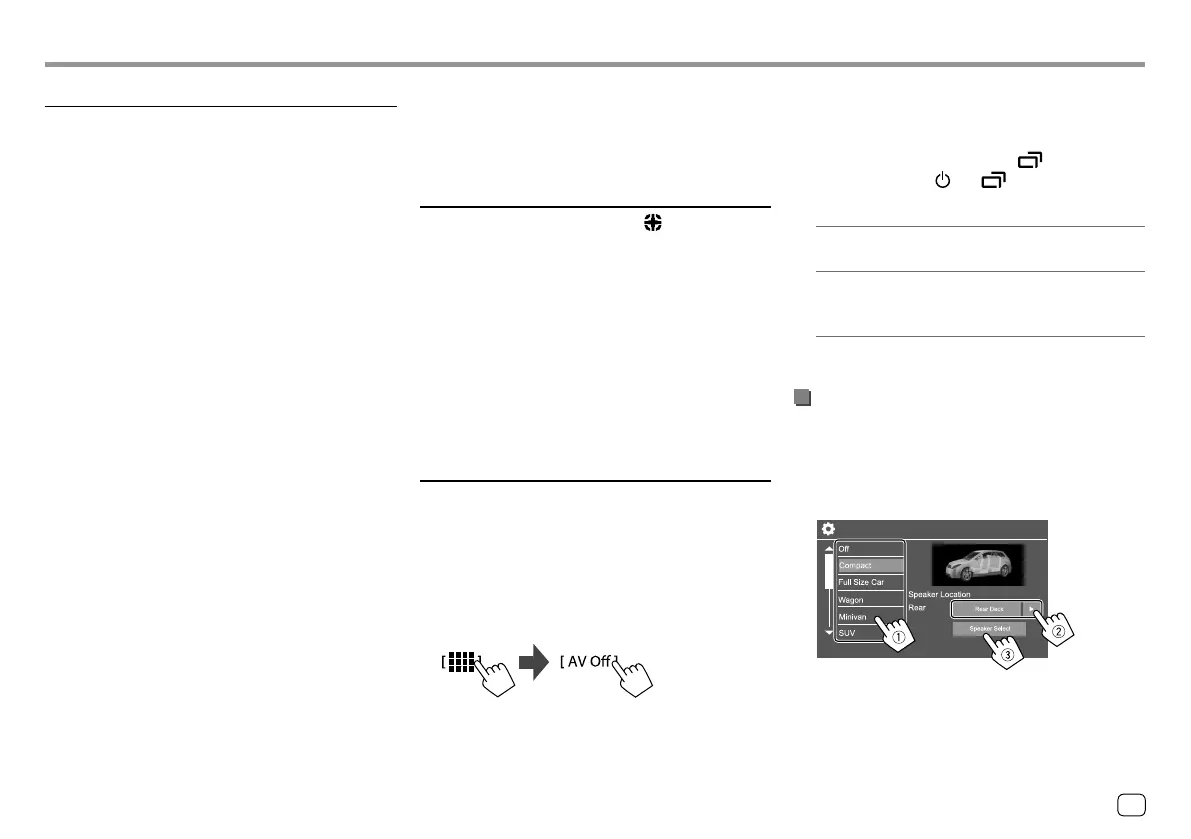
1 Select a car type (1), select the location
of the speakers (
2)*, then display the
<Speaker Select> screen (
3).
Car Setting
* Speaker location selection is available only when <X’over
Network> is set to [2way].
41ENGLISH
ENKW-V2018STKR.indb41ENKW-V2018STKR.indb41 2017/05/259:042017/05/259:04



 To Next Page