BASIC OPERATION
Make sure all necessary connections are correctly made before connecting the unit to the wall
socket and turning on the power.
Watching TV
1. Press the STANDBY button to power on the unit.
2. Press the SOURCE button to select analog (ATV) or digital (DTV) as input source.
3. Choose the channel by pressing CH+ or CH- or by pressing the numeric buttons (combined [-/--]
if necessary) to input the channel number directly.
Electronic Program Guide (EPG)
EPG stands for Digital Electronic Program Guide. It is supplied by the program providers and offers
information about the programs to be broadcast. You can access it in digital mode by pressing the
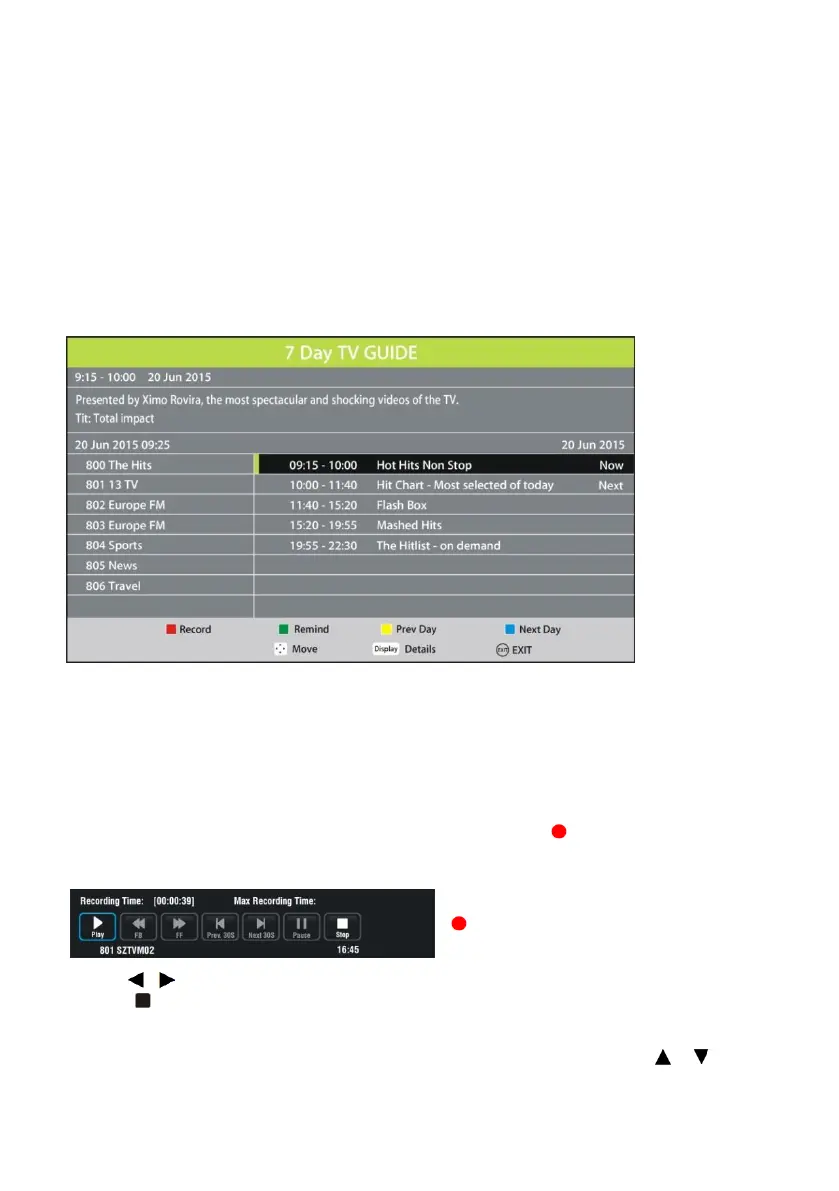
EPG button on the remote control, the menu will appear on the screen, as below:
Press ▲/▼navigation button to select preferred program
Press ◄/► navigation button to switch between left column and right column.
Press the RED button to set a recording.
Press the GREEN button to set a reminder.
Press the YELLOW button to display the program guide of the previous day.
Press the BLUE button to display the program guide of the following day.
Recording
1. In DTV mode, insert a formatted USB storage device, then press to record the program you
are watching.
The record menu will be showed on the screen.
If this menu disappears, press the EXIT or
button to display it again.
2. Press / to move the cursor and press OK to confirm your setting.
3. Press to initiate a dialog box and select [Yes] to stop recording. To dismiss the dialog box,
select [No].
To watch recorded programs, press INDEX to initiate the Record List menu. Press / to
select a recorded file and press OK to start playback.


 To Next Page