EasyManua.ls Logo

JVC RX-316BK - Selecting the Audio Source; Listening; Recording; Receiving an Am;Fm Broadcast

JVC RX-316BK
73 pages
Print Icon
To Next Page IconTo Next Page
To Previous Page IconTo Previous Page
Loading...
Selecting
the
Audio
Source
2
Se
CC
CO
CO
oo
Monitoring
Page
12
6-|
(00G0Z
ON)
The
receiver
can
receive
input
from
compact
discs,
cassette
tapes,
turntables,
or
any
audio
source
that
you
connect.
You
can
select
a
source
for
either
listening
or
recording.
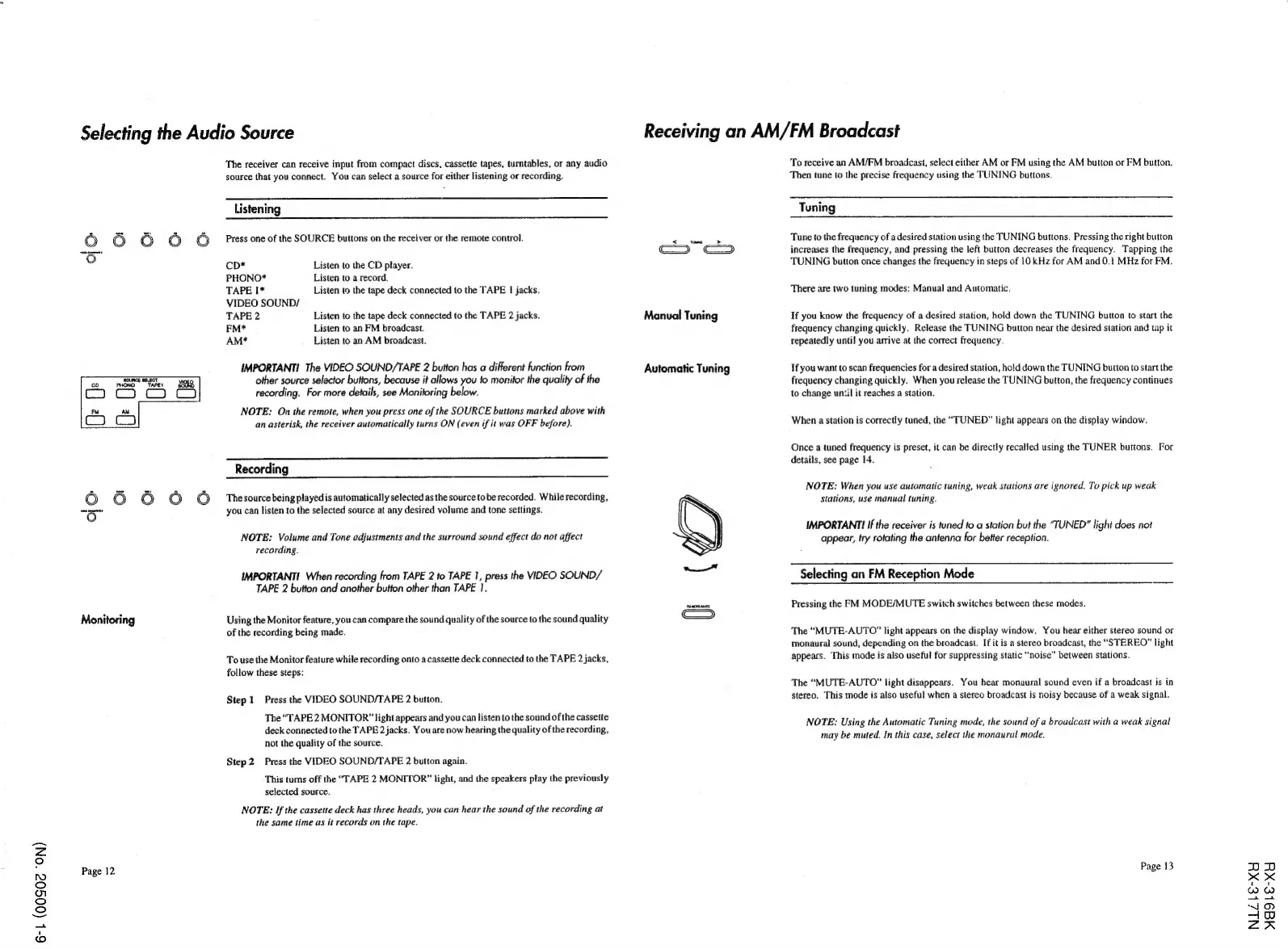
Listening
Press
one
of
the
SOURCE
buttons
on
the
receiver
or
the
remote
control.
CD*
Listen
to
the
CD
player.
PHONO*
Listen
to
a
record.
TAPE
1*
Listen
to
the
tape
deck
connected
to
the
TAPE
!
jacks.
VIDEO
SOUND/
TAPE
2
Listen
to
the
tape
deck
connected
to
the
TAPE
2
jacks.
FM*
Listen
to
an
FM
broadcast.
AM*
Listen
to
an
AM
broadcast.
IMPORTANT!
The
VIDEO
SOUND/TAPE
2
button
has
a
different
function
from
other
source
selector
buttons,
because
it
allows
you
fo
monitor
the
quality
of
the
recording.
For
more
details,
see
Monitoring
below.
NOTE:
On
the
remote,
when
you
press
one
of
the
SOURCE
buttons
marked
above
with
an
asterisk,
the
receiver
automatically
turns
ON
(even
if
it
was
OFF
before).
Recording
The
source
being
played
is
automatically
selected
as
the
source
tobe
recorded.
While
recording,
you
can
listen
to
the
selected
source
at
any
desired
volume
and
tone
settings.
NOTE:
Volume
and
Tone
adjustments
and
the
surround
sound
effect
do
not
affect
recording.
IMPORTANT!
When
recording
from
TAPE
2
to
TAPE
1,
press
the
VIDEO
SOUND/
TAPE
2
button
and
another
button
other
than
TAPE
1.
Using
the
Monitor
feature,
you
can
compare
the
sound
quality
of
the
source
to
the
sound
quality
of
the
recording
being
made.
To
use
the
Monitor
feature
while
recording
onto
a
cassette
deck
connected
to
the
TAPE
2
jacks,
follow
these
steps:
Step
1
Press
the
VIDEO
SOUND/TAPE
2
button.
The
“TAPE
2
MONITOR”
light
appears
and
you
can
listen
to
the
sound
of
the
cassette
deck
connected
to
the
TAPE
2
jacks.
You
are
now
hearing
the
quality
of
the
recording,
not
the
quality
of
the
source.
Step
2
Press
the
VIDEO
SOUND/TAPE
2
button
again.
This
turns
off
the
“TAPE
2
MONITOR”
light,
and
the
speakers
play
the
previously
selected
source.
NOTE:
If
the
cassette
deck
has
three
heads,
you
can
hear
the
sound
of
the
recording
at
the
same
time
as
it
records
on
the
tape.
Receiving
an
AM/FM
Broadcast
Manual
Tuning
Automatic
Tuning
To
receive
an
AM/FM
broadcast,
select
either
AM
or
FM
using
the
AM
button
or
FM
button.
Then
tune
to
the
precise
frequency
using
the
TUNING
buttons.
Tuning
Tune
to
the
frequency
of
a
desired
station
using
the
TUNING
buttons.
Pressing
the
right
button
increases
the
frequency,
and
pressing
the
left
button
decreases
the
frequency.
Tapping
the
TUNING
button
once
changes
the
frequency
in
steps
of
10
kHz
for
AM
and
0.1
MHz
for
FM.
There
are
two
tuning
modes:
Manual
and
Automatic.
If
you
know
the
frequency
of
a
desired
station,
hold
down
the
TUNING
button
to
start
the
frequency
changing
quickly.
Release
the
TUNING
button
near
the
desired
station
and
tap
it
repeatedly
until
you
arrive
at
the
correct
frequency.
If
you
want
to
scan
frequencies
for
a
desired
station,
hold
down
the
TUNING
button
to
start
the
frequency
changing
quickly.
When
you
release
the
TUNING
button,
the
frequency
continues
to
change
until
it
reaches
a
station,
When
a
station
is
correctly
tuned,
the
“TUNED”
light
appears
on
the
display
window.
Once
a
tuned
frequency
is
preset,
it
can
be
directly
recalled
using
the
TUNER
buttons.
For
details,
see
page
14.
NOTE:
When
you
use
automatic
tuning,
weak
stations
are
ignored.
To
pick
up
weak
Stations,
use
manual
tuning.
IMPORTANT!
If
the
receiver
is
tuned
to
a
station
but
the
“TUNED”
light
does
not
appear,
try
rotating
the
antenna
for
better
reception.
Selecting
an
FM
Reception
Mode
Pressing
the
FM
MODE/MUTE
switch
switches
between
these
modes.
The
“MUTE-AUTO”
light
appears
on
the
display
window.
You
hear
either
stereo
sound
or
monaural
sound,
depending
on
the
broadcast.
If
it
is
a
stereo
broadcast,
the
“STEREO”
light
appears.
This
mode
is
also
useful
for
suppressing
static
“noise”
between
stations.
The
“MUTE-AUTO”
light
disappears.
You
hear
monaural
sound
even
if
a
broadcast
is
in
stereo.
This
mode
is
also
useful
when
a
stereo
broadcast
is
noisy
because
of
a
weak
signal.
NOTE:
Using
the
Automatic
Tuning
mode,
the
sound
of
a
broadcast
with
a
weak
signal
may
be
muted.
In
this
case,
select
the
monaural
mode.
Page
13
NLZbE-XY
MA9Le-XY