EasyManua.ls Logo

JVC RX-316BK - Table of Contents

JVC RX-316BK
73 pages
Print Icon
To Next Page IconTo Next Page
To Previous Page IconTo Previous Page
Loading...
(00G0Z
‘ON)
v-t
Contents
Page
2
WARNINGS
inside
front
cover
INTRODUCTION
1
Features
1
About
This
Manual
1
CONTENTS
4
SWITCHES
AND
CONTROLS
3
Receiver
3
Remote
Control!
3
INSTALLATION
4
Cautions
4
Connecting
Stereo
Components
5
Connecting
Speakers
J
Connecting
an
AM
Antenna
8
Connecting
an
FM
Antenna
9
Connecting
the
Power
10
OPERATION
OUTLINE
11
Basic
Operation
Reference
11
SELECTING
THE
AUDIO
SOURCE
12
Listening
12
Recording
12
RECEIVING
AN
AM/FM
BROADCAST
13
Tuning
13
Selecting
an
FM
Reception
Mode
13
Presetting
Tuned
Frequencies
14
ADJUSTING
THE
VOLUME
AND
TONE
15
Adjusting
the
Volume
15
Adjusting
the
Tone
16
Listening
at
Low
Volume
(Loudness)
16
OPERATING
AUDIO
COMPONENTS
17
COMPU
LINK
Remote
Control
System
17
Using
the
Remote
Control
18
TROUBLESHOOTING
20
SPECIFICATIONS
21
JVC
SERVICE
CENTERS
23
WARRANTY
inside
back
cover
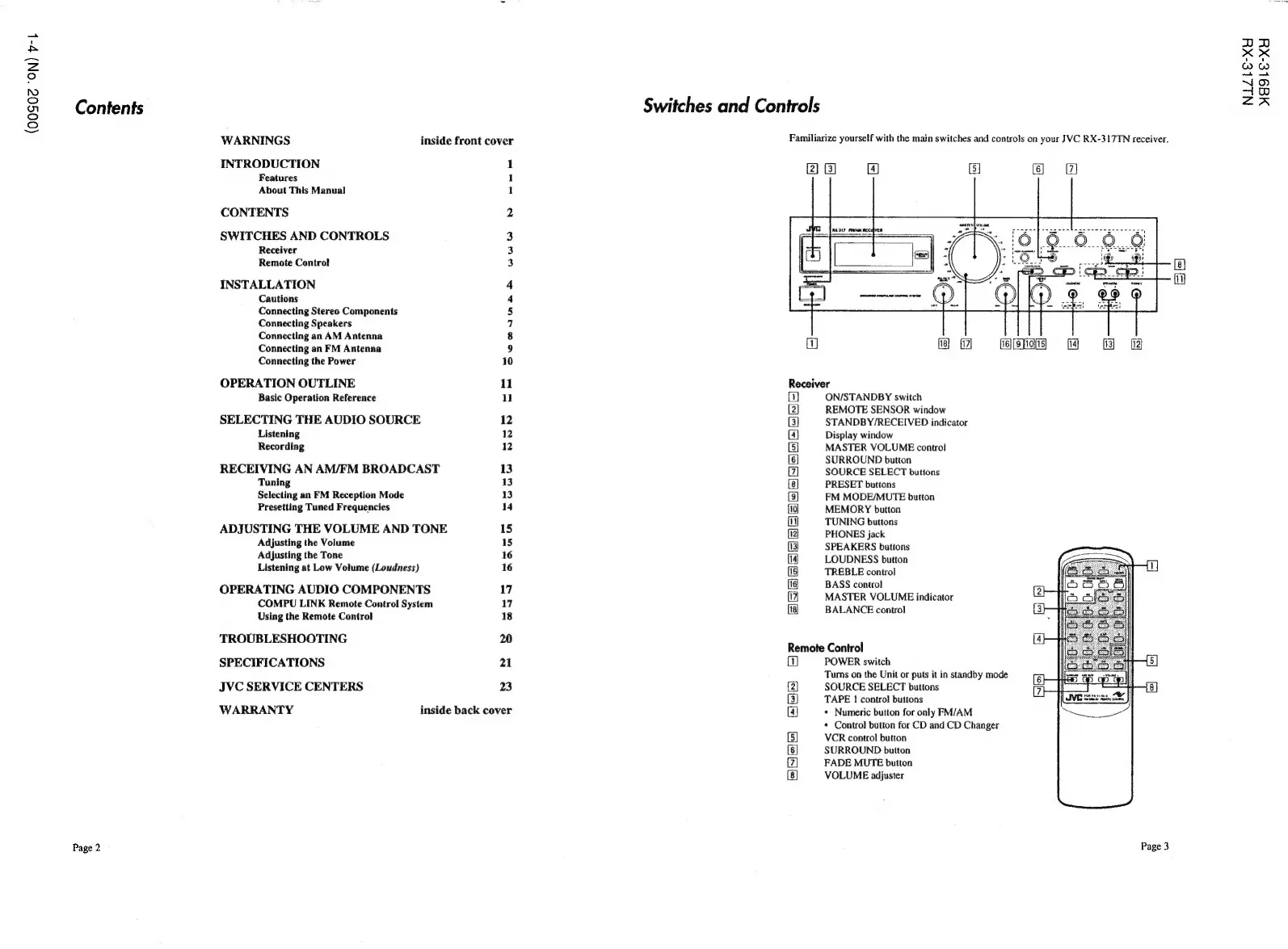
Switches
and
Controls
Familiarize
yourself
with
the
main
switches
and
controls
on
your
JVC
RX-317TN
receiver.
2)
Gl
G4]
z
7
Receiver
(1)
ON/STANDBY
switch
REMOTE
SENSOR
window
STANDBY/RECEIVED
indicator
Display
window
MASTER
VOLUME
control
SURROUND
button
SOURCE
SELECT
buttons
PRESET
buttons
FM
MODE/MUTE
button
MEMORY
button
TUNING
buttons
PHONES
jack
SPEAKERS
buttons
LOUDNESS
button
TREBLE
control
BASS
control
MASTER
VOLUME
indicator
BALANCE
control
BESSE
HF
ESERE
By
&
Ea
al
ay
B
Remote
Control
1
POWER
switch
Tums
on
the
Unit
or
puts
it
in
standby
mode
2
SOURCE
SELECT
buttons
(3]
TAPE
I
contro!
buttons
[4
*
Numeric
button
for
only
FM/AM
¢
Control
button
for
CD
and
CD
Changer
[5]
VCR
control
button
6
SURROUND
button
77)
FADE
MUTE
button
8
VOLUME
adjuster
Page
3
NIZ-E-XY
M9
le-XY

Related product manuals