EasyManua.ls Logo

JVC RX-316BK - Connecting Speakers J

JVC RX-316BK
73 pages
Print Icon
To Next Page IconTo Next Page
To Previous Page IconTo Previous Page
Loading...
(00G0z
‘ON)
9-1
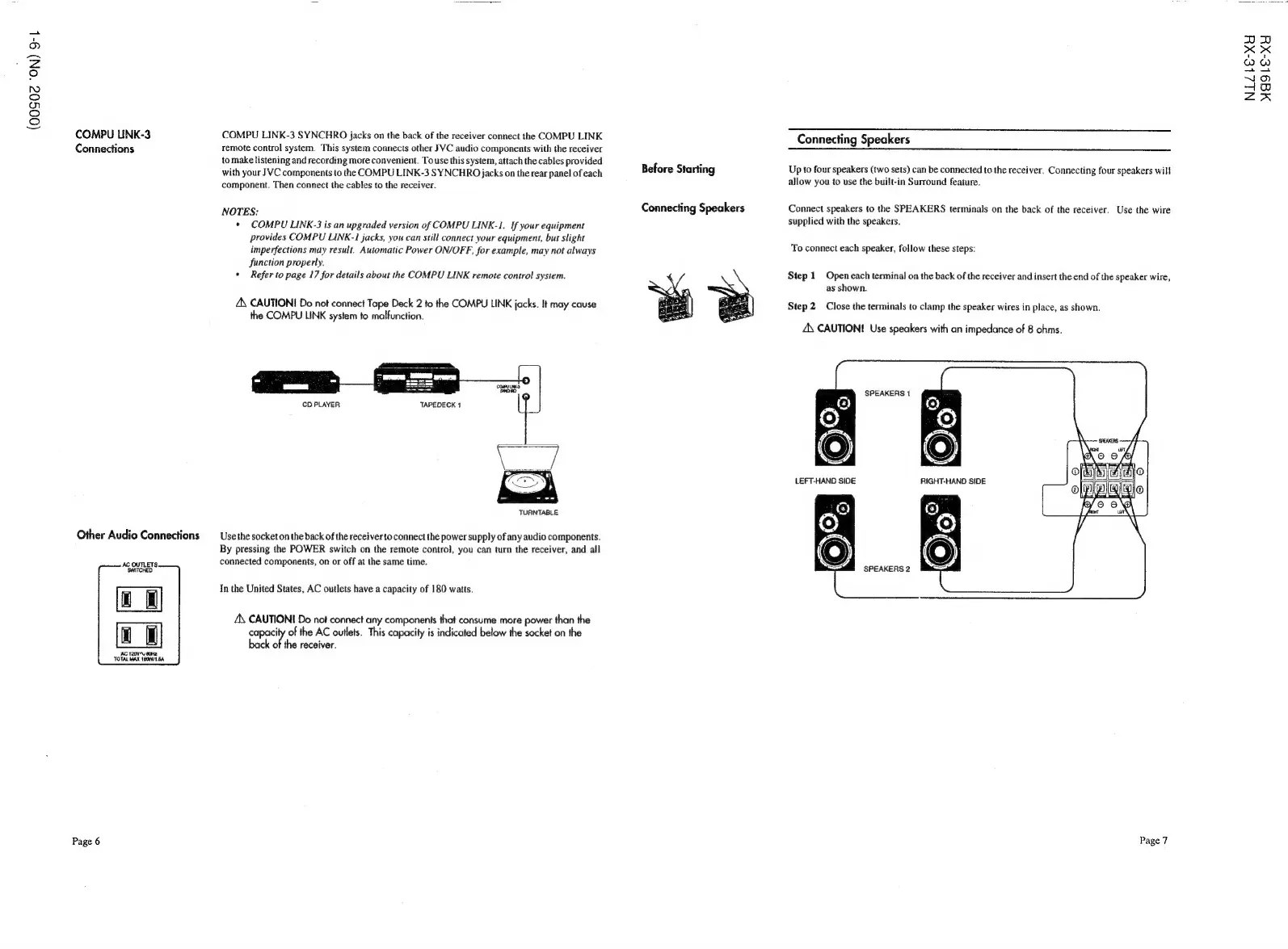
COMPU
LINK-3
COMPU
LINK-3
SYNCHRO
jacks
on
the
back
of
the
receiver
connect
the
COMPU
LINK
Connections
remote
control
system.
This
system
connects
other
JVC
audio
components
with
the
receiver
to
make
listening
and
recording
more
convenient.
To
use
this
system,
attach
the
cables
provided
with
your
JVC
components
to
the
COMPU
LINK-3
SYNCHRO
jacks
on
the
rear
panel
of
each
component.
Then
connect
the
cables
to
the
receiver.
NOTES:
*
COMPU
LINK-3
is
an
upgraded
version
of
COMPU
LINK-1.
If
your
equipment
provides
COMPU
LINK-1
jacks,
you
can
still
connect
your
equipment,
but
slight
imperfections
may
result.
Automatic
Power
ON/OFF,
for
example,
may
not
always
function
properly.
*
Refer
to
page
17
for
details
about
the
COMPU
LINK
remote
control system.
ZX
CAUTION
Do
not
connect
Tape
Deck
2
to
the
COMPU
LINK
jacks.
It
may
cause
the
COMPU
LINK
system
to
malfunction.
CD
PLAYER
TURNTABLE
Other
Audio
Connections
—_
Use
the
socket
on
the
back
of
the
receiver
to
connect
the
power
supply
of
any
audio
components.
By
pressing
the
POWER
switch
on
the
remote
control,
you
can
turn
the
receiver,
and
all
connected
components,
on
or
off
at
the
same
time.
In
the
United
States,
AC
outlets
have
a
capacity
of
180
watts.
4\
CAUTION
Do
not
connect
any
components
that
consume
more
power
than
the
capacity
of
the
AC
outlets.
This
capacity
is
indicated
below
the
socket
on
the
back
of
the
receiver.
AG
120V4,
o0HE
TOTAL
MAX
180H/1.54
Page
6
Connecting
Speakers
Before
Starting
Up
to
four
speakers
(two
sets)
can
be
connected
to
the
receiver.
Connecting
four
speakers
will
allow
you
to
use
the
built-in
Surround
feature.
Connecting
Speakers
Connect
speakers
to
the
SPEAKERS
terminals
on
the
back
of
the
receiver.
Use
the
wire
supplied
with
the
speakers.
To
connect
each
speaker,
follow
these
steps:
Step
1
Open
each
terminal
on
the
back
of
the
receiver
and
insert
the
end
of
the
speaker
wire,
as
shown.
Step
2
Close
the
terminals
to
clamp
the
speaker
wires
in
place,
as
shown.
ZX
CAUTION!
Use
speakers
with
an
impedance
of
8
ohms.
SPEAKERS
1
SPEAKERS
2
Page
7
NIZLE-XY
MaE9le-XY