EasyManua.ls Logo

JVC RX-316BK - Connecting the Power; Operation Outline; Basic Operation Reference

JVC RX-316BK
73 pages
Print Icon
To Next Page IconTo Next Page
To Previous Page IconTo Previous Page
Loading...
(00S0z
‘ON)
8-1
Connecting
the
Power
Connecting
the
Power
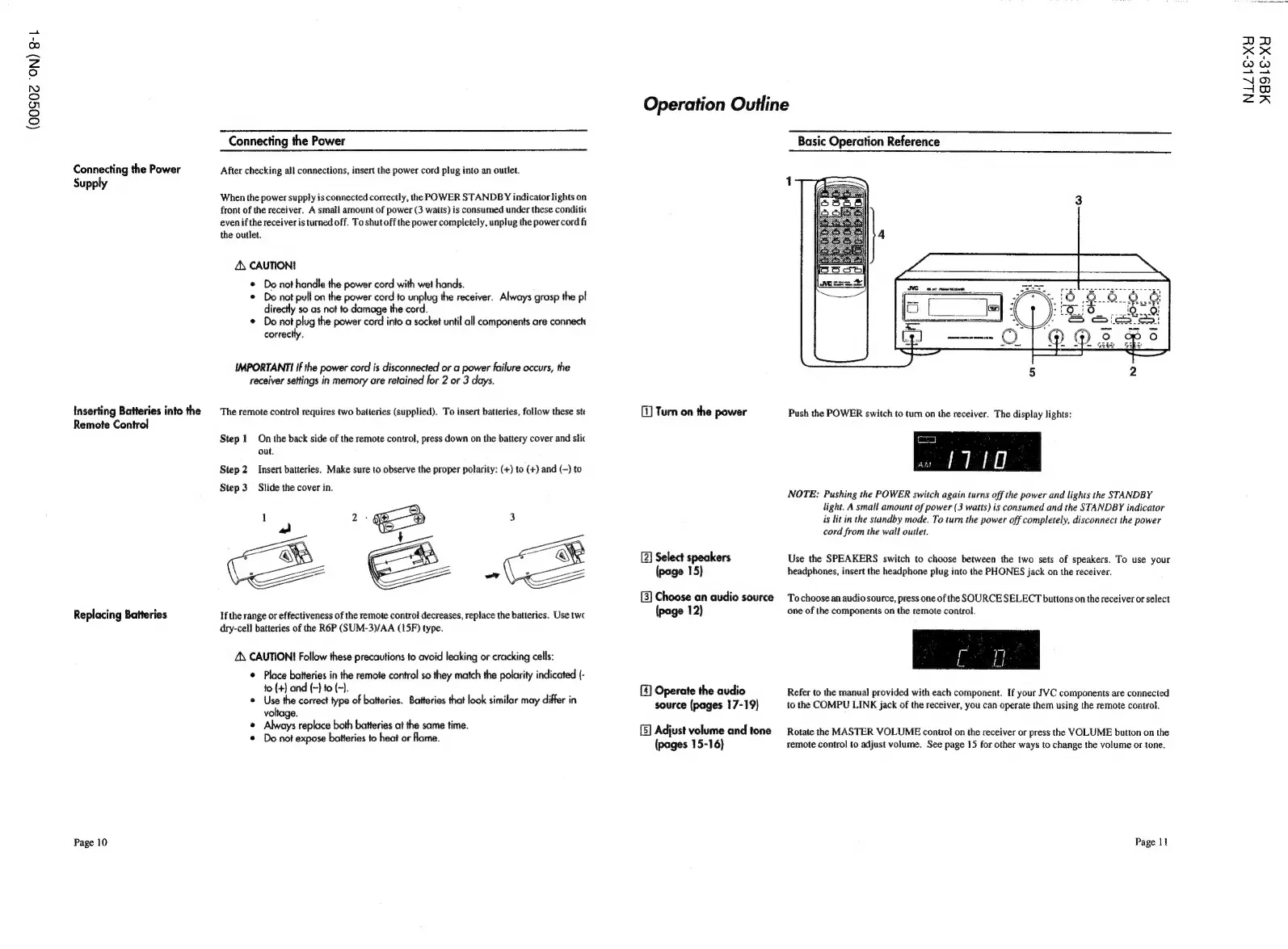
After
checking
all
connections,
insert
the
power
cord
plug
into
an
outlet.
Supply
When
the
power
supply
is
connected
correctly,
the
POWER
STANDBY
indicator
lights
on
front
of
the
receiver.
A
small
amount
of
power
(3
watts)
is
consumed
under
these
conditic
even
if
the
receiver
is
turned
off.
To
shut
off
the
power
completely,
unplug
the
power
cord
fi
the
outlet.
A\
CAUTION!
©
Do
not
handle
the
power
cord
with
wet
hands.
©
Do
not
pull
on
the
power
cord
to
unplug
the
receiver.
Always
grasp
the
pl
directly
so
as
not
fo
damage
the
cord.
©
Do
not
plug
the
power
cord
into
a
socket
until
all
components
are
connect
correctly.
IMPORTANTI
If
the
power
cord
is
disconnected
or
a
power
failure
occurs,
the
receiver
settings
in
memory
are
retained
for
2
or
3
days.
Inserting
Batteries
into
the
The
remote
control
requires
two
batteries
(supplied).
To
insert
batteries,
follow
these
ste
Remote
Control
Step
1
On
the
back
side
of
the
remote
control,
press
down
on
the
battery
cover
and
slic
out,
Step
2
Insert
batteries.
Make
sure
to
observe
the
proper
polarity:
(+)
to
(+)
and
(~)
to
Step
3
Slide
the
cover
in.
2
se
3
t
v
ee
“”
Replacing
Batteries
If
the
range
or
effectiveness
of
the
remote
control
decreases,
replace
the
batteries.
Use
twc
dry-cell
batteries
of
the
R6P
(SUM-3)/AA
(15F)
type.
ZN
CAUTION!
Follow
these
precautions
to
avoid
leaking
or
cracking
cells:
¢
Place
batteries
in
the
remote
control
so
they
match
the
polarity
indicated
(-
to
(+}
and
(-}
to
(-).
®
Use
the
correct
type
of
batteries.
Batteries
that
look
similar
may
differ
in
voltage.
¢
Always
replace
both
batteries
at
the
same
time.
Do
not
expose
batteries
to
heat
or
fame.
Page
10
Operation
Outline
[1]
Turn
on
the
power
[2]
Select
speakers
(page
15)
{3}
Choose
an
audio
source
(page
12)
[4]
Operate
the
audio
source
(pages
17-19)
[5]
Adjust
volume
and
tone
(pages
15-16)
Basic
Operation
Reference
NOTE:
Pushing
the
POWER
switch
again
turns
off
the
power
and
lights
the
STANDBY
light.
A
small
amount
of
power
(3
watts)
is
consumed
and
the
STANDBY
indicator
is
lit
in
the
standby
mode.
To
turn
the
power
off
completely,
disconnect
the
power
cord
from
the
wall
outlet.
Use
the
SPEAKERS
switch
to
choose
between
the
two
sets
of
speakers.
To
use
your
headphones,
insert
the
headphone
plug
into
the
PHONES
jack
on
the
receiver.
To
choose
an
audio
source,
press
one
of
the
SOURCE
SELECT
buttons
on
the
receiver
or
select
one
of
the
components
on
the
remote
control.
Refer
to
the
manual
provided
with
each
component.
If
your
JVC
components
are
connected
to
the
COMPU
LINK
jack
of
the
receiver,
you
can
operate
them
using
the
remote
control.
Rotate
the
MASTER
VOLUME
control
on
the
receiver
or
press
the
VOLUME
button
on
the
remote
control
to
adjust
volume.
See
page
15
for
other
ways
to
change
the
volume
or
tone.
Page
13
NIZbLE-XY
d9le-xXY