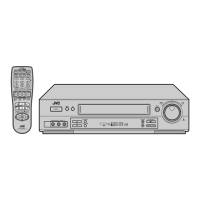
10
Front Panel
2 CONTROLS AND CONNECTORS
) [REW] button
Rewinds the tape.
[FF] button
Fast forwards the tape.
[STOP] button
Stops any operation of the VCR.
[PLAY] button
Plays back the tape.
[PAUSE/STILL] button
Pauses the recording or changes the playback
picture to a still picture. Cancelled by pressing the
PLAY button.
q [INDEX SEARCH] buttons
Search for the start of the recorded section or the
section indicated by an INDEX signal, and then
starts normal playback.
[INSERT] button
Use when replacing part of pre-recorded tape with
other images and Hi-Fi sound.
[A.DUB] button
Use when replacing only the normal soundtrack
with other sound on a pre-recorded tape.
[REC] button
Starts recording.
w [INPUT SELECT] button
Selects among video/audio signals HD, L1, S1, L2,
S3, L4 and S4.
• When W-VHS is in use, every press of the button
changes Hd-L1-S1-L2-S3-L4-S4.
• When S-VHS/VHS is in use, every press of the
button changes L1-S1-L2-S3-L4-S4.
[SP/EP] button
Selects between recording speeds.
e [PREROLL EDITING OPERATION] buttons
Use for preroll editing.
r [Random Assemble Editing] buttons
Use for Random Assemble Editing.
t [JOG] dial
Use for frame-by-frame playback.
[SHUTTLE] ring
Use for variable-speed search.



 To Next Page
 Loading...