32
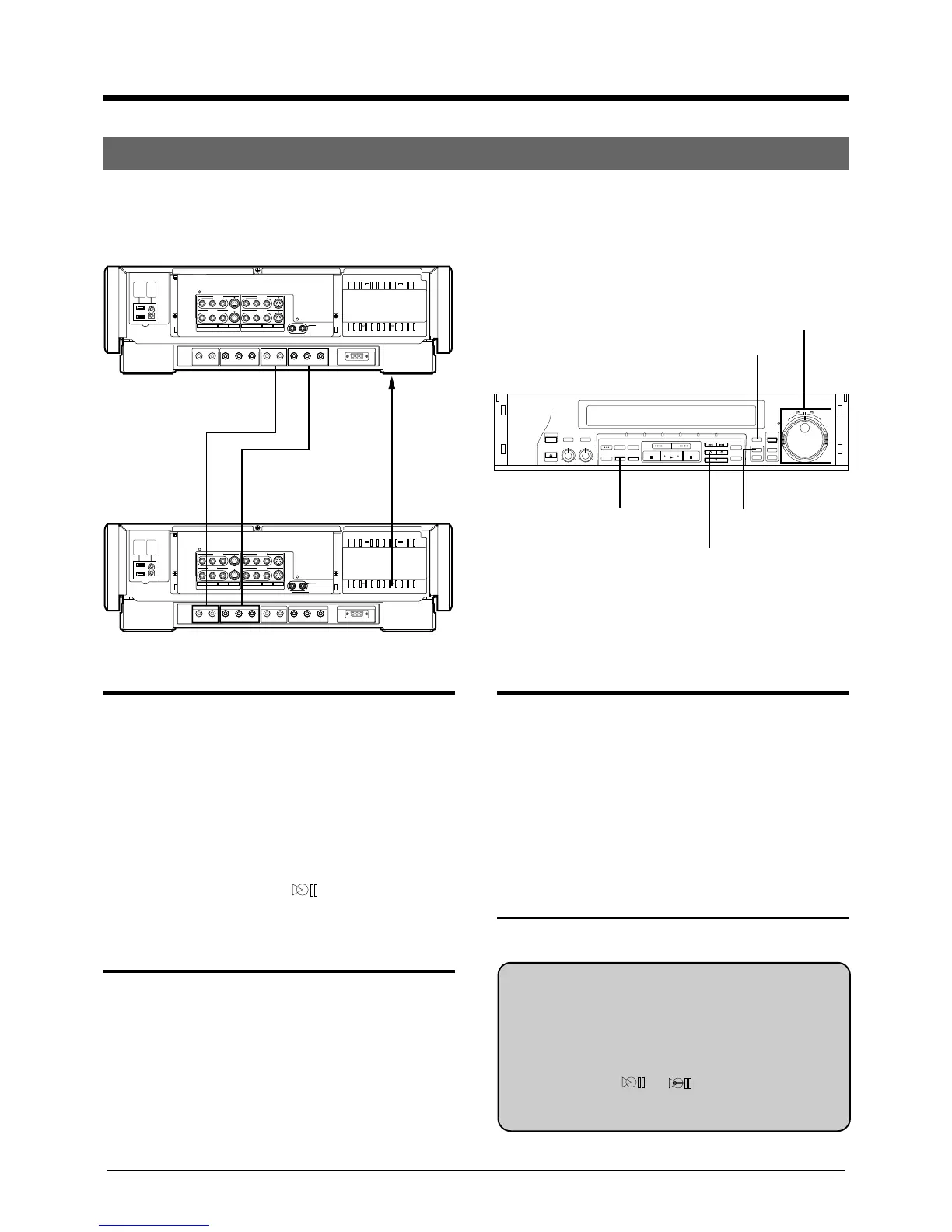
(Ex.) Preroll Insert Editing using 2 units of SR-W5U in the HD mode.
It is an Insert Editing using Preroll Editing(see page 31).
Preroll Insert Editing
8 EDITING
The unit as a recording machine
1 Select the connected (Hd) by pressing HD INPUT
button.
2 Play the tape back with JOG dial/SHUTTLE ring to
determine the insert editing-out point and set the
recorder to the still playback mode.
3 Press the COUNTER RESET button to set the
counter reading to 0:00:00.
4 Determine the insert edit-in point with JOG dial/
SHUTTLE ring and put the recorder in the still
playback mode.
5 Press the INSERT button. appears on the front
panel display window and insert pause mode is
engaged.
The unit as a playback machine
6 Play the tape back and set the player to the still
playback mode at the edit-in point.
LINE 2
VIDEO
INPUT
AC
OUTPUT
MAX
100W
AC
INTPUT
120V
60Hz
AUDIO IN
HD/S3(W-VHS) HD(CAM/W-VHS) (HDTV/W-VHS) HD(HDTV/W-VHS) RGB(DISPLAY)
HD VIDEO IN HD VIDEO OUT1 HD VIDEO OUT2AUDIO OUT3
OUTPUT
SR
RL RLYP
B
P
R
YP
B
P
R
L
VIDEO
R.A. EDIT
PREROLL
S
REMOTE
RL
LINE 3
LINE 1 LINE 1
LINE 2
()
LINE 2
VIDEO
INPUT
AC
OUTPUT
MAX
100W
AC
INTPUT
120V
60Hz
AUDIO IN
HD/S3(W-VHS) HD(CAM/W-VHS) (HDTV/W-VHS) HD(HDTV/W-VHS) RGB(DISPLAY)
HD VIDEO IN HD VIDEO OUT1 HD VIDEO OUT2AUDIO OUT3
OUTPUT
SR
RL RLYP
B
P
R
YP
B
P
R
L
VIDEO
R.A. EDIT
PREROLL
S
REMOTE
RL
LINE 3
LINE 1 LINE 1
LINE 2
()
The unit as a playback machine
The unit as a recording machine
To AUDIO OUT 3
connector
To HD
VIDEO
OUT 1
connector
To AUDIO IN
(HD/S3)
connector
To HD
VIDEO IN
connector
The unit as a recording machine
7 Press the PREROLL EDIT START button.
• Preroll insert editing starts.
• The unit as a playback machine: playback starts
after prerolling for about 5 seconds.
• The unit as a recording machine: insert editing
starts at the edit-in point.
• When the counter reaches 0:00:00, editing will be
automatically cancelled 2 seconds after the still
playback mode is engaged.
8 Press the STOP button.
The unit as a playback machine
9 Press the STOP button.
● To cancel preroll insert editing at any time, press the
COUNTER RESET button. Editing stops and the still
playback mode will be engaged 2 seconds later.
● During preroll insert editing, press the A.DUB button
after pressing the INSERT button in step 5 to dub the
same sound as the Hi-Fi audio soundtrack onto the
normal audio soundtrack. The front panel display
window displays
[ . .
The facility does not work with a W-VHS tape since
the normal soundtrack will not be recorded.
OPERATE
HI-FI AUDIO
SELECT
EJECT
BALANCE REC LEVEL
LR010
AUDIO OUT
SELECT
629
TBC
COUNTER
/REMAIN
COUNTER
RESET
ZERO
SEARCH
MARK ERASE
OPERATE HD SD S-VHS IN — R.A.E. — OUT
REW FF
INDEX SEARCH
INSERT A.DUB
REC
SP/EP
HD INPUT
R.A.EDIT
IN/OUT
REV
FWD
START
PREROLL EDIT
START
JOG
SHUTTLE
PAUSE
STOP PLAY
PAUSE/STIL
INPUT
SELECT
INDEX
COUNTER RESET PREROLL EDIT
START
INSERT
HD INPUT
JOG DIAL/
SHUTTLE RING
To REMOTE
PAUSE
connector on
the front
panel
To R.A.EDIT/
PREROLL
connector



 To Next Page