28
Random Assemble Editing
8 EDITING
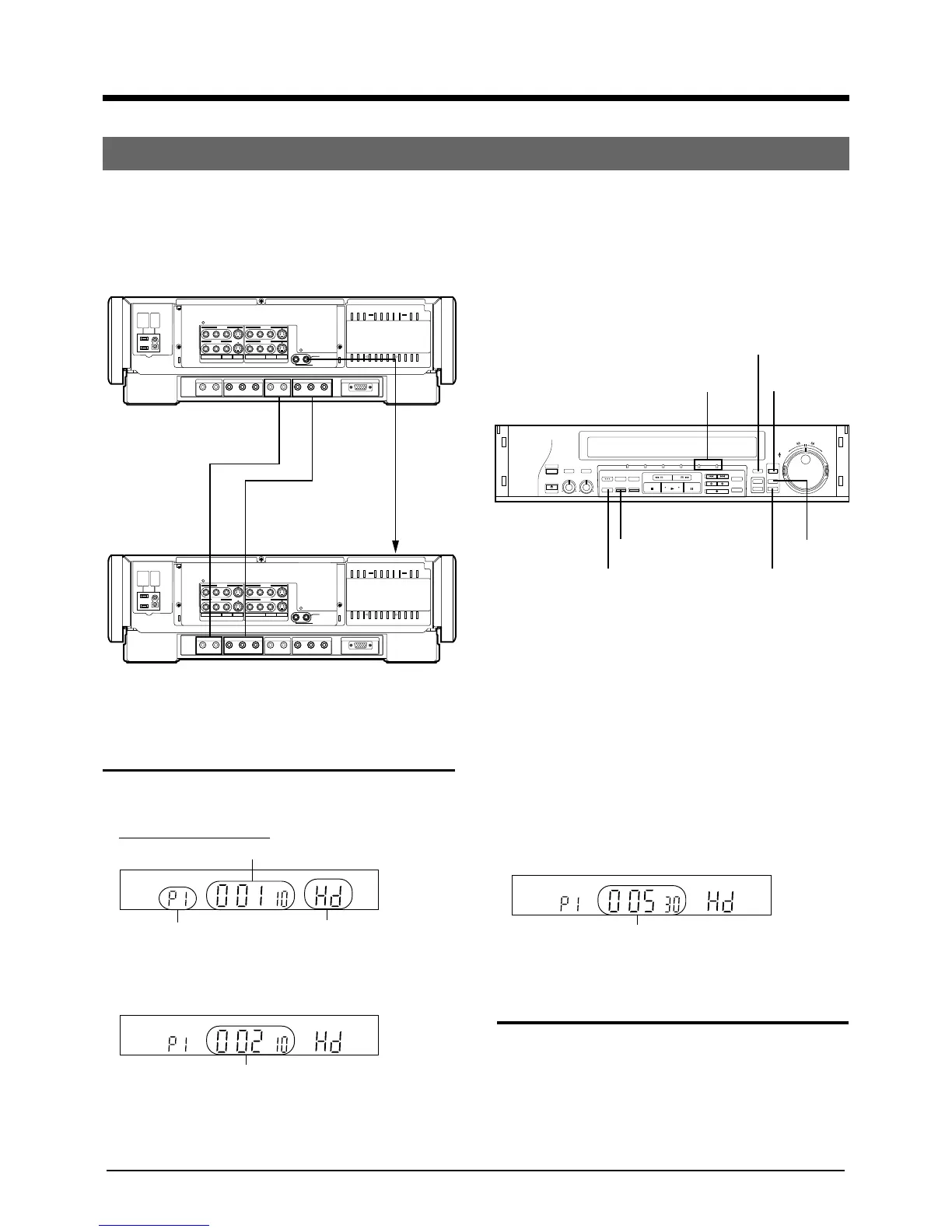
(Ex.) Random Assemble Editing in the HD mode using 2 units of SR-W5U.
It is convenient to cut unnecessary parts, change the scene orders or to dub these to another video recorder. You
can select as many as 8 segments.
OPERATE
HI-FI AUDIO
SELECT
EJECT
BALANCE REC LEVEL
LR010
AUDIO OUT
SELECT
629
TBC
COUNTER
/REMAIN
COUNTER
RESET
ZERO
SEARCH
MARK ERASE
OPERATE HD SD S-VHS IN — R.A.E. — OUT
REW FF
INDEX SEARCH
INSERT A.DUB
REC
SP/EP
HD INPUT
R.A.EDIT
IN/OUT
REV
FWD
START
PREROLL EDIT
START
JOG
SHUTTLE
PAUSE
STOP PLAY
PAUSE/STIL
INPUT
SELECT
INDEX
LINE 2
VIDEO
INPUT
AC
OUTPUT
MAX
100W
AC
INTPUT
120V
60Hz
AUDIO IN
HD/S3(W-VHS) HD(CAM/W-VHS) (HDTV/W-VHS) HD(HDTV/W-VHS) RGB(DISPLAY)
HD VIDEO IN HD VIDEO OUT1 HD VIDEO OUT2AUDIO OUT3
OUTPUT
SR
RL RLYP
B
P
R
YP
B
P
R
L
VIDEO
R.A. EDIT
PREROLL
S
REMOTE
RL
LINE 3
LINE 1 LINE 1
LINE 2
()
LINE 2
VIDEO
INPUT
AC
OUTPUT
MAX
100W
AC
INTPUT
120V
60Hz
AUDIO IN
HD/S3(W-VHS) HD(CAM/W-VHS) (HDTV/W-VHS) HD(HDTV/W-VHS) RGB(DISPLAY)
HD VIDEO IN HD VIDEO OUT1 HD VIDEO OUT2AUDIO OUT3
OUTPUT
SR
RL RLYP
B
P
R
YP
B
P
R
L
VIDEO
R.A. EDIT
PREROLL
S
REMOTE
RL
LINE 3
LINE 1 LINE 1
LINE 2
()
The unit as a playback machine
The unit as a recording machine
To AUDIO OUT 3
connector
To HD
VIDEO
OUT 1
connector
To REMOTE
PAUSE
connector on
the front
panel
To AUDIO IN
(HD/S3)
connector
To HD
VIDEO IN
connector
HD INPUT
R.A. EDIT
R.A.E. IN/OUT LAMP
IN/OUT
START
COUNTER RESET
COUNTER/REMAIN
The unit (as a playback machine)
1 Press the R.A.EDIT button.
R.A.E. IN lamp will light.
Video unit display window
2 Start playback and press the IN/OUT button at the
edit-in point (the beginning of the segment).
R.A.E. OUT lamp will light.
HM
The current counter value
Program number
Recording mode
HM
In-point
3 Press the IN/OUT button at the edit-out point (the
end of the segment).
• R.A.E. IN lamp will light.
• Repeat steps 2-3, as many as 8 segments can be
selected.
4 Press PAUSE button to enter still picture playback
after setting IN/OUT points.
The unit (as a recording machine)
5 Press the HD INPUT button to set to external
input(Hd).
6 Enter the recording pause mode.
HM
Out-point
To R.A.EDIT/
PREROLL
connector



 To Next Page