11
2 CONTROLS AND CONNECTORS
Rear Panel
LINE 2
VIDEO
INPUT
AC
OUTPUT
MAX
100W
AC
INTPUT
120V
60Hz
AUDIO IN
HD/S3(W-VHS) HD(CAM/W-VHS) (HDTV/W-VHS) HD(HDTV/W-VHS) RGB(DISPLAY)
HD VIDEO IN HD VIDEO OUT1 HD VIDEO OUT2AUDIO OUT3
OUTPUT
SR
RL RLYP
B PR YPB PR
L
VIDEO
R.A. EDIT
PREROLL
S
REMOTE
RL
LINE 3
LINE 1 LINE 1
LINE 2
()
12345
0!@# $
6789
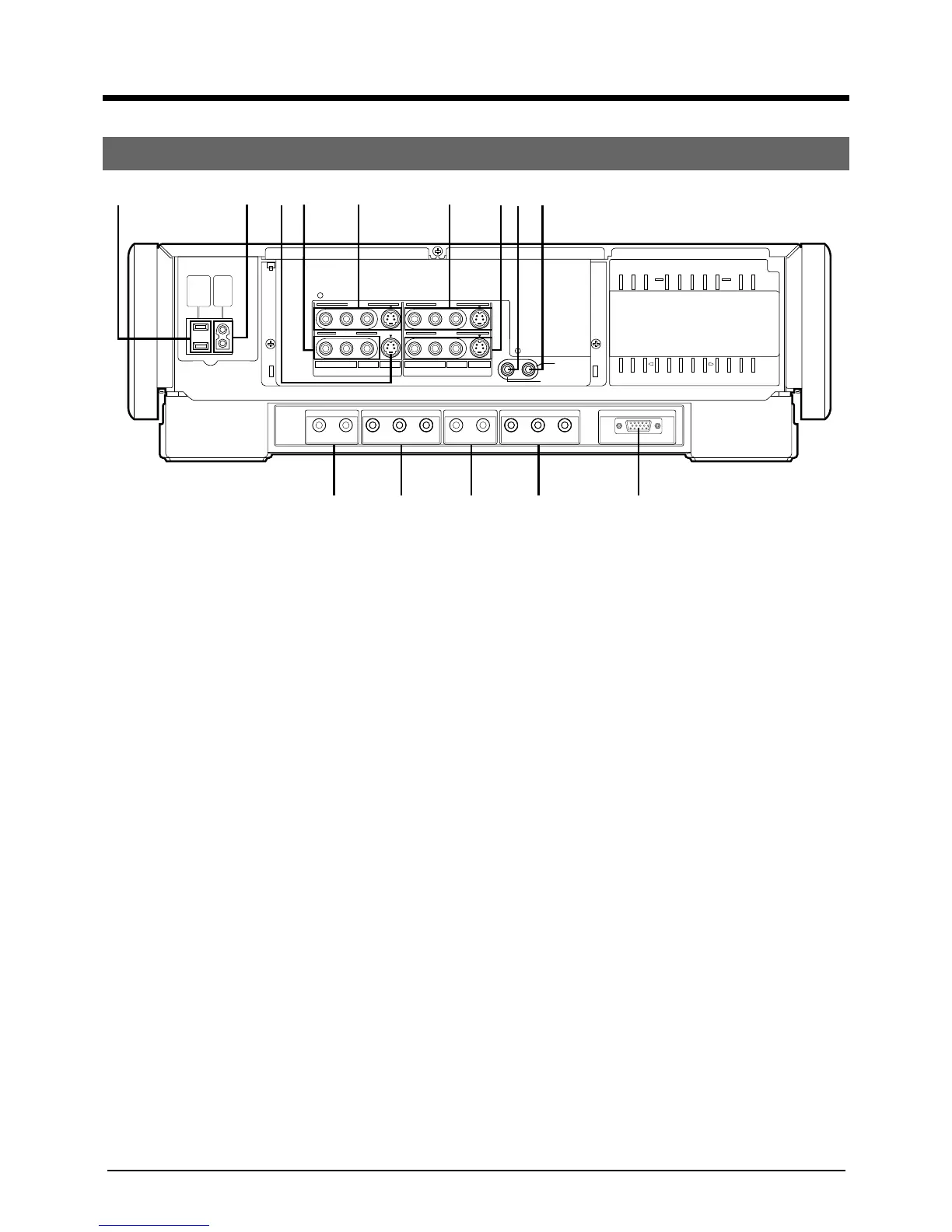
1 Socket for peripheral equipment
Connects up to a maximum of 100 W.
2 AC IN Socket
Make sure that the end of the provided power cord fits
into the power socket and plug it straight in until it stops.
3 S-VIDEO INPUT3 connector
When this machine is used as a recording unit for
editing, connect to the S-VIDEO OUTPUT connector on
the playback unit with the S-VIDEO cable.
4 VIDEO/AUDIO INPUT2 connectors
When this machine is used as a recording unit for editing,
connect to the VIDEO/AUDIO OUTPUT connectors on
the playback unit with the VIDEO/AUDIO cable.
5 S-VIDEO/VIDEO/AUDIO INPUT connectors
When this machine is used as a recording unit for editing,
connect to the S-VIDEO/VIDEO/AUDIO OUTPUT
connectors on the playback unit with the S -VIDEO/
VIDEO/AUDIO cable.
6 S-VIDEO/VIDEO/AUDIO OUTPUT 1 connectors
Connect to the S-VIDEO/VIDEO/AUDIO INPUT connec-
tors on a TV or other unit with the S-VIDEO/VIDEO/
AUDIO cable.
7 S-VIDEO/VIDEO/AUDIO OUTPUT2 connectors
When this machine is used as a playback unit for editing,
connect to S-VIDEO/VIDEO/AUDIO INPUT connectors
with the S-VIDEO/VIDEO/AUDIO cable.
8 REMOTE connector
When externally controlling the machine using the
optional remote control unit (RM-G30U), connect the
remote control cable here.
9 R.A.EDIT/PREROLL connector
Connect to the REMOTE PAUSE connector on the
recording unit with mini-plug cable for R.A.EDIT editing
or PREROLL editing.
0 HD/S3 AUDIO IN connectors
• Connect to the AUDIO OUTPUT connectors on a hi-
vision video camera with the AUDIO cable.
• When HD VIDEO IN connectors on this unit are used
for editing, connect to the HD AUDIO OUT connectors
on the playback unit (W-VHS) with the AUDIO Cable.
• When S-VIDEO INPUT3 connectors on this unit are
used for editing, connect to the AUDIO OUT connec-
tors on the playback unit with the AUDIO cable.
! HD VIDEO IN connectors
• Connect to the HD VIDEO OUT connectors on a hi-
vision video camera with the HD VIDEO cable.
• When this machine is used as a recording unit for
editing, connect to the HD VIDEO OUT connectors on
the playback unit (W-VHS) with the HD VIDEO cable.
@ AUDIO OUT3 connectors
• Connect to the HD AUDIO IN connectors on a hi-vision
TV, etc., with the AUDIO cable.
• When this machine is used as a playback unit for
editing, connect to the HD AUDIO IN connectors on the
recording unit (W-VHS ) with the AUDIO cable.
# HD VIDEO OUT 1 connectors
• Connect to the HD VIDEO IN connectors on a hi-vision
TV, etc., with the HD cable.
• When this machine is used as a playback unit for
editing, connect to the HD VIDEO IN connectors on the
recording unit (W-VHS) with the HD cable.
$ HD VIDEO OUT 2 connector
Connect to the RGB input connector on PC monitors,
etc., with the RGB connector(15-pin).



 To Next Page
 Loading...