33
2.4.5 KRMC Cloud Settings
You can enable or disable KRMC Cloud functionality through the Security Settings. Note: This section
does not apply to Enterprise Edition users or if you have already enabled KRMC Cloud.
To change your device’s KRMC functionality:
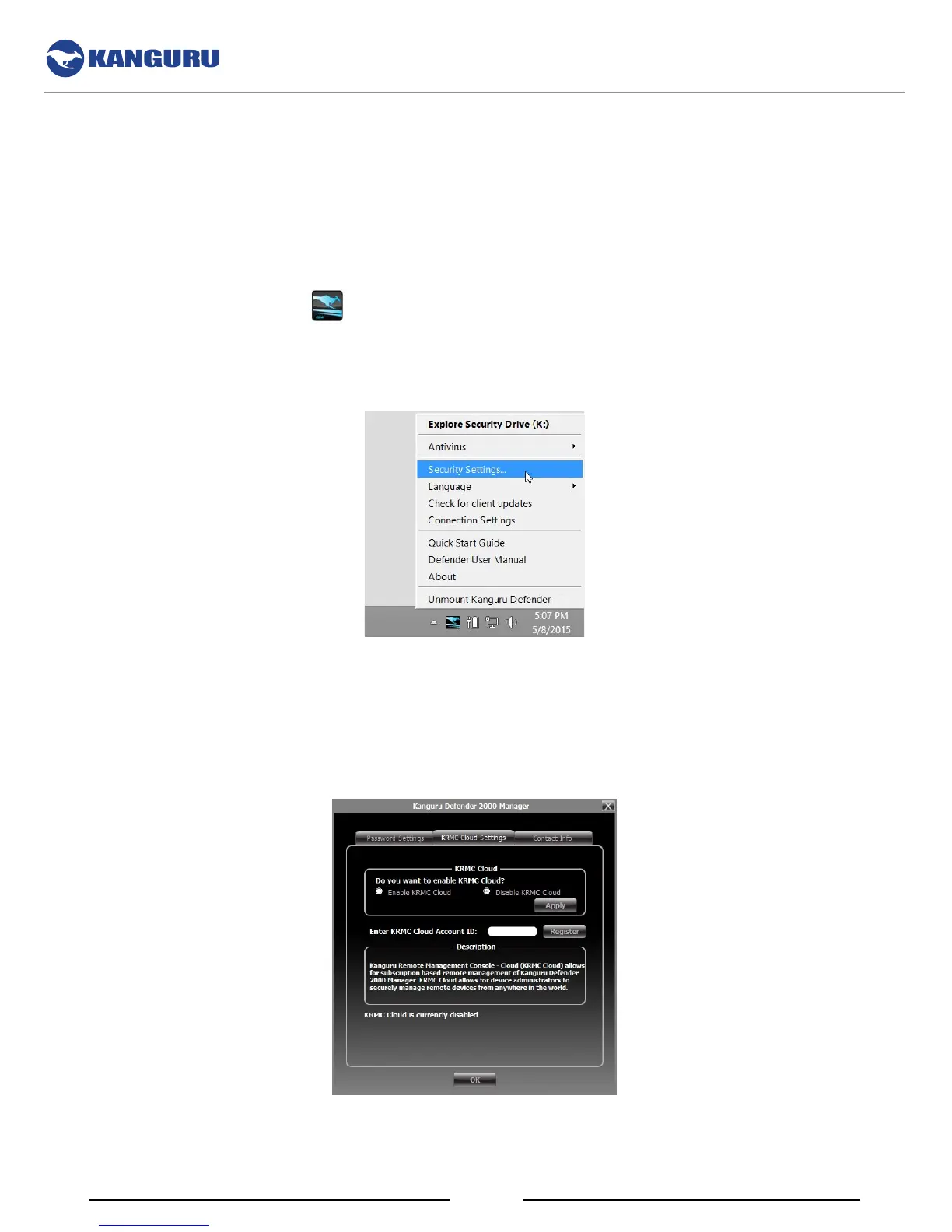
1. Click on the KDM icon
located in the task bar and then select the Security Settings… option
from the popup menu.
Note: Linux users must right-click on the KDM icon in the task bar.
2. The ‘Password Settings’ window opens. Click on the KRMC Cloud Settings tab at the top of the
window to enter the ‘KRMC Cloud Settings’ window.
3. Enable or Disable KRMC Cloud by clicking on the appropriate radio button and then click on the
Apply button.
4. If you are choosing to enable KRMC Cloud, enter your KRMC Cloud Account ID and then click
on the Register button.
The KDM Taskbar Menu



 To Next Page