14
M
MM
M
M
MM
M
A
AA
A
A
AA
A
C
CC
C
C
CC
C
1
11
1
1
11
1
0
00
0
0
00
0
0
00
0
0
00
0
【
11
】
OPERATION PANEL AND CONTROL BOX
11
1111
11-
--
-1 Mounting and wiring of control box
1 Mounting and wiring of control box1 Mounting and wiring of control box
1 Mounting and wiring of control box
■
Wiring of connectors
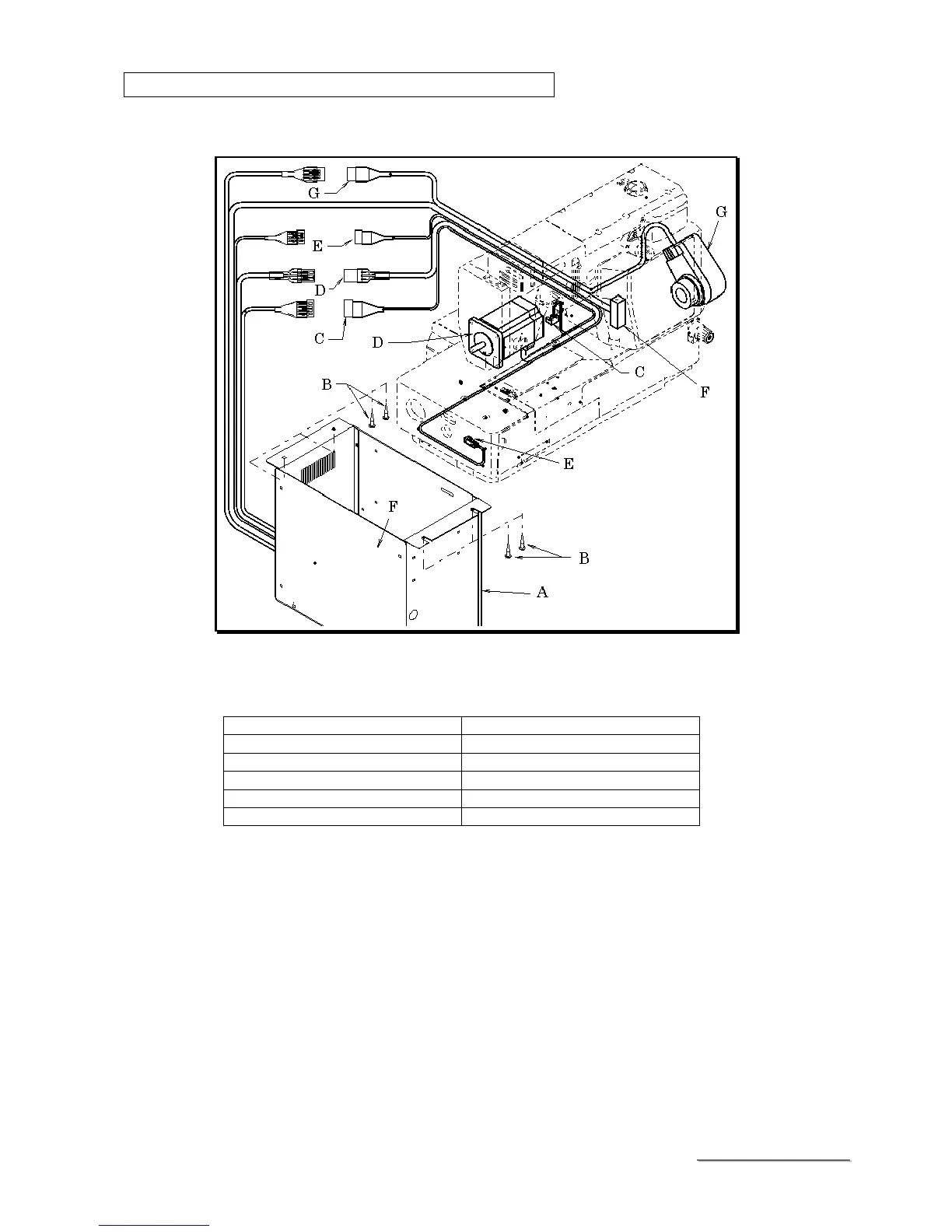
Mount the control box (A) under the table in proper place by 4 pcs. of the screw (B).
Connect the following connectors to conformable pairs.
Parts
PartsParts
Parts
Description
DescriptionDescription
Description
Proximity sensor C MOLEX 4 PIN
Stepping motor D MOLEX 6 PIN
Proximity sensor E MOLEX 3 PIN
Panel board F OMRON 26 PIN
Position transmitter G MOLEX (AMP) 6 PIN



 To Next Page