Karel MS48 Installation & Maintenance Guide
Edition 3.2
54
III.7. AUTO ATTENDANT & VOICE MAIL
• R
EMARK
If one of the PC Interface accessories – namely CM48, PK48 and
CM48+PK48 – or the RS232 Serial Printer Interface is to be connected to the
system as well, the installation and wiring of this accessory must be made
before the installation and wiring of EVM48 Auto Attendant.
• I
NSTALLATION
:
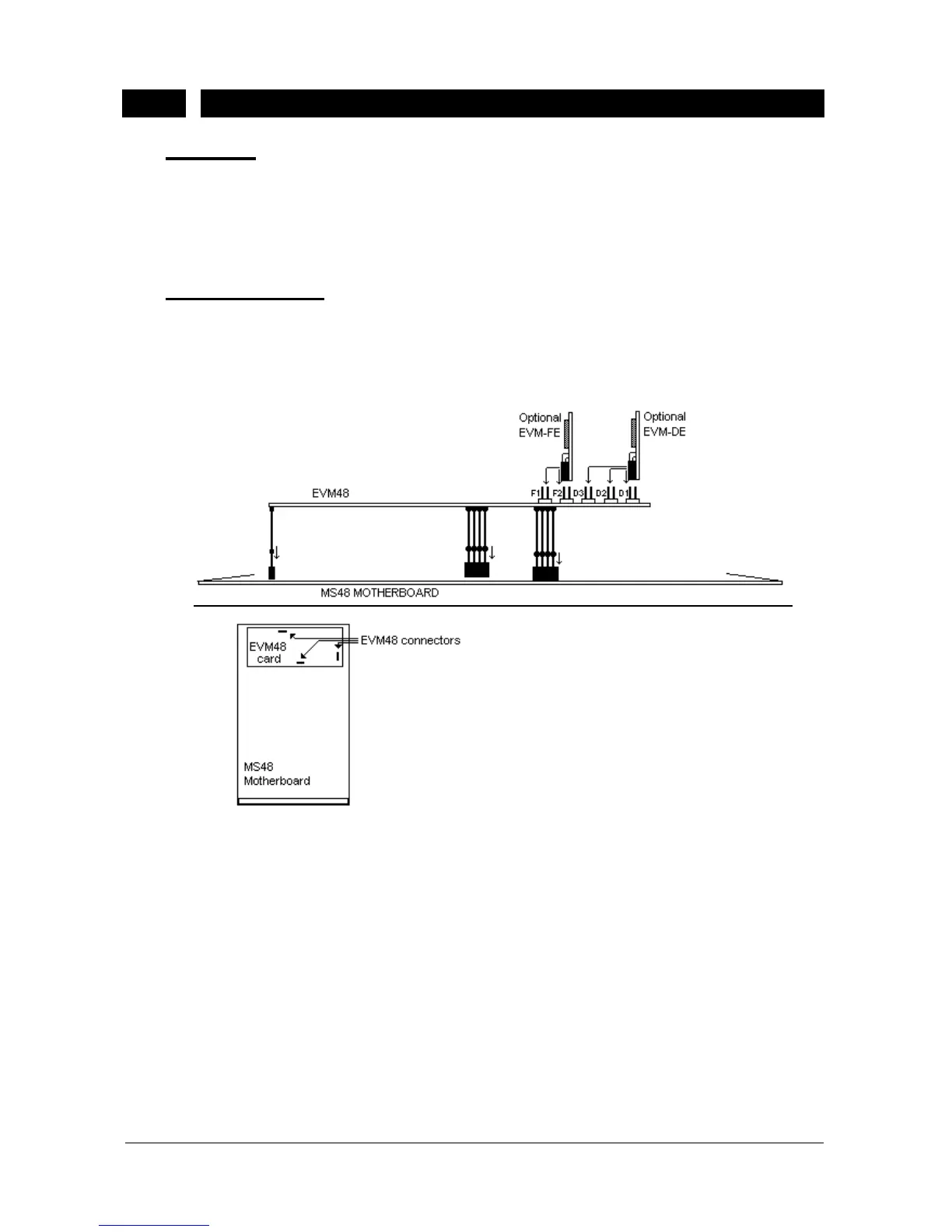
The EVM48 card has three male connectors on the solder side, which must be
attached to the female correspondents on the MB48 motherboard.
The installation of EVM48 card is illustrated in the following figure.
Figure B-23
Additional EVM-FE (Auto Attendant Expansion) and EVM-DE (Voice Mail
Expansion) cards – if there exist any - must be installed on the EVM48 card
through 36-pin F1/F2 and 24-pin D1/D2/D3 connectors, respectively. The first
EVM-FE card must be installed to the Flash socket marked as F1, whereas the
second EVM-FE card must be installed to the socket marked as F2. The first
EVM-DE card must be installed on the DRAM socket marked as D1 and the
second EVM-DE card must be installed to the socket marked as D2, whereas
the third EVM-DE card must be installed to the socked marked as D3. See the
following figure for the location of these sockets.



 To Next Page