72
Settings
3
Tone Control
The Tone Control setting allows the overall sound character of the CN39 digital piano to be adjusted to provide
the best sound quality within the area that the instrument is located. There are eight dierent preset EQ settings
available, with an additional ‘User’ setting allowing ner control over the dierent frequency bands.
Tone Control setting
Tone Control type Description
Flat (default) Tone control adjustment is not applied.
Brilliance Adjusts the overall brightness of the sound, independently of the Virtual Technician ‘Voicing’ parameter.
Bass Boost Emphasises low-range frequencies, creating a deeper sound.
Bass Cut Reduces low-range frequencies, creating a clearer sound.
Mid Boost Emphasises mid-range frequencies, creating a harder sound.
Loudness Emphasises frequencies to retain the instrument’s sound character when playing at low volume levels.
Bright Emphasises high-range frequencies, creating a brighter sound.
Mellow Reduces high-range frequencies, creating a softer sound.
User Allows the low, mid, and high-range frequency bands to be adjusted separately.
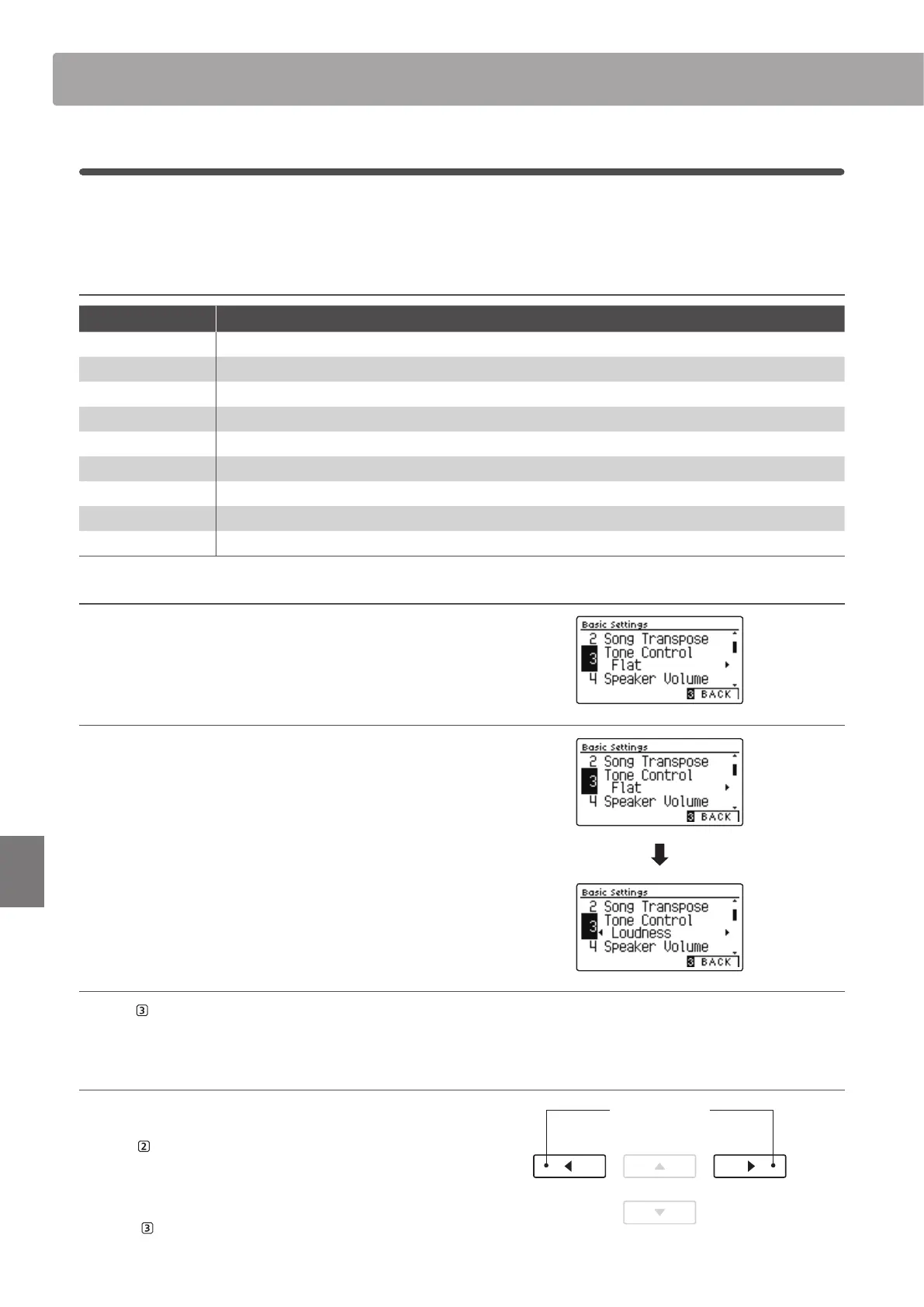
1. Selecting the Tone Control setting
After entering the Basic Settings menu (page 69):
Press the
or
buttons to select the Tone Control setting.
2. Changing the Tone Control type
Press the
or
buttons to cycle through the dierent Tone
Control types.
* To reset the Tone Control setting to the default type, press the
and
buttons simultaneously.
* Any changes made to the Tone Control setting will remain until the
power is turned o.
* Preferred Tone Control settings can be stored to a Registration
Memory for convenient recall, or to the Startup Setting memory for
automatic selection when the instrument is turned on. Please refer to
pages 35 and 79 for more information.
3. Exiting the Tone Control setting
Press the FUNCTION button (BACK) to exit the Tone Control
setting and return to the Function Menus screen.
Adjusting the Brilliance level
When the Brilliance tone control type is selected:
Press the
FUNCTION button (EDIT), then press the
or
buttons to increase/decrease the value of the Brilliance setting.
* The Brilliance value can be adjusted within the range of –10~+10.
Press the FUNCTION button (BACK) to exit the Brilliance
setting and return to the Tone Control setting.
buttons:
Adjust Brilliance setting.
Basic Settings


 To Next Page