83
Settings
Virtual Technician Settings
The Virtual Technician settings of the CN39 digital piano allow the player to adjust advanced parameters such as
hammer hardness, action regulation, cabinet size, and a variety of other acoustic characteristics, in order to suit
their personal preferences. Virtual Technician settings are adjusted and stored independently for each sound,
variation, allowing exible control over the characteristics of each piano voice.
* The table below indicates which Virtual Technician settings aect to all sounds, or acoustic piano and electric piano sounds only.
Virtual Technician Settings
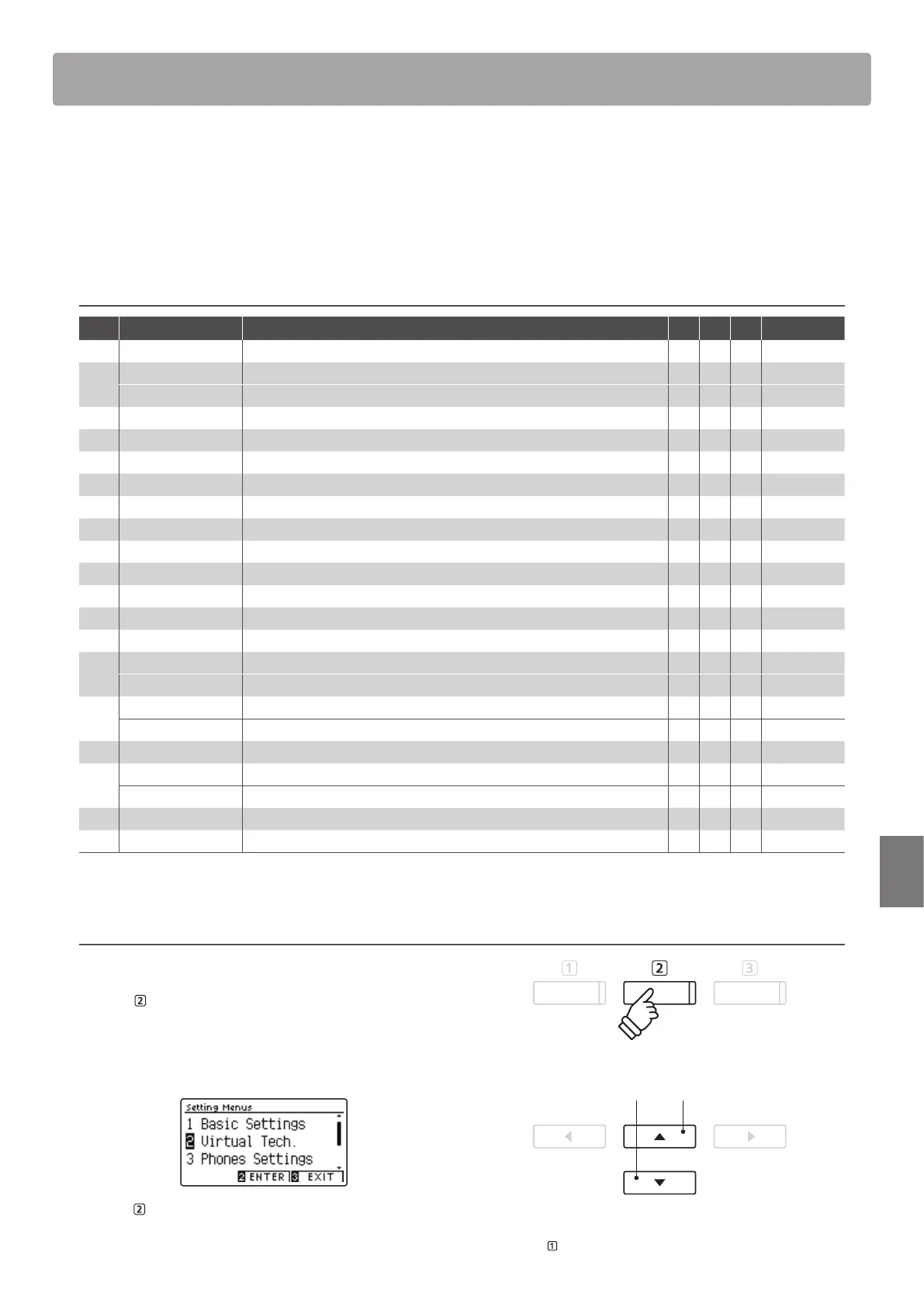
No. Setting Description All AP EP Default
1 Touch Curve Adjust the touch sensitivity of the keyboard.
Normal
2 Voicing Adjust the tonal character of the instrument.
Normal
User Voicing Adjust the individual voicing of each of the 88 keys.
–
3 Damper Resonance Adjust the resonance that is heard when pressing the damper pedal.
5
4 Damper Noise Adjust the sound that is heard when pressing the damper pedal.
5
5 String Resonance Adjust the resonance that is heard when notes are held.
5
6 Undamped Str. Res. Adjust the resonance produced by the topmost undamped strings.
5
7 Cabinet Resonance Adjust the resonance produced by the piano cabinet itself.
1
8 Key-o Eect Adjust the sound that is heard when keys are released.
5
9 Fall-back Noise Adjust the sound that is heard when the key action falls back.
5
10 Hammer Delay Adjust the delay of the hammer striking strings when playing pianissimo.
O
11 Topboard Simulation Adjust the position of the grand piano topboard.
Open 3
12 Decay Time Adjust the decay time of the piano sound while the keys are pressed.
5
13 Minimum Touch Adjust the minimum key velocity required to produce a sound.
1
14 Stretch Tuning Adjust the level of stretch tuning for equal temperaments.
Normal
User Tuning Adjust the individual tuning of each of the 88 keys.
–
15 Temperament Adjust the tuning system to suit Renaissance and Baroque periods etc.
Equal Temp.
User Temperament Adjust the tuning of each note in the scale to a custom temperament.
–
16 Temperament Key Adjust the key of the selected tuning system.
C
17 Key Volume Adjust the volume balance of the keyboard.
Normal
User Key Volume Adjust the individual volume of each of the 88 keys.
–
18 Half-Pedal Adjust Adjust the point at which the damper pedal begins to sustain the sounds.
5
19 Soft Pedal Depth Adjust the depth/eectiveness of the soft pedal.
3
* Default settings will be shown in the rst LCD display illustration (i.e. Step 1) for each setting explanation below.
Entering the Virtual Technician menu
While the normal playing mode screen is shown in the LCD display:
Press the
FUNCTION button (MENU).
The Function menus will be shown in the LCD display.
Press the
or
buttons to select the Virtual Technician menu.
Press the FUNCTION button (ENTER) again to enter the Virtual
Technician menu.
buttons:
Move selection cursor.
* It is also possible to enter the Virtual Technician menu by pressing and
holding the FUNCTION button (VT) on the normal playing screen.


 To Next Page