76
Settings
Basic Settings
6
Damper Hold
The Damper Hold setting is used to determine whether sounds such as organ or strings should be sustained
continuously when the sustain (damper) pedal is pressed, or whether these sounds should decay, naturally.
Damper Hold setting
Damper Hold Description
O (default) Organ, strings, etc. sounds will gradually decay, even while the sustain pedal is pressed.
On Organ, strings, etc. sounds will be sustained continuously while the sustain pedal is pressed.
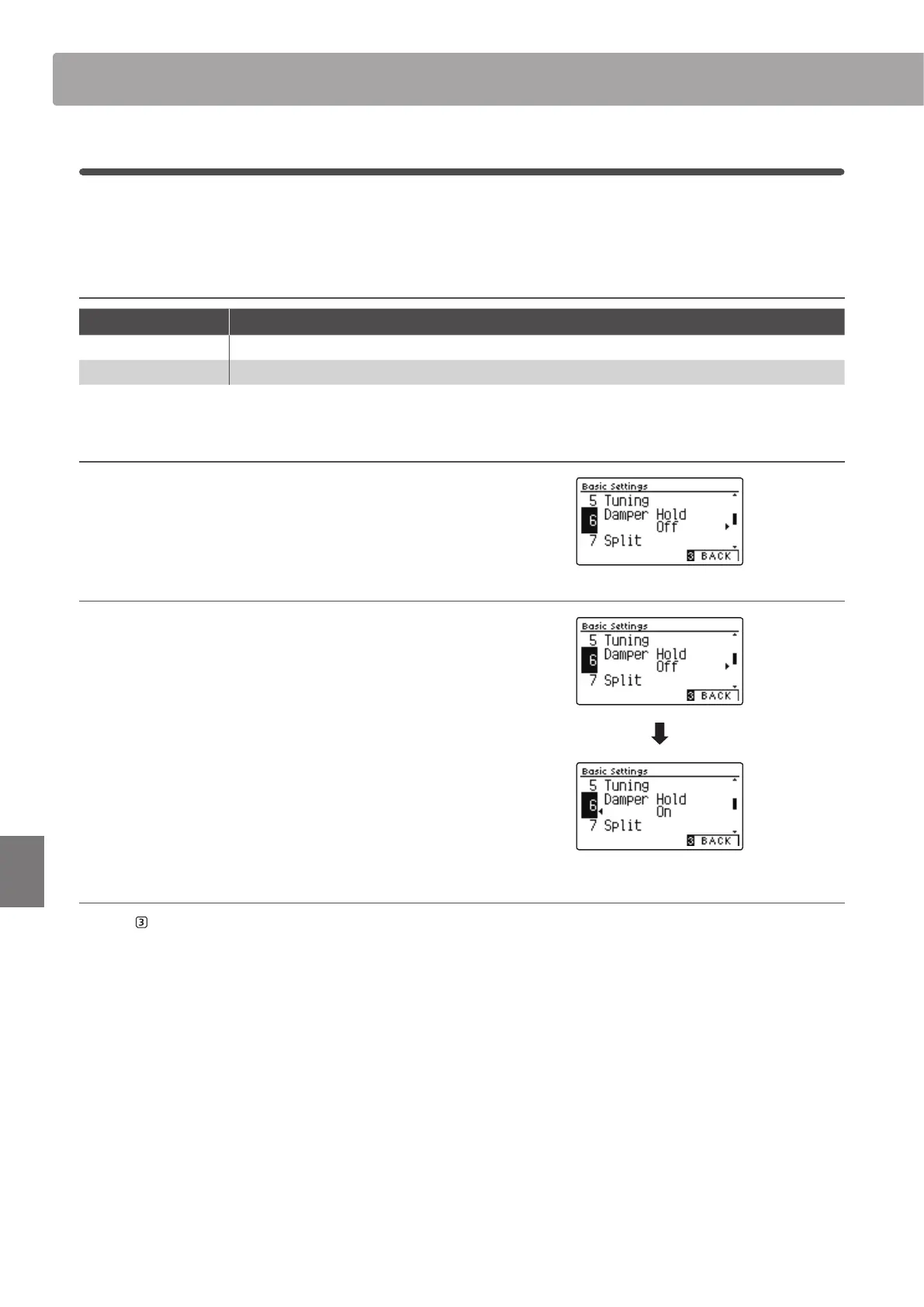
1. Selecting the Damper Hold setting
After entering the Basic Settings menu (page 69):
Press the
or
buttons to select the Damper Hold setting.
2. Changing the Damper Hold setting
Press the
or
buttons to turn the Damper Hold setting on
or o.
* To reset the Damper Hold setting to the default setting, press the
and
buttons simultaneously.
* Any changes made to the Damper Hold setting will remain until the
power is turned o.
* Preferred Damper Hold settings can be stored to a Registration
Memory for convenient recall, or to the Startup Setting memory for
automatic selection when the instrument is turned on. Please refer to
pages 35 and 79 for more information.
3. Exiting the Damper Hold setting
Press the FUNCTION button (BACK) to exit the Damper Hold
setting and return to the Function Menus screen.


 To Next Page