16
TEST RUN
試運轉
After connecting the power, please check the following item using the remote control:
Does the fan revolve normally?
Does it have abnormal vibration or noise?
Does it blow out hot air?
Is each button on remote control perform its right function?
接通電源,按動遙控器上各個功能按鍵,檢查以下項目:
扇葉是否正常旋轉?
是否有不正常的震動或者噪音?
是否有熱風輸出?
遙控器上的各個功能按鈕的功能是否正常?
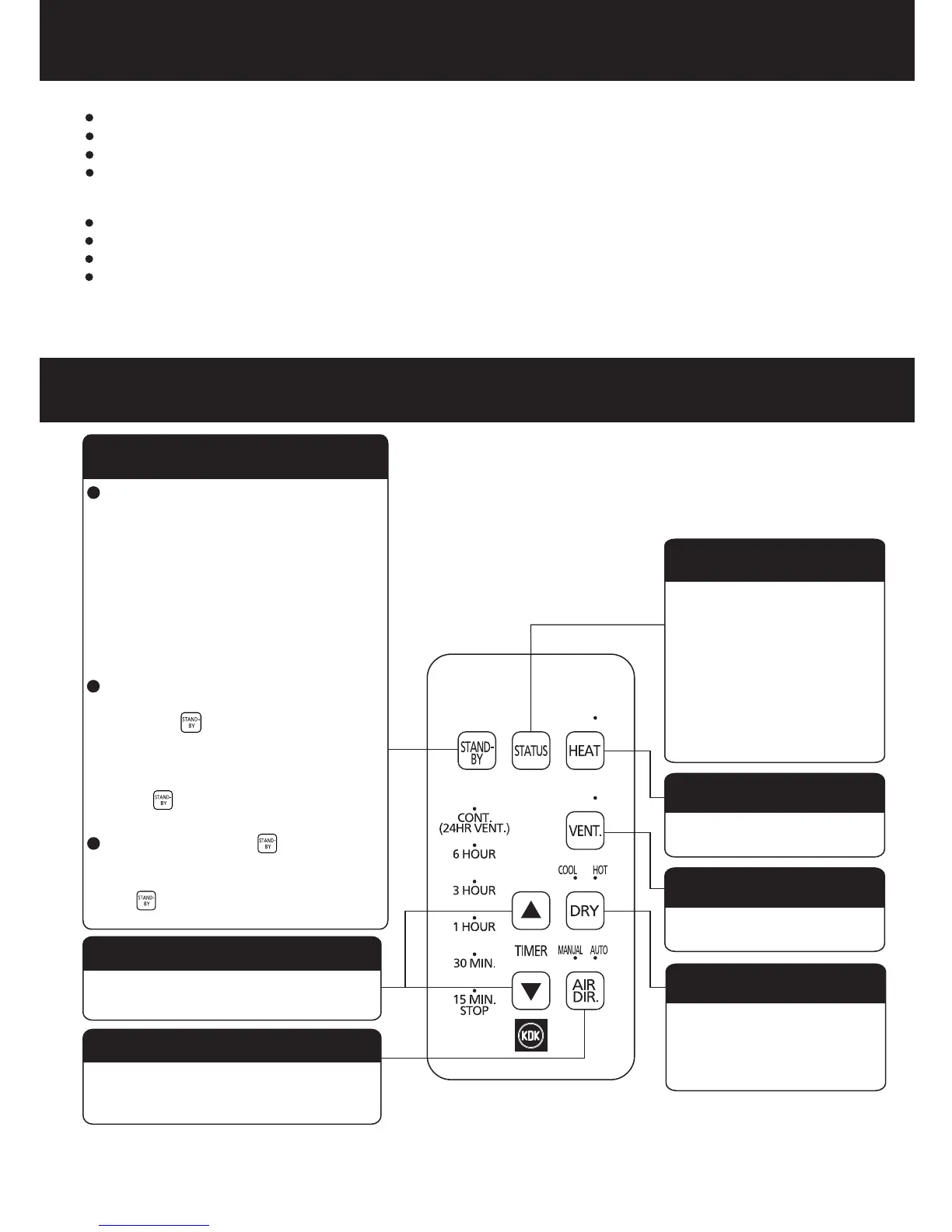
STANDBY button
In the standby status, this product
still requires power consumption
of 0.5 W. If the product will not be
in use for a long time, the all-pole
power switch should be turned off
to disconnect the power supply
for the purpose of energy saving.
Confirm the current
running status. (When you
press the button once, the
indicator of the current
running status will stay on
for 3 seconds.)
HEAT button
VENT button
Heating function
Air change function
Change the dry mode
(COOL/HOT)
Change the air direction
(MANUAL/AUTO)
Timer function
TIMER button
STATUS button
AIR DIR. button
DRY button
當在暖氣、熱乾燥功能運轉達30秒以
上,按 按鈕,加熱器將停止工作,
扇葉延時20秒後停止運轉。
確認當前運轉狀態(每按一
次,當前運轉狀態的指示燈
會亮3秒)
定時功能
切換風向設置(手動/自動)
切換乾燥方式
(涼乾燥/熱乾燥)
換氣功能
暖氣功能
定時按鈕
暖氣按鈕
換氣按鈕
乾燥按鈕
風向按鈕
狀態確認按鈕
待機按鈕
本產品處於待機狀態時,仍有0.5 W
的功耗。如長時間不使用時,應使用
電源全極開關斷開電源,以節省能源。
In the heating or hot drying mode
running for 30 seconds above,
press the button to stop the
heater. The fan will stop running
after a delay of 20 seconds.
FUNCTION OF REMOTE CONTROL
遙控器功能介紹
Press and hold the button for 3
seconds, the product will restore
the initial settings .
長按 按鈕3秒,產品將恢復初始設
置。


 To Next Page