18
HOW TO USE TIMER FUNCTION
定時功能的使用方法
1
2
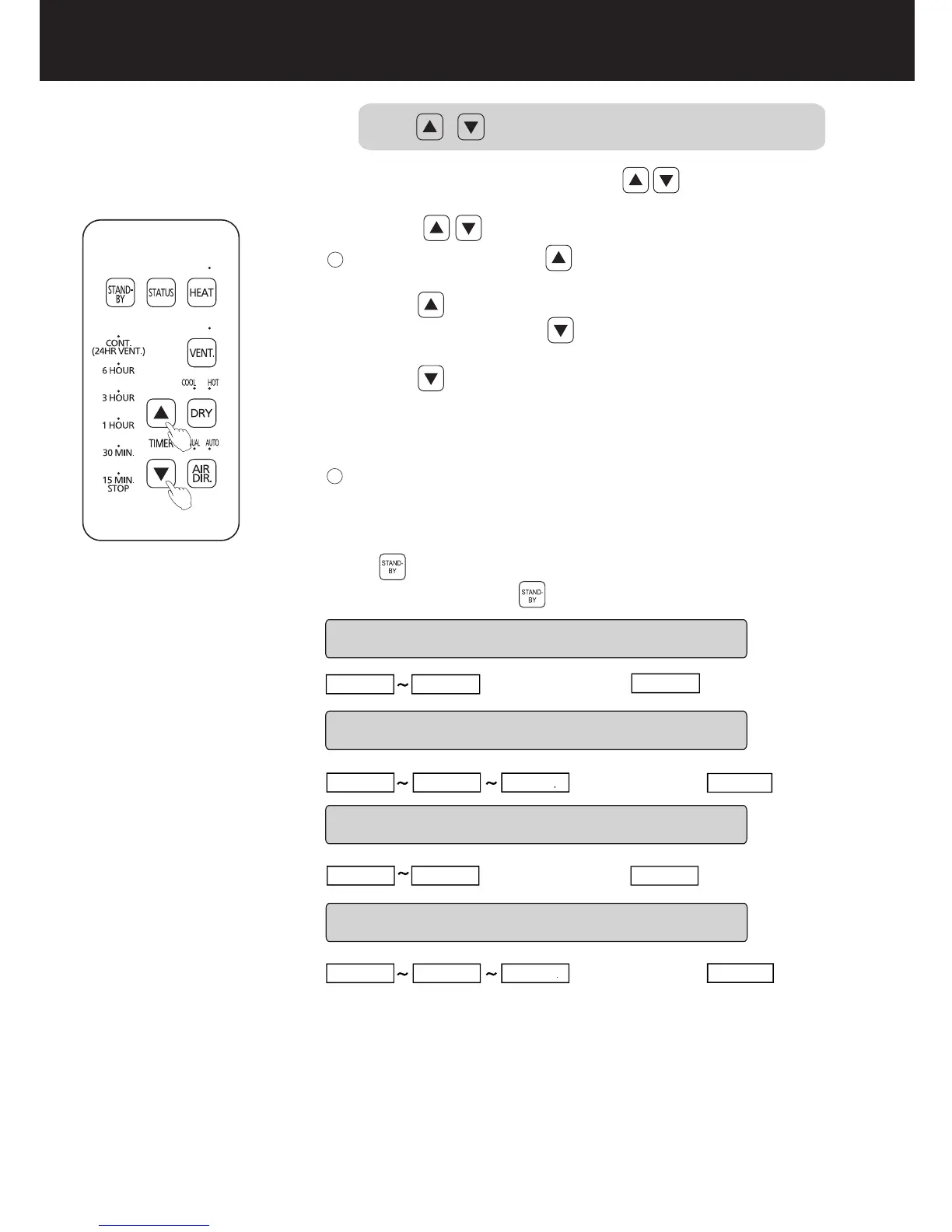
During operation, you can press the button to change
the running time.
Each time you press the button, the time will increase
accordingly.
If you press and hold the button, the running time will
keep changing.
After the running time is set once, the system will automatically
memorize the last running time of each mode.
To cancel the automatic memory content, press and hold
the button for 3 seconds.
For running time adjusted
Default settings
Default settings
Default settings
DRY COOL mode
DRY HOT mode
VENT. mode
Default settings
HEAT mode
CONT
15 MIN.
15 MIN.
15 MIN.
15 MIN.
15 MIN.
15 MIN.
15 MIN.
15 MIN.
3 HOUR
6 HOUR
6 HOUR
6 HOUR
CONT
調整運轉時間時使用
運轉中可通過 調整運轉時間。
每按一次 按鈕,運轉時間將隨之遞增;
如連續按,運轉時間將連續快速變換。
取消記憶時間,請長按 按鈕3秒。
設置一次運轉時間後,會自動記憶每個模式上一次的運轉時間。
換氣 模式
熱乾 燥模 式
涼乾 燥模 式
出廠 設置 為
出廠 設置 為
出廠 設置 為
出廠 設置 為
暖氣 模式
Each time you press the button, the time will increase
accordingly.
每按一次 按鈕,運轉時間將隨之遞減;


 To Next Page