19
風向功能的使用方法
HOW TO USE AIR DIRECTION FUNCTION
Air direction cannot be set in the ventilation mode.
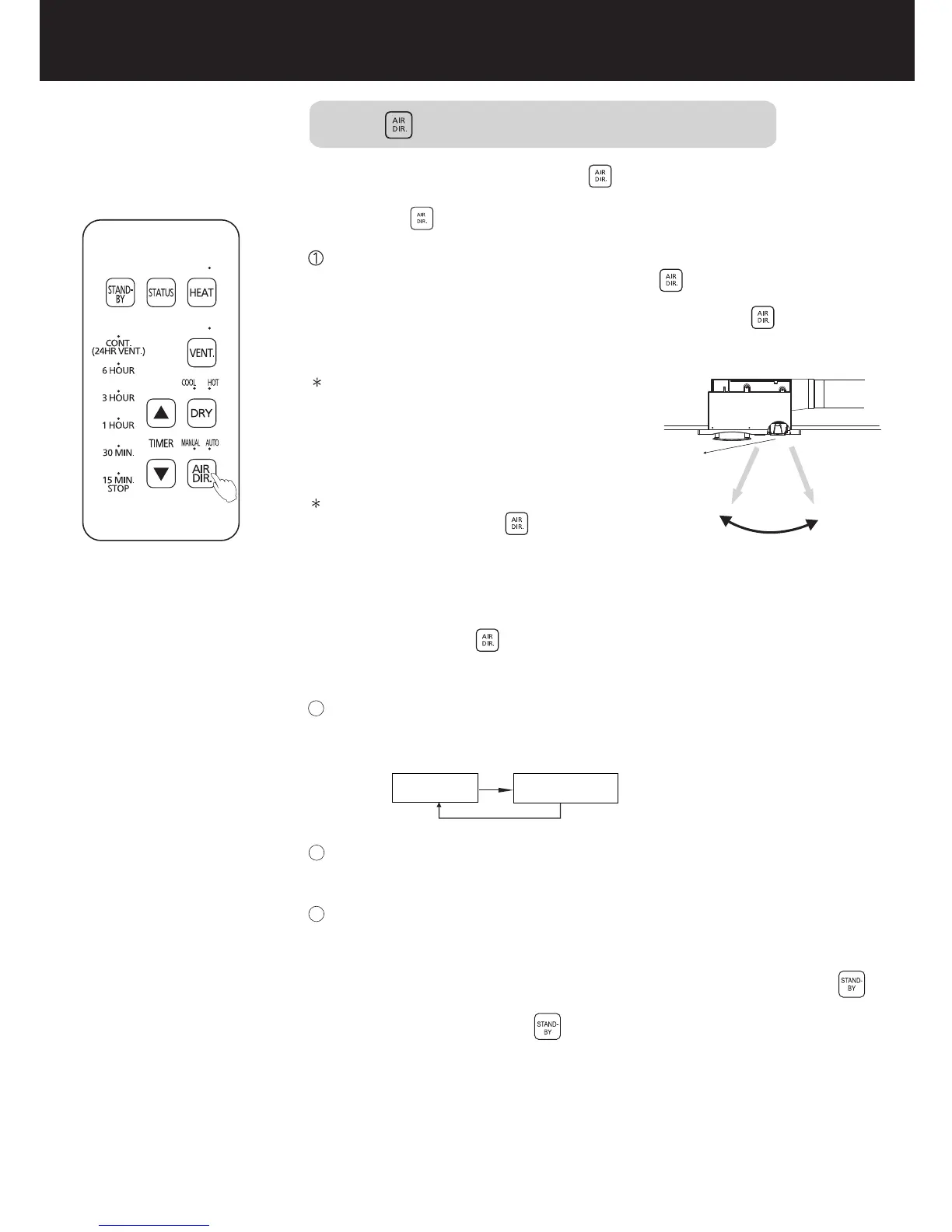
For adjusting air direction
AUTO mode
MANUAL mode
To cancel the automatic memory content, press and hold the
button for 3 seconds.
Each mode will automatically memorize the air direction position
set this time.
MANUAL mode: To fix the baffle
plate angle, press the button
when the baffle plate turns to the
required position. The baffle plate
will stop, and the MANUAL indicator
lights on.
2
3
4
調整風向時使用
運轉中可通過 按鈕,調整風向。
手動模式與自動模式的轉換如下圖:
自動模式:導風板在約60度 120度的
~
範圍內循環擺動。
換氣模式不可進行風向設置。
取消自動記憶內容,請長按 按鈕3秒。
各模式會自動記憶本次所設置的風向模式。
自動模 式
手動模 式
手動模式:需固定導風板角度時,待導風
板轉到所需位置,按 按鈕,導風板將
停止轉動,手動的指示燈亮起。
暖氣、熱乾燥、涼乾燥的風向初始設置為自動模式,通過 鍵,可進行
手動與自動模式的切換。
During running, you can press the button to adjust the air
direction.
The figure below shows switching sequence between the AUTO
mode and MANUAL mode:
AUTO mode: The baffle plate
circularly swings within the range
of about 60° to 120°
The initial air direction setting of HEAT, DRY HOT and DRY
COOL is AUTO mode. You can press the button change the
mode between MANUAL and AUTO.
Baffle plate
導風板
(Automatic mode)
(自動模 式)
Air direction angle
風向角 度
About 60°About 120°
約60°約120°


 To Next Page