22
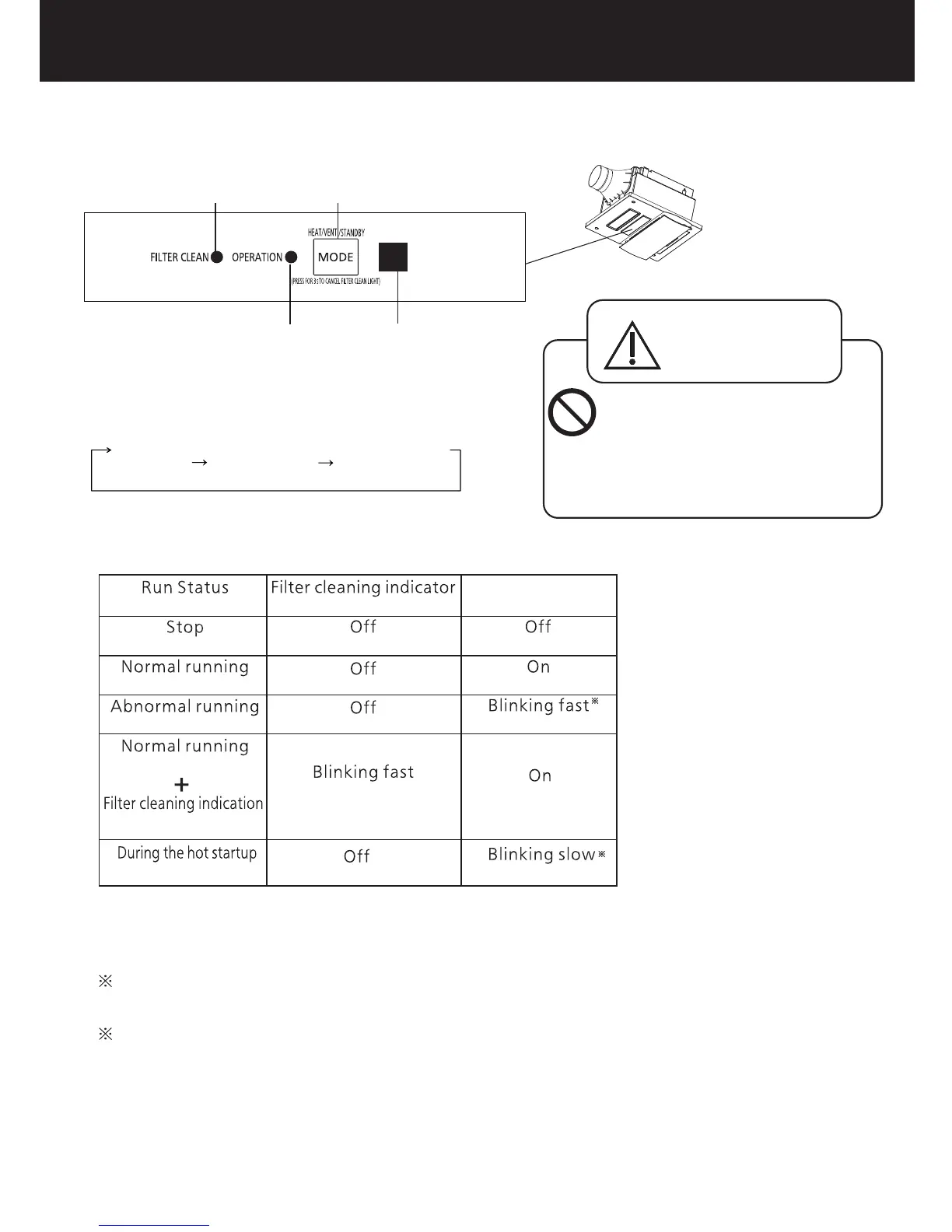
1. The MODE button can be used to switch among the
following functions:
HEAT VENT. STANDBY
When the remote control is lost or does not work, you can use the MODE button panel on the
front surface of the main body to operate the product. (Each time can be operated for 15 mins)
當遙控器丟失或者無法正常使用時,可臨時通過機體面板正面的模式按鈕進行操作。(每次可運轉15分鐘)
模式按鈕可進行下記功能的切換:
換氣
待機
暖氣
警告
WARNING
Do not press the MODE
button during a bath or
shower in the bathroom.
Otherwise, you may slip.
機體模式按鈕面板
MODE BUTTON PANEL ON MAIN BODY
Running indicator
Filter cleaning indicator
Signal receiver
.
過濾 網清 潔指 示燈
運轉 指示 燈
信號 接收 器
Mode button
模式 按鈕
為避免意外滑倒,當在浴室沐浴
時,請不要操作模式按鈕。
1
2
2
1
2.Conditions of the filter cleaning indicator and running indicator.
Running indicator
Blinking fast: On for 0.5 seconds and off for 0.5 seconds
Blinking slow: On for 1 second and off for 1 second
過濾網清潔指示燈及運轉指示燈的變化。
運轉指示燈
滅
滅
滅
滅
滅
快速閃爍
快速閃爍:0.5秒亮、0.5秒滅。
慢速閃爍:1秒亮、1秒滅。
運轉指示燈快速閃爍時,請斷開電源,且與Panasonic客戶諮詢服務中心或經銷商聯繫。
慢速閃爍
亮
亮
過濾網清潔指示燈
過濾網清潔提示
熱啟動功能時
運轉狀態
正常運轉
正常運轉
運轉異常
停止
When the running indicator blinks quickly, Please disconnect the power supply, and contact Panasonic
customer consultation service center or your distributor.
快速閃爍


 To Next Page