25
過濾網的清潔:
不可用水洗,因為水會破壞過濾網的抗菌性能;不可用鋼絲刷或其他硬質的工具來清潔以免損壞 過濾網。
當機體接收部的過濾網清潔指示燈閃爍時,表示已達到清潔過濾網的時間,請清潔過濾網。
(當運轉時間累計達到2200小時(約連續運轉3個月),清潔指示燈就會閃爍。)
Cleaning the filter:
1. Do not wash the filter with water, because water may destroy the anti-microbial
performance of the filter; do not use a wire brush or any other hard tool to clean the filter,
lest the filter would be damaged.
2. When the filter cleaning indicator at the receiving part of the main body blinks, it is time to
clean the filter. You need to clean the filter. (When the accumulated running duration
reaches 2,200 hours (continuous running about three months), the filter cleaning indicator
will blink.)
清潔注意事項
Cleaning Precautions
面板組合的清潔:
如使用化學抹布,請遵照其使用指示來清潔本產品。
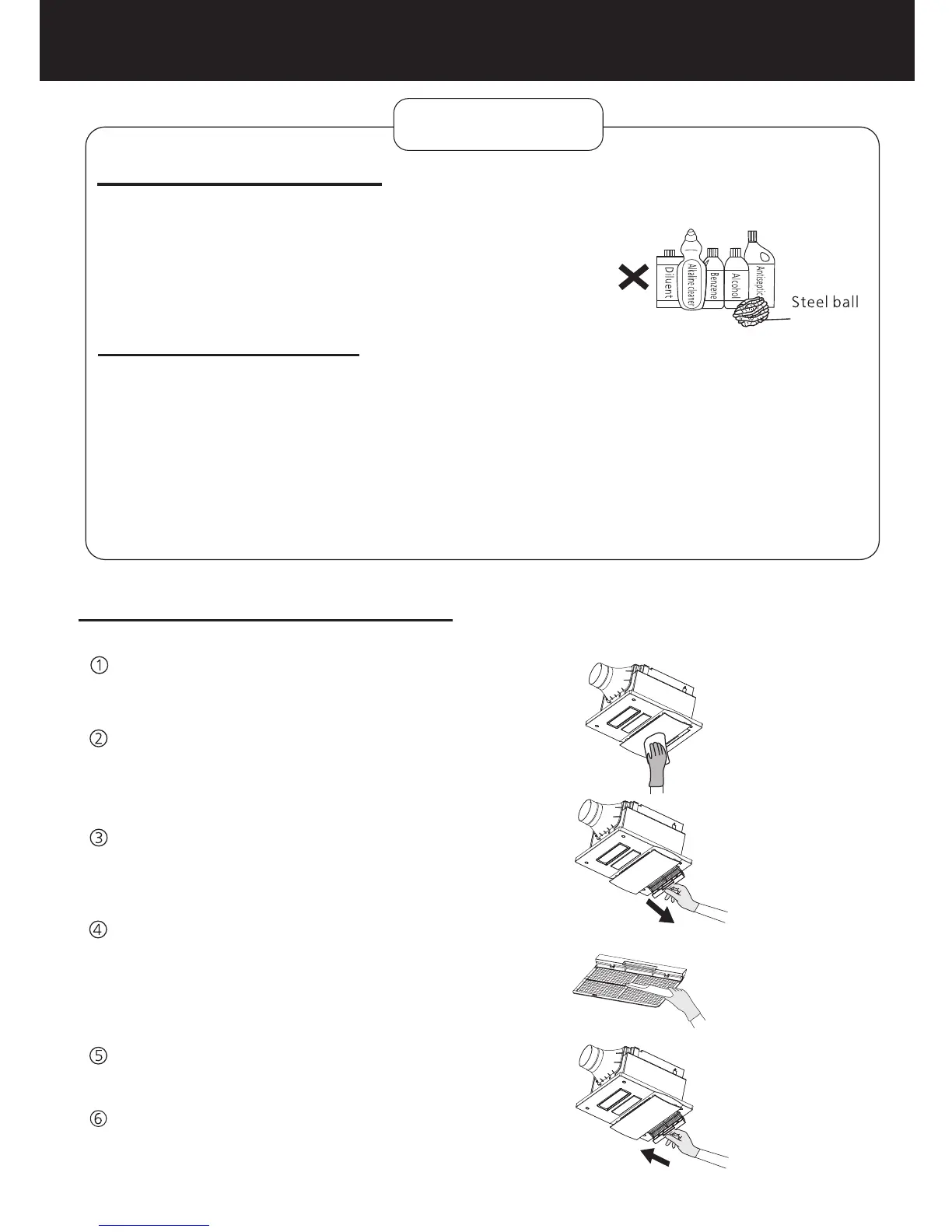
為避免導致面板變色及加速面板老化,請勿使用類似於圖示的
各種稀釋劑、鹼性清潔劑、苯、酒精、殺菌劑或鋼絲球等。
鋼絲球
Cleaning the louver:
1. To prevent color change and accelerated aging of the panel, do not use any type of diluent,
alkaline cleaner, benzene, alcohol, antiseptic, or steel ball as shown below.
2. To use a chemical cloth, clean this product by
following the instructions.
維護方法
MAINTENANCE
斷開“電源全極開關”。
用軟布擦拭前面板及面板底座。
Shut off the all-pole switch.
Wipe the front panel with a soft cloth.
開啟“電源全極開關”。
Turn on the all-pole switch.
重新安裝過濾網組合。
Reinstall the filter assembly.
將過濾網從面板組合中取出。
用吸塵機清除過濾網上的灰塵。
Remove the filter from the louver assembly.
Use a vacuum cleaner to remove dust from
the filter.
清潔面板組合和過濾網
Cleaning the louver assembly and filter


 To Next Page