4544
b. Do not move the switch directly from "On" to "Setup" -always
move the switch all the way down to "Off" first, then back up to
"Setup" .
2. LCD screen shows a faint black line after turning from
"Setup" to "On"
a. The LCD will turn off when you slide the switch to the "On"
position. In some cases, this black line will appear and then fade in
about 1 second. This is normal and the camera will function
properly.
3. Screen comes on but then powers off
a. Make sure that you have installed the SD card correctly.
Camera won't retain settings
1. Make sure that you have been saving the changes to any
parameter settings that you made while in Setup mode, by
pressing "OK" after changing the setting. If you don!-t save your
new setting afterchanging it, the camera will continue to use the
original default setting for that parameter.
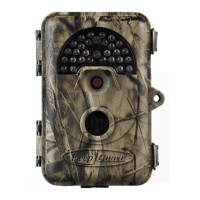
KeepGuard TECHNICAL SPECIFICATIONS
Image Sensor
Lens
IR-Flash Range
Display Screen
Memory Card
Internal RAM
5 Megapixel Color CMOS
F=7.36; FOV=55°Auto IR-Cut-Remove(at night)
45'-75'(15m-25m)
2.0 inch Color Display
SD or SDHC Card, Maximum capacity 32GB
32M
Image Size
12MP(4000×3000; 8MP(3264×2448);
5M (2592X1944); 3M (2048X1536);
Video Size
PIR Sensitivity
Operation
Response Time
Triggering Interval
Shutter Speed
Shooting Numbers
Video Length
Power Supply
Stand-by current
Power Consumption
Timed Scan
Temperature Display
Password
Moon Display
Audio Video
User Interface
Interface
Security
Dimensions
1280×720; 640×480;320×240;
PIR with 3sensitivity levels:High/ Normal/ Low
Day/Night
<1 s
1sec-60min programmable
1/10-1/2000sec.
1-3 programmable
5-60sec. programmable
8×AA recommended;4×AA as emergency power
<0.28mA
<200mA(+600mA when IR-LED Lighted)
programmable
programmable
programmable
programmable
programmable
LCD display
TV out(AVI);USB;SD card holder; 6V DC external
Strap;1/4-20 attachment
94X65X146MM


 To Next Page