43
Table of ContentsSetting UpWi-Fi StreamingUsing KEF Connect AppFAQ and Troubleshooting
12. Playback with USB Input
You can connect your computer to the speakers through a USB (type C) cable. The
speakers must always be first connected to your local network before USB connection.
This feature is compatible with Mac and Windows PC, with a maximum streaming
quality of 192 kHz / 24 bit.
Please note that Microsoft has ended support for Windows 7 and Windows 8, and it is
recommended to use Windows 10 or above for best USB audio experience.
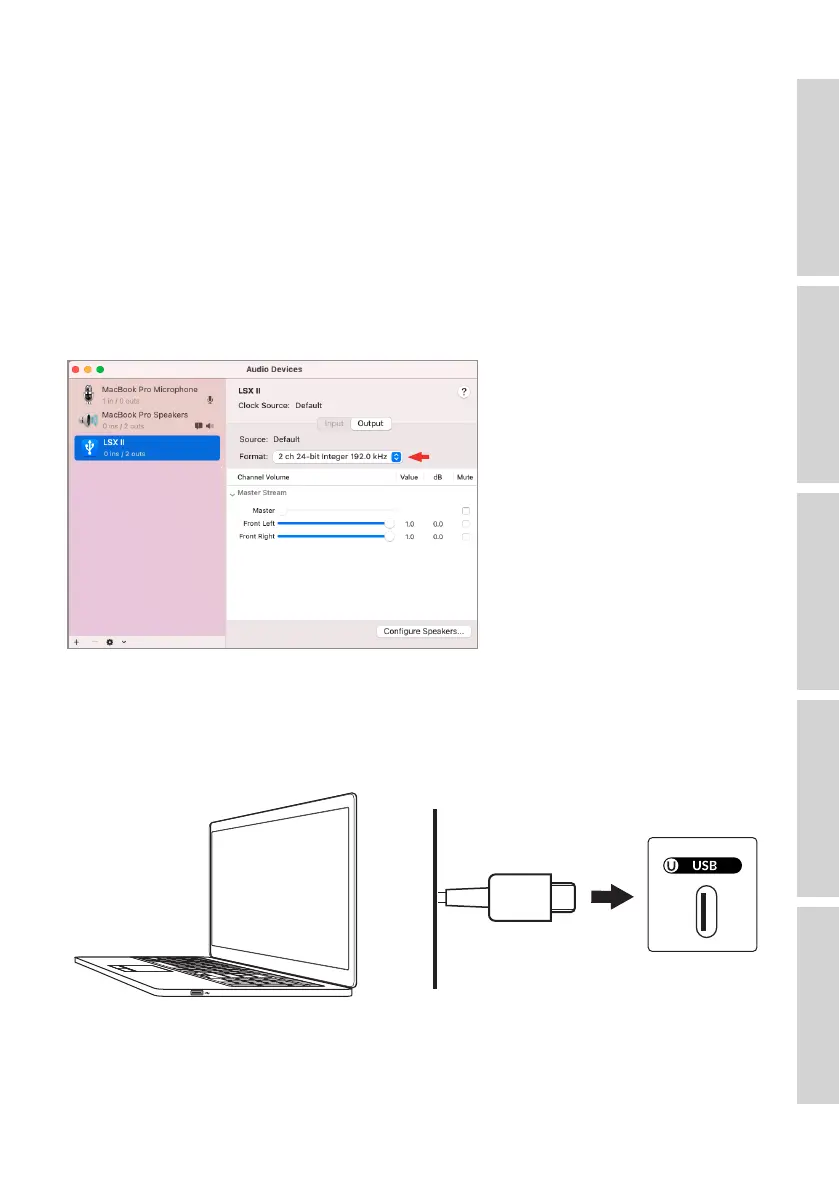
To adjust the audio resolution of a Mac PC, go to “Utilities > Audio Midi Setup” and
select the desired format.
12.1 USB Connection
Connect your computer and the USB port (U) on the back panel of the Primary
Speaker via a USB cable (type C).



 To Next Page