7
Table of ContentsSetting UpWi-Fi StreamingUsing KEF Connect AppFAQ and Troubleshooting
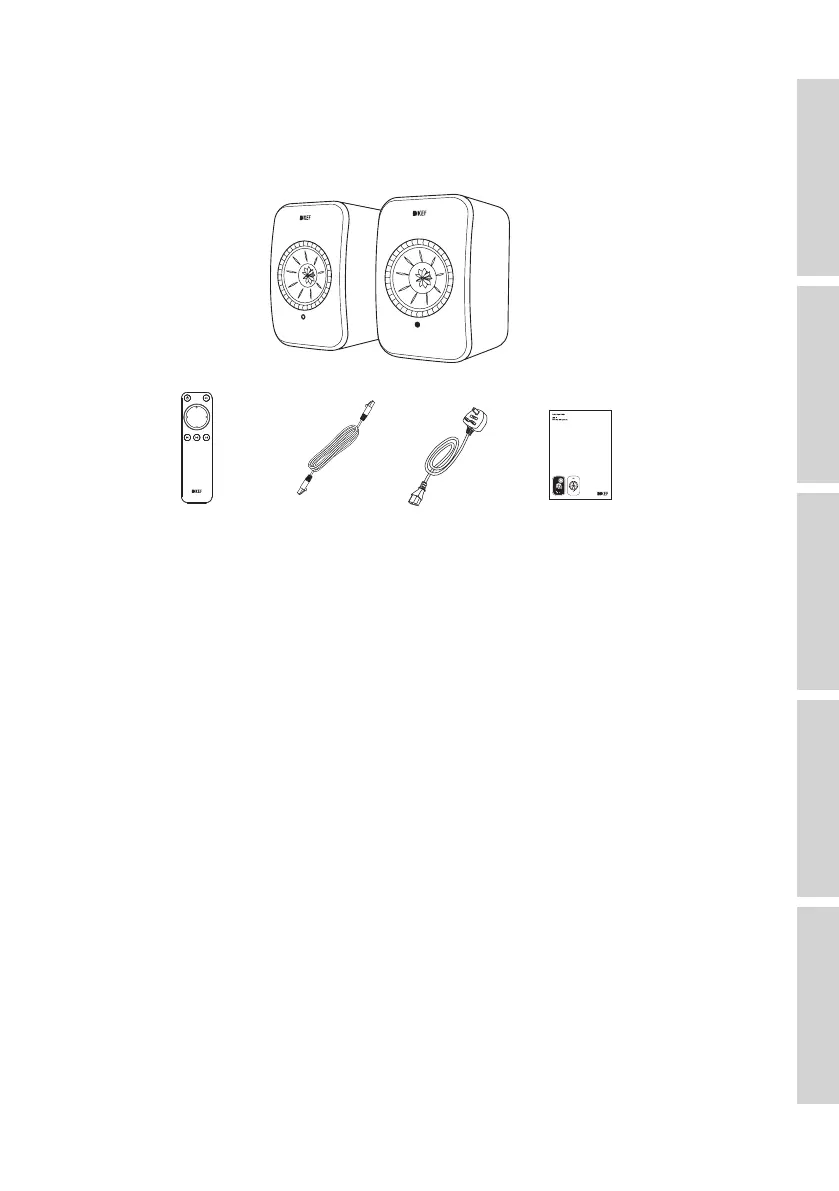
3. In the Box and Unpacking
Be very careful when opening the packaging. Follow the instructions on the packaging
to lift up the speakers from the sides to avoid damaging the Uni-Q drivers.
×1 se t
×1 ×1 ×2 ×4
1. Take the speakers and accessories out of the packaging.
2. Check to make sure that all parts are included, namely:
• Speaker ×2 (Primary Speaker ×1, Secondary Speaker ×1)
• Remote control ×1 (with 2 AAA batteries)
• Inter-speaker cable ×1 (length: 3 m)
• Power cable ×2 (length: 2 m, with country-specific power plugs)
• Printed materials: Quick Start Guide, Safety Information, Warranty Information and
Fabric Cleaning Guide
3. Check whether the speakers or individual parts are damaged. If this is the case, do
not use the speakers and contact your retailer.



 To Next Page