EasyManua.ls Logo

Kemppi WFX 200 - User Manual

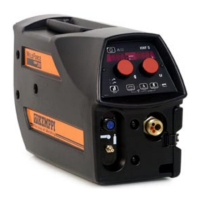
Kemppi WFX 200
36 pages
Print Icon
To Next Page IconTo Next Page
Loading...
Operating manual
Brugsanvisning
Gebrauchsanweisung
Manual de instrucciones
Käyttöohje
Manuel d’utilisation
Manuale d’uso
Gebruiksaanwijzing
Bruksanvisning
Instrukcja obsługi
Manual de utilização
Инструкции по эксплуатации
Bruksanvisning
操作手册
EN
DA
DE
ES
FI
FR
IT
NL
NO
PL
PT
RU
SV
ZH
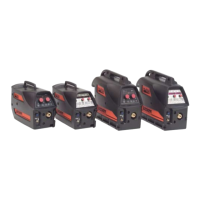
WFX
200, 300
200 P Fe, 300 P Fe
200 P Ss, 300 P Ss
200 AMC, 300 AMC
200-T, 300 P-T, 300-T

Questions and Answers

  • J
    jennifer61Aug 7, 2025
    What to do if my Kemppi WFX 200 Welding System won't work?
    • M
      Melissa NicholsAug 8, 2025
      If your Kemppi Welding System isn't working, try these steps: * Ensure the mains plug is correctly connected. * Verify the mains power distribution is switched on. * Inspect the mains fuse and/or circuit breaker. * Confirm the power source 0/I switch is in the ON position. * Check that the interconnection cable set and connectors between the power source and wire feed unit are correctly fastened. * Make sure the earth return lead is connected. * Verify the control panels are switched on.
  • C
    Christina ColemanAug 13, 2025
    Why does my Kemppi WFX 200 have a high spatter volume?
    • R
      Richard GonzalezAug 13, 2025
      A high spatter volume in your Kemppi Welding System could be due to several factors. You should check the following: * Welding parameter values * Inductance/Dynamics values * Cable compensation value if long cables are fitted * Gas type and flow * Welding polarity and cable connections * Filler material selection * Correct welding program selected * Correct channel number selection * Filler wire delivery system * Power supply – is 3-phase present?
  • M
    Mrs. Lisa Strickland MDAug 19, 2025
    How to fix a dirty, poor quality weld with Kemppi WFX 200 Welding System?
    • B
      Bobby SanchezAug 19, 2025
      To address a dirty, poor quality weld with your Kemppi Welding System, consider the following checks: * Verify the shielding gas supply. * Check and adjust the gas flow rate. * Confirm the gas type is appropriate for the application. * Inspect the gun/electrode polarity. * Ensure the correct welding program is selected. * Verify the correct channel number is selected on the wire feeder control panel. * Check the power supply for phase issues.
  • C
    Crystal JimenezAug 26, 2025
    Why is the welding performance of my Kemppi WFX 200 Welding System variable?
    • L
      Lauren HendersonAug 26, 2025
      Variable welding performance in your Kemppi Welding System can stem from various issues. You should check if: * The wire feed mechanism is correctly adjusted. * The correct drive rolls are fitted. * The wire spool overrun tension is correctly adjusted. * The gun liner is not blocked (replace if necessary). * The correct gun liner is fitted for the filler wire size and type. * The contact tip is the correct size and type and is not worn. * The gun is not overheating. * The cable connections and earth return clamp are secure. * The welding parameter settings are correct.
  • J
    Joshua RodriguezAug 30, 2025
    What to do if the filler wire won’t feed in my Kemppi Welding System?
    • T
      Trevor SantosAug 31, 2025
      If the filler wire isn't feeding in your Kemppi Welding System, check these items: * Ensure that pressure arms are closed and adjusted in wire feed mechanism. * Verify welding gun switch function. * Confirm Euro gun collar is correctly fastened. * Inspect the gun liner for blockages. * Check contact tip, size, type, wear. * Try an alternative gun.

Summary

1. INTRODUCTION

1.1 General

Provides an overview of the Kemppi WFX welding equipment and the manual's purpose.

1.2 About WFX wire feeders

Details the different WFX wire feeder models and their features, including welding processes.

2. INSTALLATION

2.1 Machine introduction

Identifies and labels the main parts and connections of the WFX welding machine.

2.2 Connecting cables

Explains how to connect the WFX wire feeder to the power source and other components.

2.3 Assembly of MIG;MAG system

Details the steps for assembling the MIG/MAG welding system, including mounting units.

2.4 Accessories corresponding to wire diameter

Lists accessories like wire feed rolls and guide tubes needed for different wire sizes.

2.5 Welding gun selection

Guides the user on selecting the appropriate welding gun for specific applications.

2.6 Mounting and locking of wire spool

Provides instructions on correctly mounting and securing the wire spool onto the wire feeder.

2.7 Loading the filler wire and automatic feed

Describes the procedure for loading filler wire and using the automatic feed mechanism.

2.8 GT04 wire feed mechanism

Details the GT04 wire feed mechanism, including part numbers for wire guide tubes.

2.9 DuraTorque 400, 4-wheel wire feed mechanism

Details the DuraTorque™ 400 wire feed mechanism, including part numbers for wire guide tubes.

2.10 Adjustment of pressure arms

Explains how to adjust the pressure arms for optimal filler wire feeding and performance.

2.11 Adjustment of spool brake

Details the procedure for adjusting the spool brake to prevent wire overrun.

2.12 Burn back time

Explains the burn back time function controlled by the FastMig electronics.

2.13 Earth return cable

Provides guidance on connecting the earth return cable for proper welding operation.

2.14 Shielding gas

Discusses the importance of shielding gas and its correct handling and application.

2.15 Main switch I;O

Describes the function of the main power switch and pilot lamp for machine readiness.

2.16 Operation of cooling unit, Cool X

Explains how to operate the Cool X liquid-cooling unit when connected to the power source.

2.17 Hanging kit

Information on mounting the wire feeder using an optional hanging kit for boom mounting.

3. XF 37 AND XF 38 CONTROL PANEL

3.1 Connecting and mounting

Instructions for connecting the control panel to the WFX wire feed unit.

3.2 Layout

Provides a diagram and overview of the control panel layout and its components.

3.3 Button functions

Details the functions of various buttons and controls on the XF 37 and XF 38 control panels.

3.4 Welding software

Explains compatible welding software, modified processes, and their features.

3.5 Arc voltage display

Describes how to use and calibrate the arc voltage display feature for accurate readings.

4. BASIC TROUBLESHOOTING

5. MAINTENANCE

5.1 Daily maintenance

Outlines daily checks and cleaning procedures for the welding equipment.

5.2 Periodic maintenance

Details periodic checks, cleaning, and tightening of components for long-term reliability.

5.3 Service Workshop maintenance

Describes the comprehensive maintenance performed by authorized Kemppi Service Workshops.

6. DISPOSAL OF THE MACHINE

7. ORDERING CODES

8. TECHNICAL DATA

Kemppi WFX 200 Specifications

General IconGeneral
BrandKemppi
ModelWFX 200
CategoryWelding System
LanguageEnglish

Related product manuals