Other External Components
35English
Other External Components
View Camera
NOTE
• To connect a camera, see P.50.
• To use a rear view camera, a REVERSE lead
connection is required. (P.50)
• The rear view screen is displayed when you shift
the gear to the reverse (R) position.
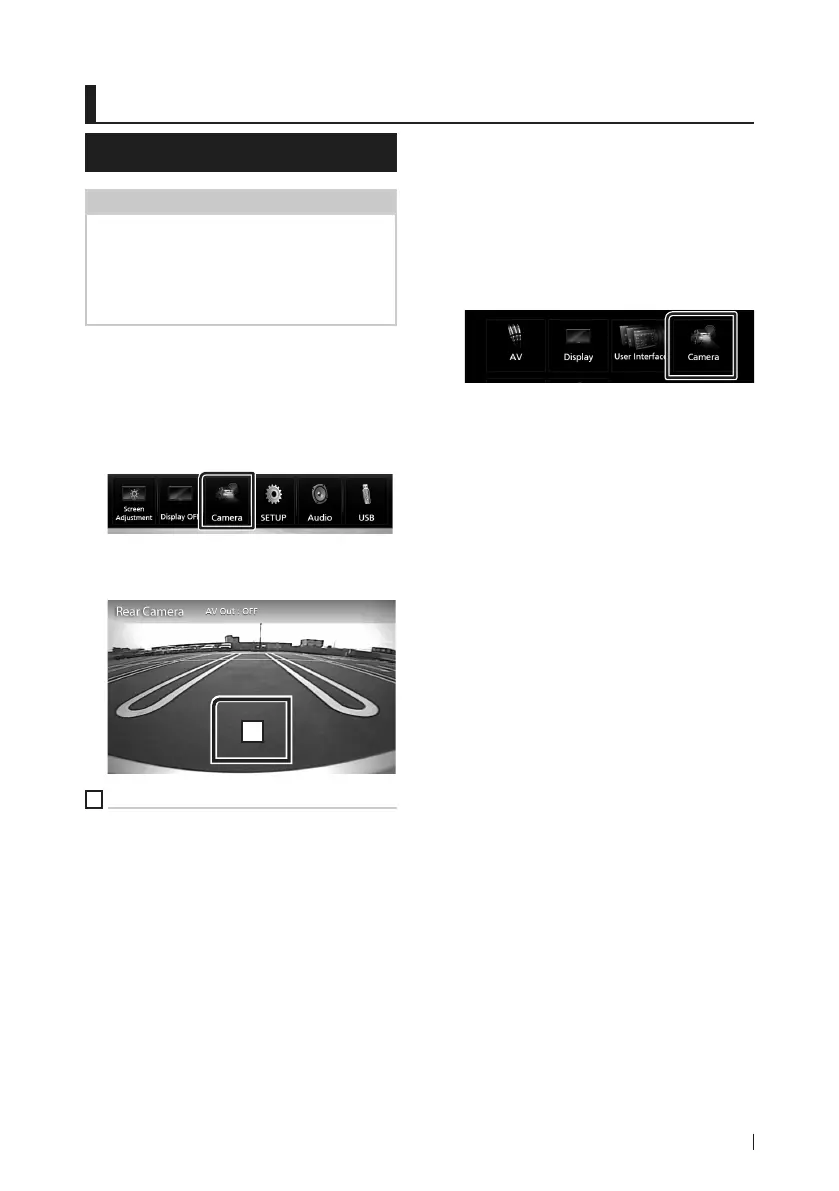
Ñ Display the camera screen
1 Press the [MENU] button.
Popup menu appears.
2 Touch [Camera].
View camera screen appears.
3 Adjust each item as follows.
1
1
Camera off
Touch to exit the camera screen.
Ñ Camera Setup
1 Press the [MENU] button.
Popup menu appears.
2 Touch [SETUP].
SETUP Menu screen appears.
3 Touch [Camera].
Camera screen appears.
4 Set each item as follows.
■ Parking Guidelines
You can display parking guidelines to enable
easier parking when you shift the gear to the
reverse (R) position.
Default is “ON”.
■ Guidelines SETUP
If you select [ON] for [Parking Guidelines],
adjust the parking guidelines. See To adjust
the parking guidelines (P.36).
!B5A-2247-10_DMX_E_EnFr.indb 35 2018/06/11 16:16


 To Next Page
 Loading...