USBUSB
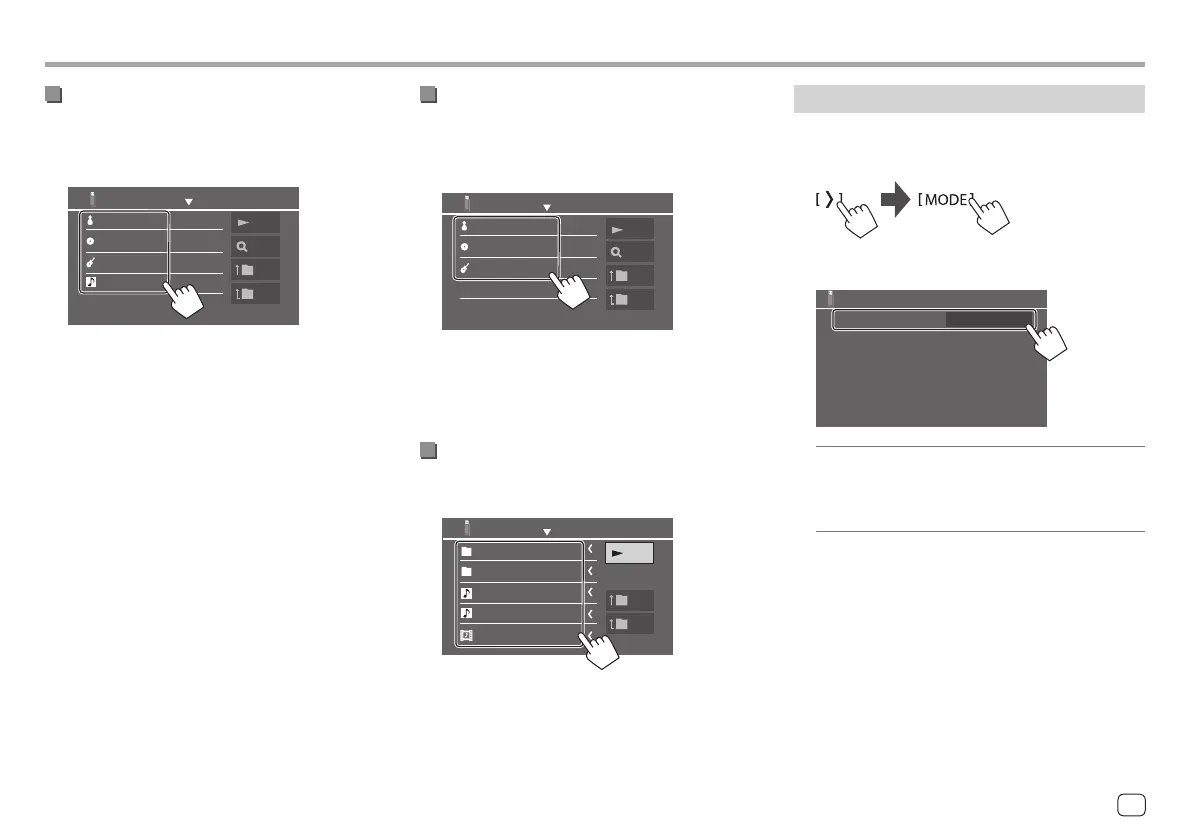
<Category Search>
This is only used for audio files.
• To change the file type, see page 19.
1 Select your desired category.
Category List
Artists
Albums
Genres
Songs
Play
A-Z
Top
Up
List of the selected category appears.
2 Select your desired file on the list.
<Link Search>
This is only used for audio files.
• To change the file type, see page 19.
1 Select the tag information.
Artist name
Album title
Genre
Link Search
Play
A-Z
Top
Up
List of the contents containing the same tag with
the file currently playing file is displayed.
2 Select your desired file on the list.
<Folder List>
Select the folder, and then the item in the
selected folder.
Play
Top
Folder name 1
Folder name 2
Audio file 1
Audio file 2
Video file 1
Folder List
Up
• Touching [ < ] scrolls the text if not all of the text
is shown.
Settings for USB playback
1 Display the <USB Mode> screen.
On the source control screen:
2 Make the settings.
Drive Select
4:3LB
Next
USB Mode
<Drive Select>
• Next: Switch between internal memory and the
memory source of the connected device (such as
mass storage device).
21ENGLISH
00DMX7722DABSE.indb2100DMX7722DABSE.indb21 2022/10/1716:202022/10/1716:20


 To Next Page
 Loading...