SettingsSettings
<User Customize>
You can change the following items.
• Background image of the Home screen
• Display background by using your desired still image
file (JPEG/24 bit BMP/PNG)
• Illumination colour of the buttons on the monitor
panel
• Home screen display pattern
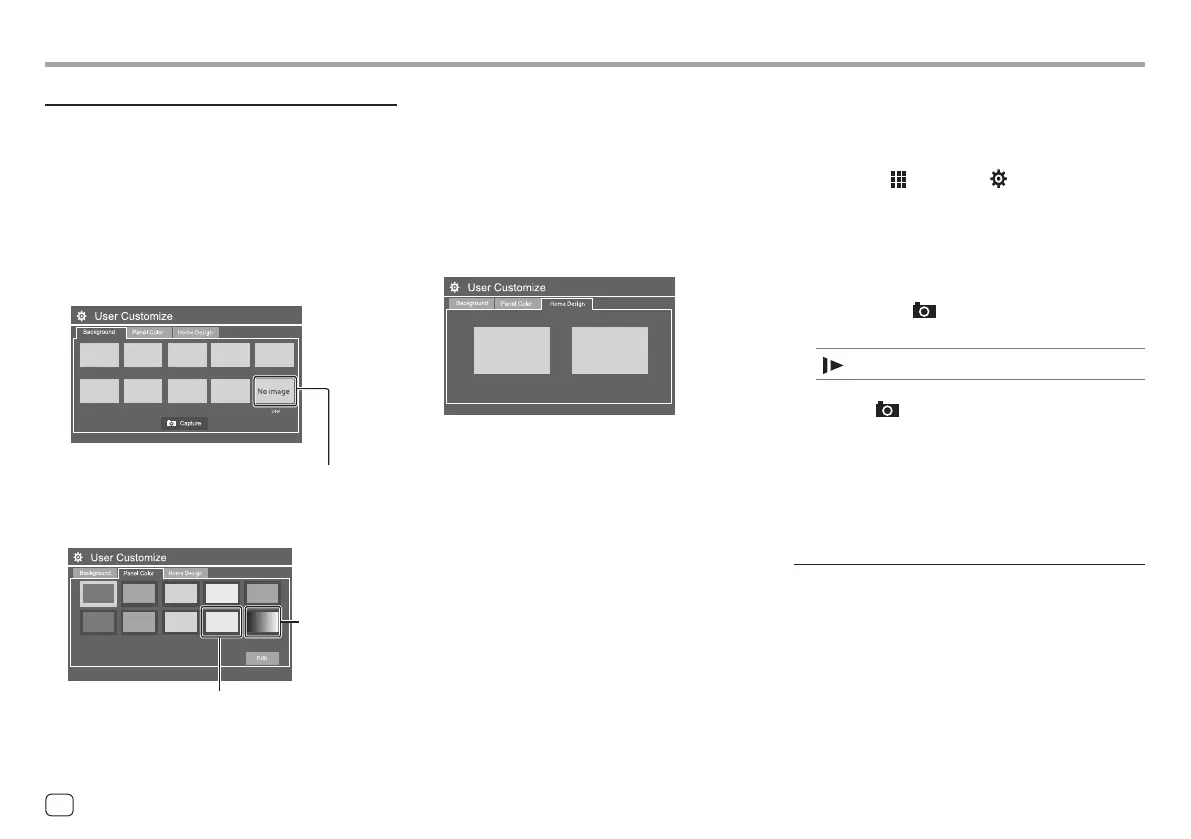
<Background>: Changes the background image of
the Home screen.
To store your own image into <User>.
<Panel Color>: Changes the illumination colour of the
buttons on the monitor panel.
To store your own illumination colour setting into the
white-coloured box.
a
1 While playing Slide Show, display the
<User Customize> screen.
1 Press the HOME button on the monitor panel.
The Home screen is displayed.
2 Touch [ ], and then [ ].
The <SET-UP> screen is displayed.
3 Then, on the <SET-UP> screen, touch as
follows:
[Display] → <User Customize>: [Enter]
2 Display the <Background> screen, and
then touch [
Capture].
The current still picture is displayed on the screen.
[ ]
Moves to the following still picture.
3 Touch [ Capture] to capture the image.
A confirmation message appears. Touch [Yes] to
store the captured image into [User]. (The existing
image is replaced with the new one.)
• To return to the previous screen, touch [No].
• To cancel the capture, touch [Cancel].
<OSD Clock>
• ON (Initial): Displays the clock while the screen is off,
or while a video source is playing.
• OFF: Cancels.
• You can also adjust the illumination colour yourself.
Touch the white-coloured box, and then [Edit] to
display the illumination colour adjustment screen,
then select the dimmer setting and adjust the colour.
The adjustment is saved in the white-coloured box.
• Selecting a changes the illumination colour
gradually.
<Home Design>: Changes the display pattern of the
Home screen.
To store your own scene for <Background>
When using an image file, make sure that the
resolution is 800 x 480 pixels.
• You cannot capture copyrighted content and
images.
• The colour of the captured image may look different
from that of the actual scene.
40 ENGLISH
00DMX7722DABSE.indb4000DMX7722DABSE.indb40 2022/10/1716:202022/10/1716:20








 To Next Page