24
|
KDC-X792/KDC-X692/KDC-MP738U/KDC-MP638U
Audio Adjustments
Audio Setup
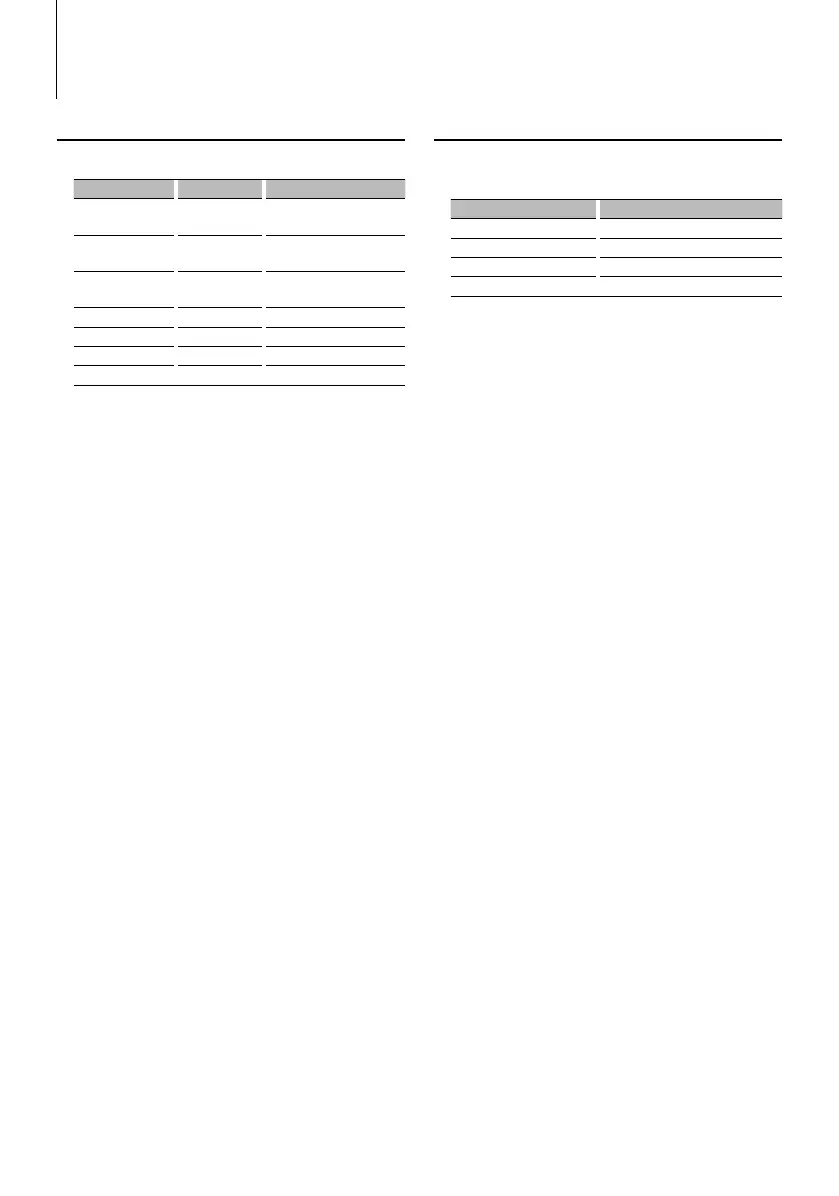
You can set Sound system , such as follows;
Adjustment Item Display Range
Front High Pass Filter “HPF-F” Through/40*
1
/ 60*
1
/80/100/
120/150/180/220*
1
Hz
Rear High Pass Filter “HPF-R” Through/40*
1
/ 60*
1
/80/100/
120/150/180/220*
1
Hz
Low Pass Filter “LPF” 50*
1
/60/80/100*
1
/120/
Through Hz
Subwoofer Phase “SW PHASE” Reverse (180°)/ Normal (0°)
Volume offset “VOL-OFFSET” –8 — ±0 (AUX: -8— +8)
Loudness “LOUD” OFF/ON
Dual Zone System “2 ZONE” OFF/ON
*
1
KDC-X792/X692 only.
⁄
• Volume offset: Sets each source’s volume as a difference
from the basic volume.
• Loudness: Compensates for low and high tones during
low volume. (Only the low tone is compensated for
when the tuner is selected as a source.)
• Dual Zone System
Main source and sub source (Auxiliary input) output
Front channel and Rear channel separately.
- Set up the channel of sub source by “Zone2” of
<Function Control> (page 6).
- Select Main source by [SRC] button.
- Adjust the volume of Front channel by [AUD] knob.
- Adjust the volume of Rear channel by <Audio Control>
(page 23) or [5]/[∞] button on the remote control
(page 28).
- The Audio Control has no effect on sub source.
1 Select the source to adjust
For how to select source item, refer to <Power/
Source Select button> of <Basic Operation> (page
4).
2 Enter Audio Setup mode
Press the [AUD] knob for at least 1 second.
3 Select the Audio Setup item to adjust
Press the [AUD] knob.
4 Adjust the Audio setup item
Turn the [AUD] knob.
5 Exit Audio Setup mode
Press the [AUD] knob for at least 1 second.
Speaker Setting
Fine-tuning so that the System Q value is optimal
when setting the speaker type as follows;
Speaker type Display
OFF “OFF”
For 5 & 4 in. speaker “5/4inch”
For 6 & 6x9 in. speaker “6x9/6inch”
For the OEM speaker “O.E.M.”
1 Enter Standby
Select the “STANDBY” display.
For how to select source item, refer to <Power/
Source Select button> of <Basic Operation> (page
4).
2 Enter Speaker Setting mode
Press the [AUD] knob.
“SP SEL” is displayed.
3 Select the Speaker type
Turn the [AUD] knob.
4 Exit Speaker Setting mode
Press the [AUD] knob.
B64-4048-0000.indb24B64-4048-0000.indb24 08.2.54:22:48PM08.2.54:22:48PM


 To Next Page
 Loading...