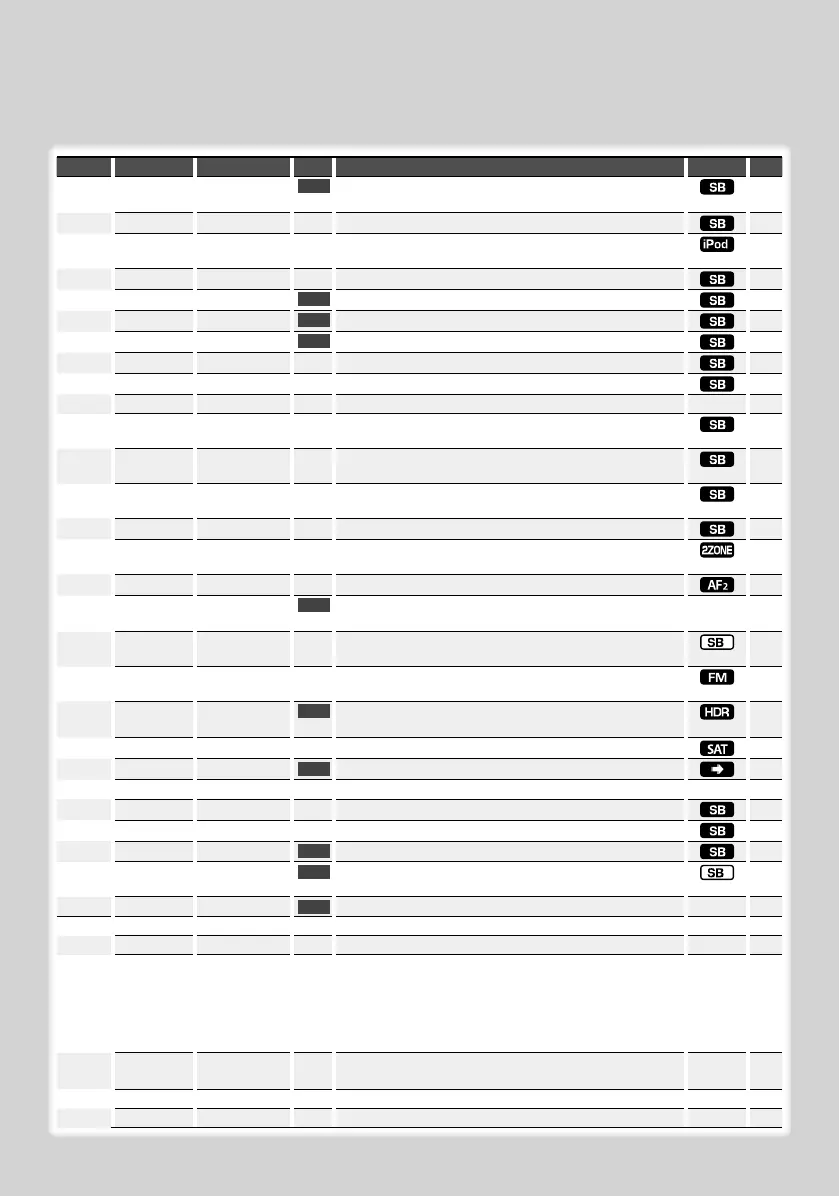
Category Item Setting Entry Setting overview Condition Page
MENU “Security Set”/
“Security Clear”
1 sec.
Sets/Resets security code.
19
“SRC Select” “1”*/ “2”
Sets the source selection method.
32
“iPod Mode” “OFF”/ “ON”*
When set to “ON”, allows you to select music in the manner
similar to that of the iPod.
15
“Beep” “OFF”/ “ON”*
Setting the operation check sound (beep sound) ON/OFF.
“Clock Adjust” 1 sec.
Sets the clock.
20
“Date Adjust”
1 sec.
Sets the date.
20
“Date Mode” 7 types
1 sec.
Sets the date display mode.
“SYNC”*
1
“OFF”*/ “ON”
Synchronizing the RDS station time data and this unit’s clock.
“DSI” “OFF”/ “ON”*
Turns on/off the Disabled System indicator.
“Display” “OFF”/ “ON”*
Turns off the display when no operation is performed.
—32
“Dimmer” “OFF”/ “ON”*
Dims the display part in conjunction with the light switch of
the vehicle.
“ILM Dimmer” “OFF”/ “AUTO”*
Dims the key Illumination in conjunction with the light
switch of the vehicle.
32
“ILM Effect” “OFF”/ “ON”*
Sets whether the key illumination brightness is changed in
conjunction with the key operation.
“AMP” “OFF”/ “ON”*
Turns on/off the built-in amplifier.
32
“Zone2” “Rear”*/ “Front”
Specifies the destination of AUX input sound when the Dual
Zone function is turned on.
32
“Supreme” “OFF”/ “ON”*
Turns ON/OFF the Supreme function.
32
“AMS Control”*
1,
2
1 sec.
Controls the connected LX amplifier.
—20
“TI”
*
1
“OFF”*/ “ON”
Switches to the traffic information automatically when the
traffic bulletin starts.
“CRSC” “OFF”/ “ON”*
Switches to Monaural to decrease noise when reception is
poor.
“Receive Mode” “Auto”*/ “Digital”/
“Analog”
1 sec.
Sets the receive mode of HD Radio.
32
“ESN=”
Displays the Electronic Serial Number of satellite radio.
“Name Set” 1 sec.
Sets the station name (SNPS)/ disc name (DNPS)/ AUX name.
10,11
“Scroll” “Auto”*/ “Manual”
Specifies whether the text is scrolled automatically.
—
“Built in AUX” “OFF”*/ “ON”
Sets whether to display AUX during source selection.
“CD Read” “1”*/ “2”
Sets the CD read mode.
32
“DISP Data DL”
*
1
1 sec.
Downloads the picture data to be shown on the display.
21
“Audio Preset” 1 sec.
Presets the setting value of the audio control. The preset
value is retained after resetting.
25
“DEMO Mode” “OFF”/ “ON”*
2 sec.
Specifies whether to enable demonstration.
—21
DISP > TYPE A/ B/ C/ D/ E/ F
*
1
Sets the display pattern.
—8
> MODE 1/ 2
Sets the text display pattern.
ıÇ
> GRAPH
Movie 1 – 2/
Downloaded movie*
1
/
Wallpaper 1 – 6/
Downloaded
Wallpaper*
1
/ Wallpaper
scan
Sets the Type A graphic display.
When Wallpaper scan is selected, displays “SCAN”.
For Download movie and Download Wall Paper, refer to
<Picture downloading> (page 21).
Å
> SIDE Text icon/ Source
icon
Sets the Type C side icon display.
Ç
> TEXT
Sets the text display.
ÅıÇÎ
9
> COLOR
*
1, 3
Sets the text display color.
ÅıÇ
10
6
|
KDC-X792/KDC-X692/KDC-MP738U/KDC-MP638U
Function Control
Functions in the table below can be set up by using Function Control.
B64-4048-0000.indb6B64-4048-0000.indb6 08.2.54:22:40PM08.2.54:22:40PM



 To Next Page
 Loading...