5 D-STAR
39
Selecting "Reflector" during Destination Select 5.4.3
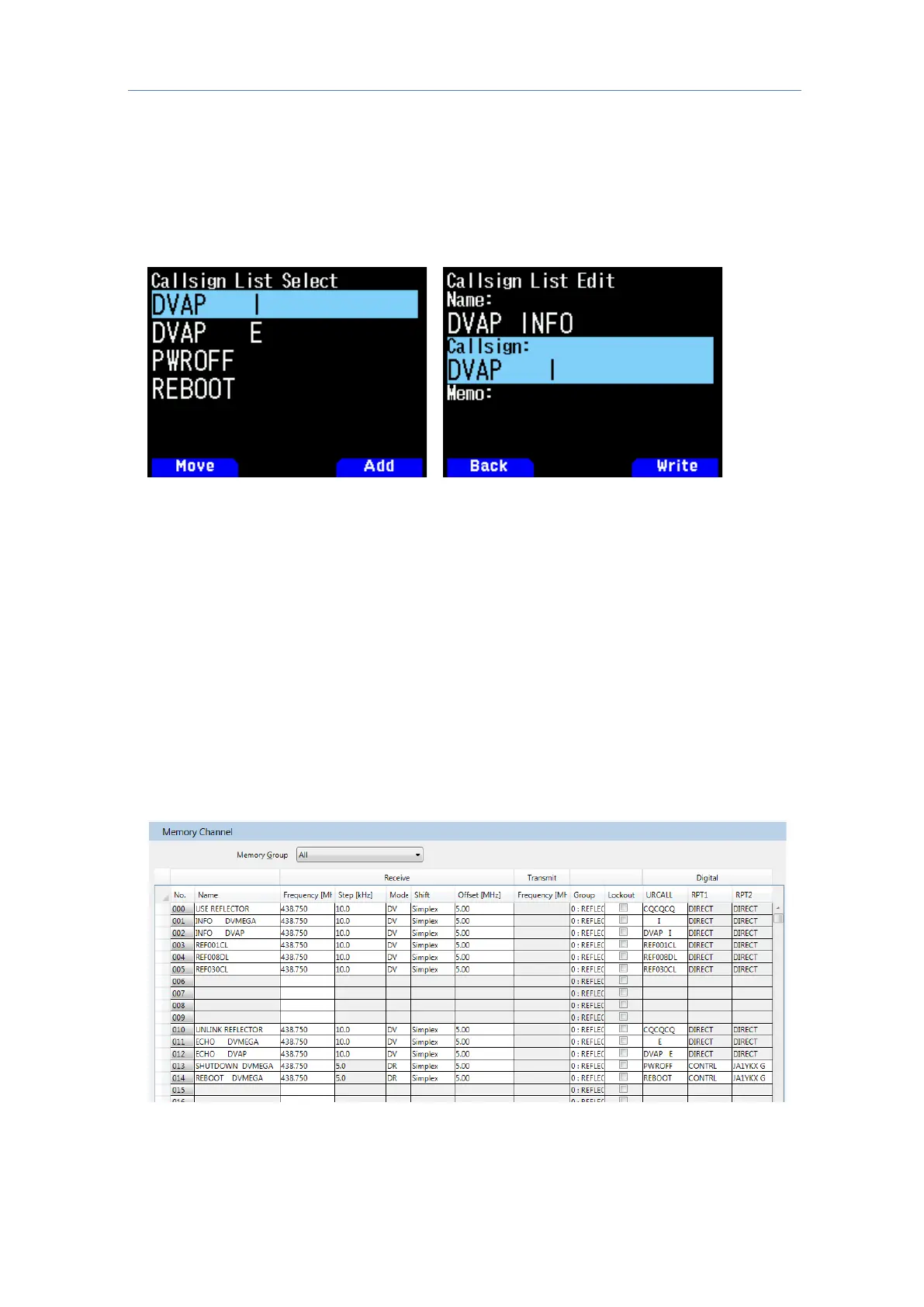
Various reflector commands can be configured in "Reflector Menu Select". If other
reflector commands are needed, add the command in place of the Callsign to the Callsign
list in the MCP-D74 Memory Control Program or
Menu No. 220 of the TH-D74A/E.
On the Destination Select screen, select “Individual” and configure the registered
command in "TO".
When using Memory Channels for a simplex node device 5.4.4
The memory channels can be edited as follows to enable access to the node device for
reflector connection.
1. Read the configurations from the transceiver using the MCP-D74, followed by clicking
"Memory Channel" to add a frequency for the node device for reflector connection.
2. Click "Display Item (Y)" and select the "Mode" and "URCALL" checkboxes.
3. Set "Mode" to "DV".
4. Create multiple memory channels with the same frequency, and configure the different
commands such as "CQCQCQ" and "REFXXXXL" in "URCALL". If character strings
other than "DIRECT" need to be entered into "RPT1" and "RPT2" to enable control of the
reflector device, click "Display Item (Y)" and select the "RPT1" and "RPT2" checkboxes
accordingly, and configure "Mode" to "DR".



 To Next Page