6 Settings & Controls
58
GPS Receiver for Prolonged GPS Logging 6.12.2
Disabling the radio communications feature of the TH-D74A/E allows it to be used for an
extended period of time.
To do so, configure the "Operating Mode" for GPS to "GPS Receiver".
Menu No. 403
The transceiver feature is disabled in the GPS Receiver mode, but the FM radio feature
remains usable.
Menu No. 700
Saving Configuration Data to microSD Card 6.12.3
The configuration or programming data of the TH-D74A/E can be saved to a microSD card.
Export of configuration data
Menu No. 800
・When upgrading the firmware version, it is recommended that the data be saved to the
microSD card.
・The data format is the same as that of the MCP-D74 software.
・To change the configuration on the TH-D74A/E, it is possible to save the new configuration
data to the microSD card in advance, followed by applying it using the configuration data
import feature.
Menu No. 810
Position Memory Usage (GPS) 6.12.4
The TH-D74A/E allows users to register the positional information of their favorite locations
in the Position Memory.
The Position Memory feature stores information including the latitude, longitude, altitude,
time of registration, name and icon. Up to 100 sets of information can be stored in the
Position Memory. All contents except the time of registration can also be edited.
You can copy information on the current location, APRS station list and My Position to the
Position Memory.
<Ways to Utilize Position Memory>
・Applying the Position Memory information to My Position and sending Position Memory
information as object and item
・Target point
To register a Position Memory, press and hold the [MARK] key. Registration is not possible
if GPS positioning information is not available. When GPS positioning data is available,
pressing and holding the [MARK] key registers the positional information of the current
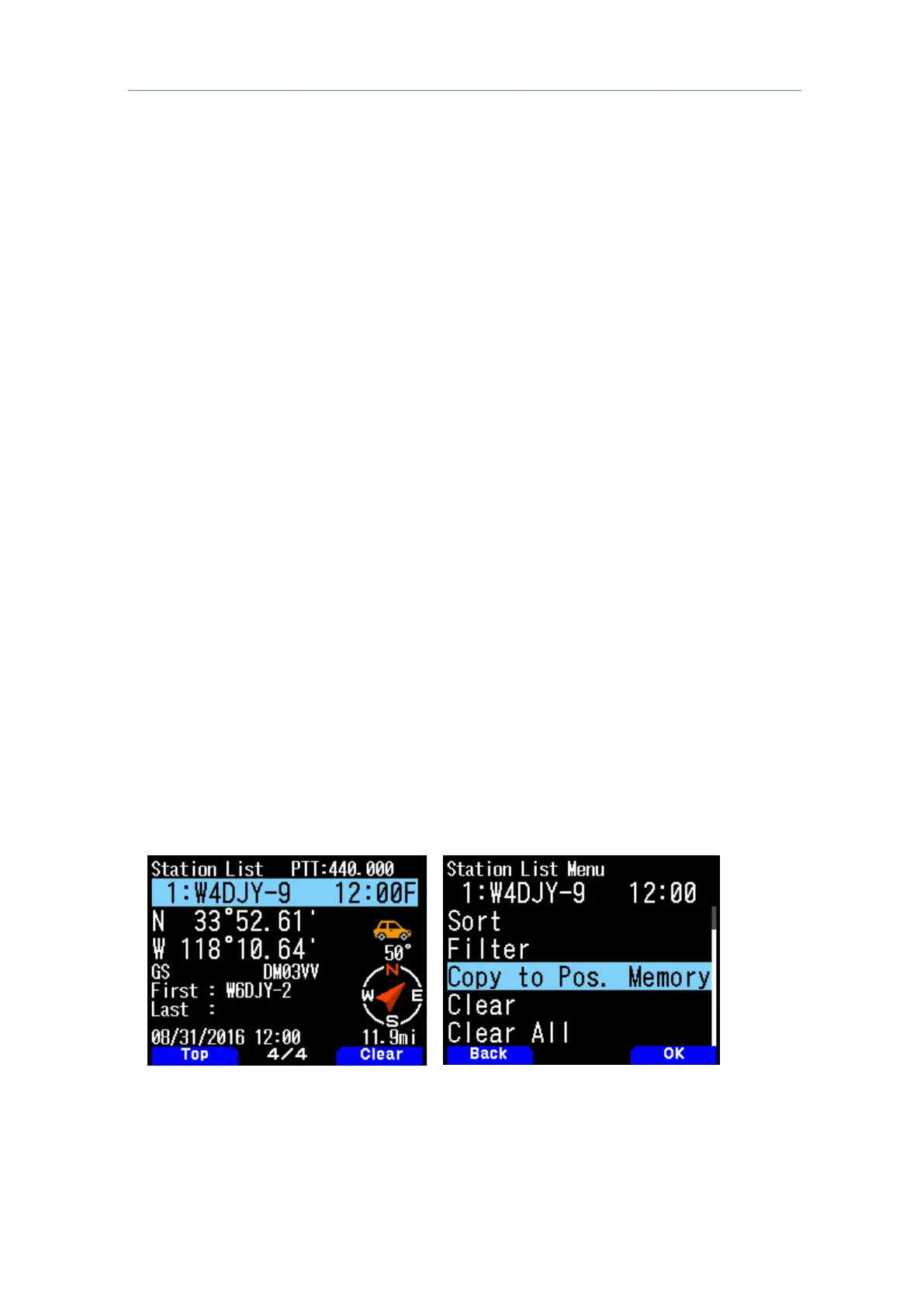
location to the Position Memory. Let us look at the steps to register the APRS station list
information to the Position Memory. The procedure is as follows.
Press [MENU] to display the list menu
(and select Copy to Pos. Memory)



 To Next Page