9
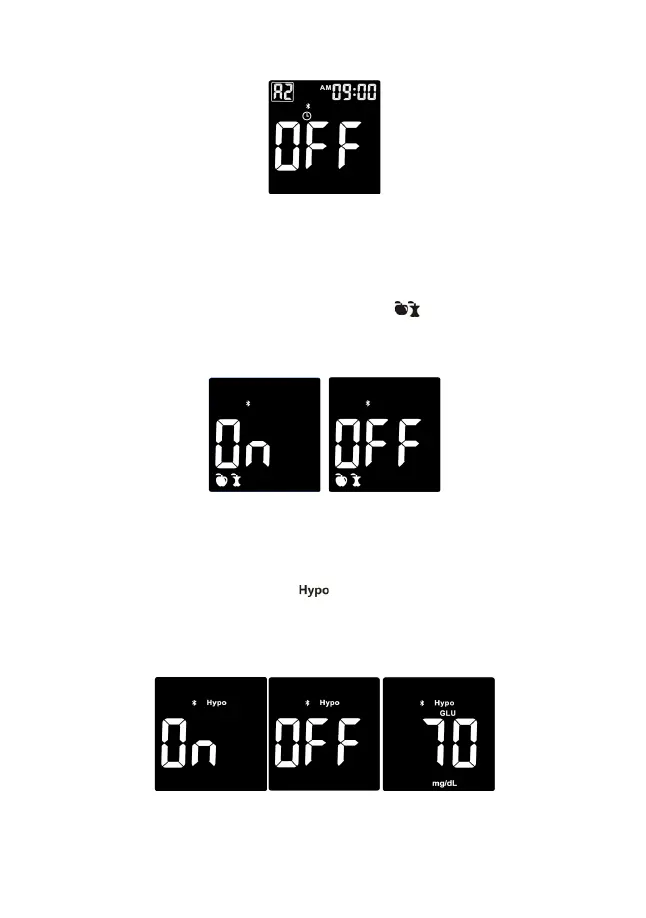
The next alarm “A2” flashes on the display with an “OFF.”
You can now set a second alarm by pressing the side button to turn on the second
alarm. Do the same procedures to set the rest of the alarms.
Note: If the meter is on at the test reminder time, the test alarm will not be activated.
Set the Meal Marker
After setting the test alarm functions, the symbol of will now flash, along with
word “On” on the display. The Meal Marker allows you to tag your glucose test either
“before meal” (whole apple icon) or “after meal” (eaten apple icon). Press the side
button to turn the meal marker function On or Off, press the power button to set.
Set the Hypoglycemia (Hypo) Warning
After setting the meal marker, you can set the hypo alarm, which indicates a
possible hypoglycemic condition (blood glucose level is too low).
Before you set the hypo alarm, the flashes along with “On” on the display.
Press the side button to turn the Hypo alarm function on or off, press the power
button to set. If you select the hypo alarm “On” the display shows 70 mg/dL with the
symbol of “GLU.” Press the side buttons to change your glucose level up or down
and press the power button to set.
Note: Talk to your healthcare professional to help you decide the hypo level that
suits your health condition.


 To Next Page