10
Set the Ketone Warning
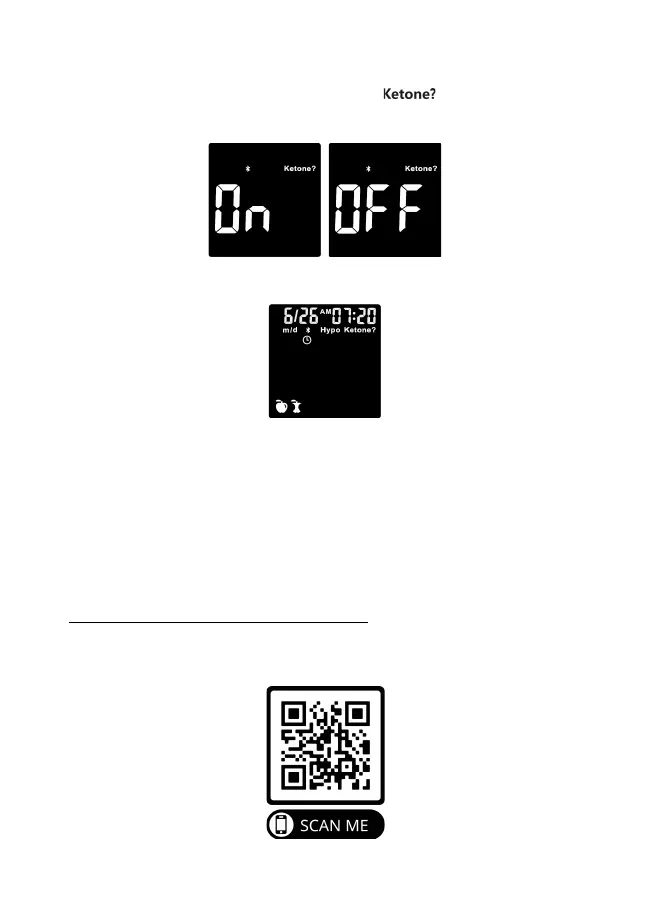
After the hypo warning setting is completed, the symbol will now flash,
along with word “On” on the display. Press the side button to turn the Ketone
Warning on or off, then press the power button to set.
After setting the Ketone Warning, the screen will now show all of the symbols you
have set. Press the power button and the meter will turn off.
Once all the settings are completed, if you want to change the settings, please
press and hold the power button for 2 seconds when the Keto-Mojo
®
GK+
Blood Glucose and β-Ketone Meter is off, and then return to the setting mode.
Pairing Your Meter with a Smartphone
Pairing allows your Keto-Mojo
®
GK+ Blood Glucose and β-Ketone Meter and
Smartphone to communicate with each other.
Instructions for pairing your meter with the Keto-Mojo iOS and Android App can be
found by either scanning the QR code below, or by typing the following weblink into
a new browser tab:
https://keto-mojo.com/bluetooth-app-connection/
Follow the guidelines and instructions to successfully pair the meter with the
Keto-Mojo App. Please note that data and reports in the App are not used for
medical care reference by user or healthcare professionals.


 To Next Page