2
Your Meter Display
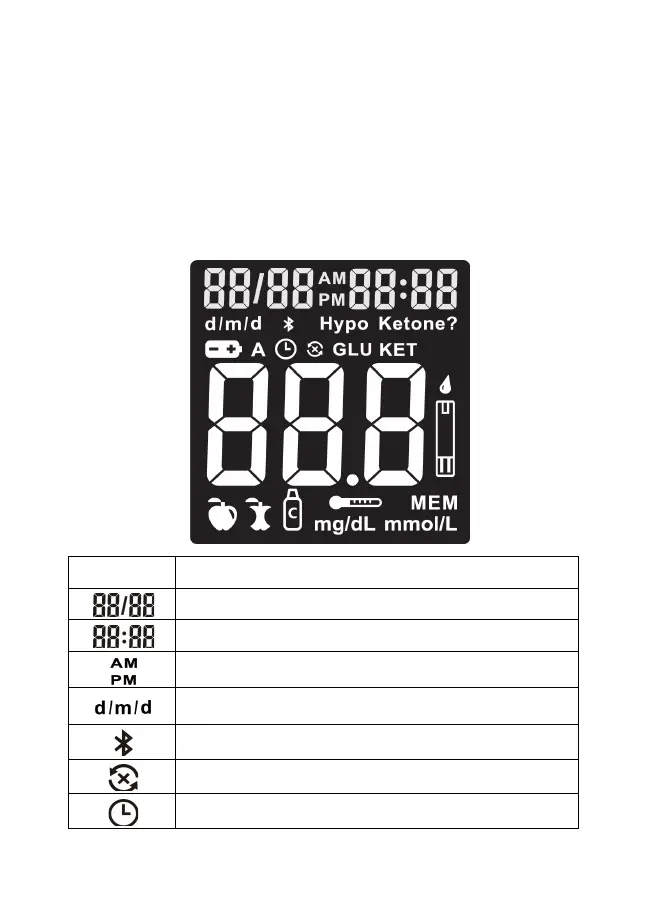
The picture below shows all of the symbols that may appear on your meter display.
Please make sure the display is working properly before testing. When the meter is
off, press and hold the power button to see the complete display. All display
segments will appear. If you need more time to check the display, repeat the
operation.
All of the segments should be clear and look exactly like the picture below. If not,
contact Keto-Mojo at 800-513-1965 (5 days a week, 10am-4pm PST) for further
assistance. Please contact your healthcare professional if you need help outside of
these hours.
The top left area on the screen indicates the date.
The top right area on the screen indicates the year or time.
The top middle area on the screen indicates morning or afternoon
time.
Indicates the display form of date and month (d/m or m/d), or
month and year.
Indicates successful Bluetooth communication.
Indicates failed Bluetooth communication.
Indicates the alarms have been set.


 To Next Page