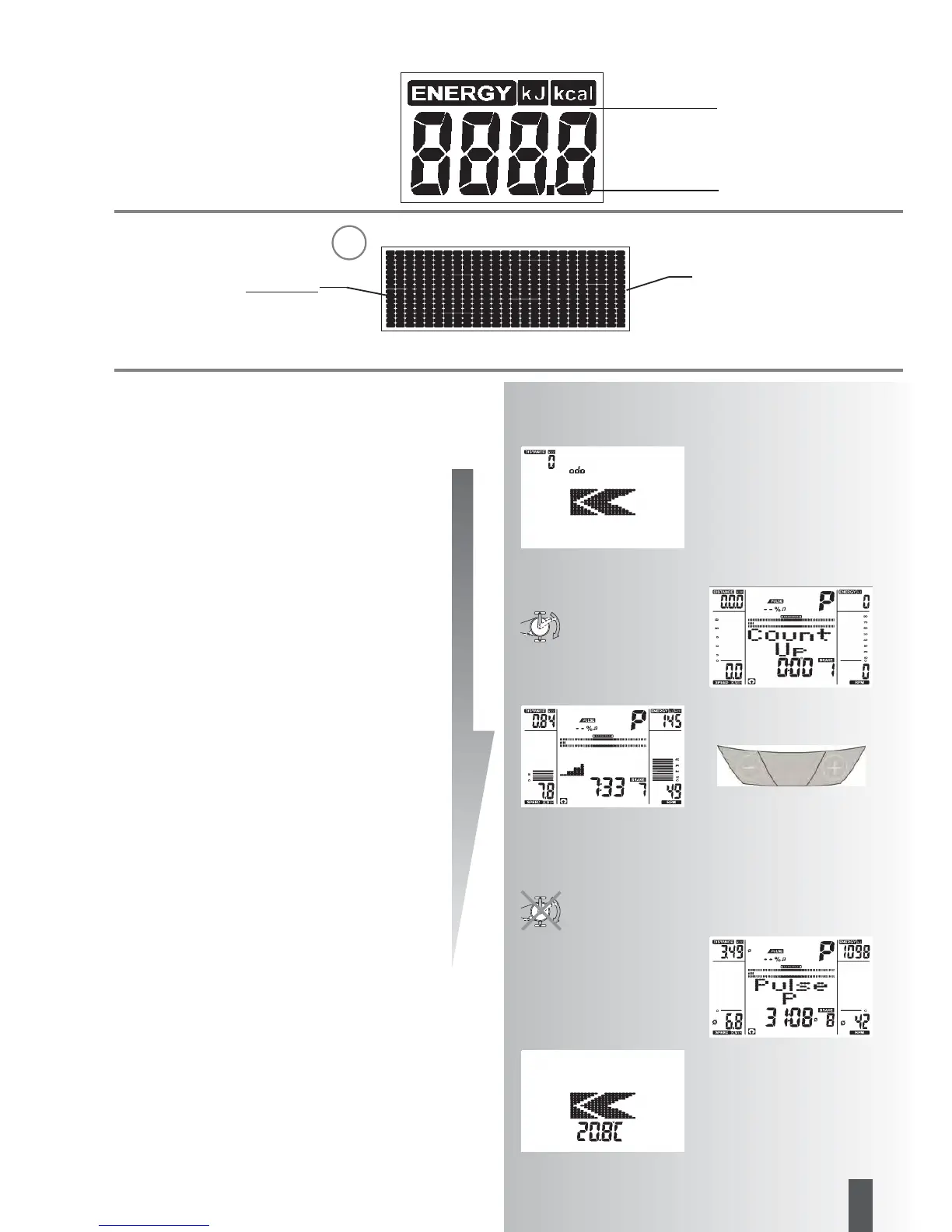
Energy consumption
Display of text and values
Points
25 rows
Strain profile
1 point (height) = 1 Level
1. row = Level 1
G
1 column equates to 1 minute
with a cross trainer: 200 m 0.1
miles
with the exercise bike: 400 m
or 0.2 miles
Dimension adjustable
Value 0 – 9999
23
GB
FB606-608-609
Quick start (Introduction)
Start of training:
without special settings
• Image shown after switch-on
Display of total kilometres “odo”
• After 5 seconds:
Display
“Count Up”; all values indica-
te 0;
Strain shows Level 1
• Start of training
Display
Scale, Pulse (if measurement of pulse is active),
distance, level, energy, time, revolutions, speed and
time
Change of the strain during training:
• “Plus”: display value below “BRAKE” is increased in
steps of 1.
• “Minus” reduces in steps of 1
Continuation of the training with this setting. Changes of
strain in the meantime are possible at any time.
End of training
• Average values (Ø):
Display
Pulse (if measurement of pulse is active), level, revoluti-
ons and speed
• Total values
Distance, energy and time
Standby operation
The display goes to standby operation 4 minutes after the
end of training. Press any button, display re-starts with
“Count Up”.



 To Next Page
 Loading...