10
UsingthePlayer:Playback,SDcardandInitialSystemSet‐Up
PCMinimumSystemsRequirements:
*Note:
When using MS Windows Vista and SMARTER T-Eye Player software for the first time, you may have to run the Player in
Administrator Mode.
ToReviewVideo:
RemovePowerfromtheunit.RemovetheSDcardfromtheunitandInserttheSDcardintoaPCorSDcardreaderandconnectittoa
computer.ExploretheSDcard.Locatethe‘Player.exe”filethatisfoundinthe‘PLAYER’folder.Doubleclickon‘Player.exe’.The
followingwindowwilla
ppear:
VolumeandPlaybackSpeedControl
VolumeControl:Adjuststhevolumelevelwhileplayingbacktherecordeddata.
Playbackspeedcontrol:Adjuststhevideoplaybackspeed.
Toplaybackvideo,selectthe“OpenaFile”button,exploretheSDcardorotherlocationwheretherecorded(orsaved)dataislocated,
(filecalledDATAisontheSDcard),th
endoubleclicktheselectedfilefromthelistinordertoplay.
Volume Control Playback Speed Control
Component Requirement
CPU Pentium4/1GHzprocessororhigher
Memory 512MBofRAMorhigher
Operatingsystem MicrosoftWindowsXPHomeEditionorhigher
Graphics DirectX8.1borhigher
Harddiskdrivespace 200MBorhigher
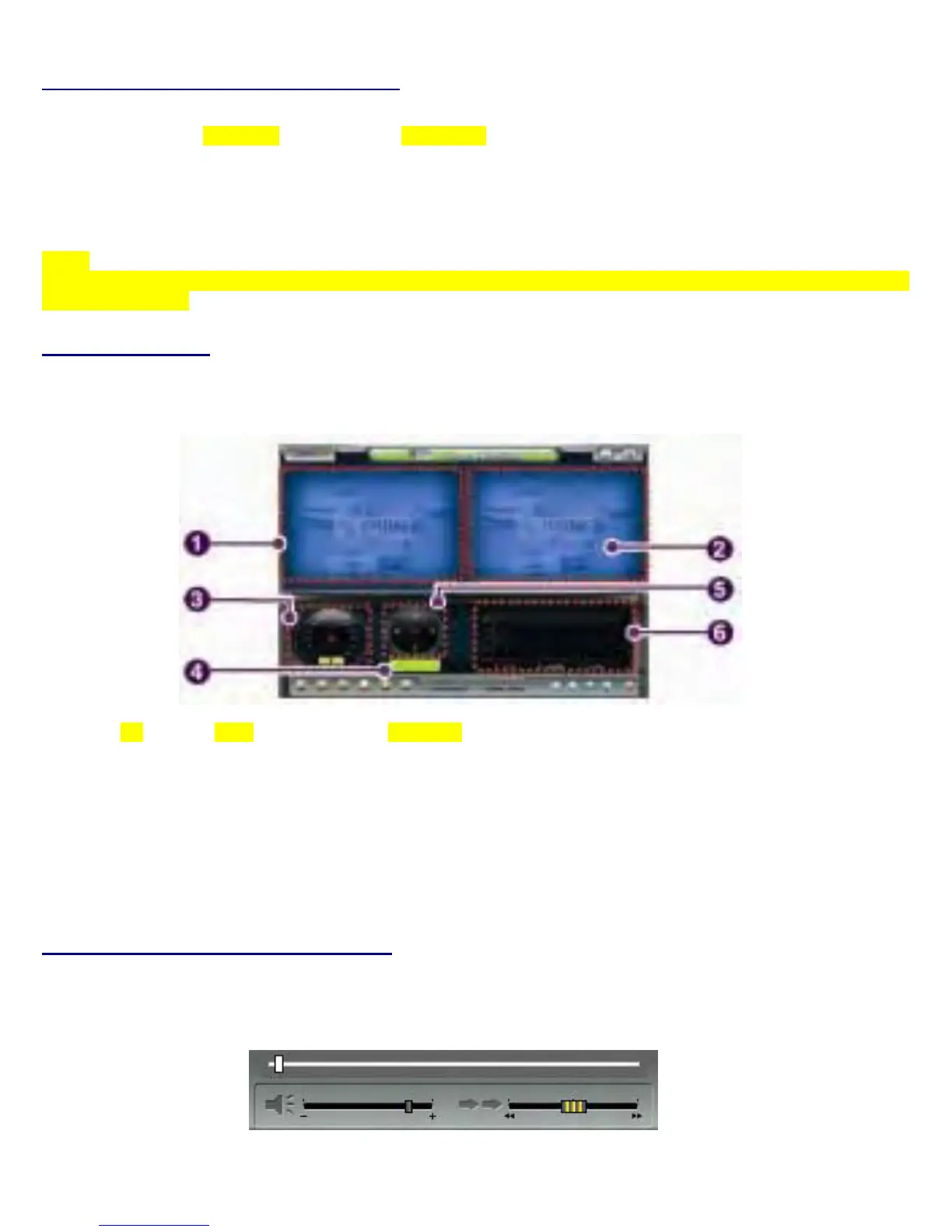
No. Name Description
1 ForwardCameraView Displaysthevideoimagesrecordedbytheforwardfacingcamera.
2 RearFacingCamera Displaysthevideoimagesrecordedbytheinteriorfacingcamera.
3 VehicleSpeed Displaysthespeedofyourvehicle.
4 VehicleLocation Displaysthecoordinates(latitudeandlongitude)ofthevehicle.
(RequiresGPSsignallock)
5 DirectionofTravel Displaysth
evehicle’sdirectionoftravel.
6 GForceAnalyzer DisplaysvehiclemotionandanyimpactdetectedbytheG‐Sensor
withagraphicallyin3‐axis.


 To Next Page