11
Systemconfiguration
Beforeusingthesystem,removetheSDcardfromtherecorderandinserttheSDcardintotheSDslotofaPCorintheSDcardreader
ofacomputer.MSWindowswillautomaticallyseethedevice.LocatetheFoldercalled“Player”.DoubleClickon“Player.exe”.When
theplayer’smainscree
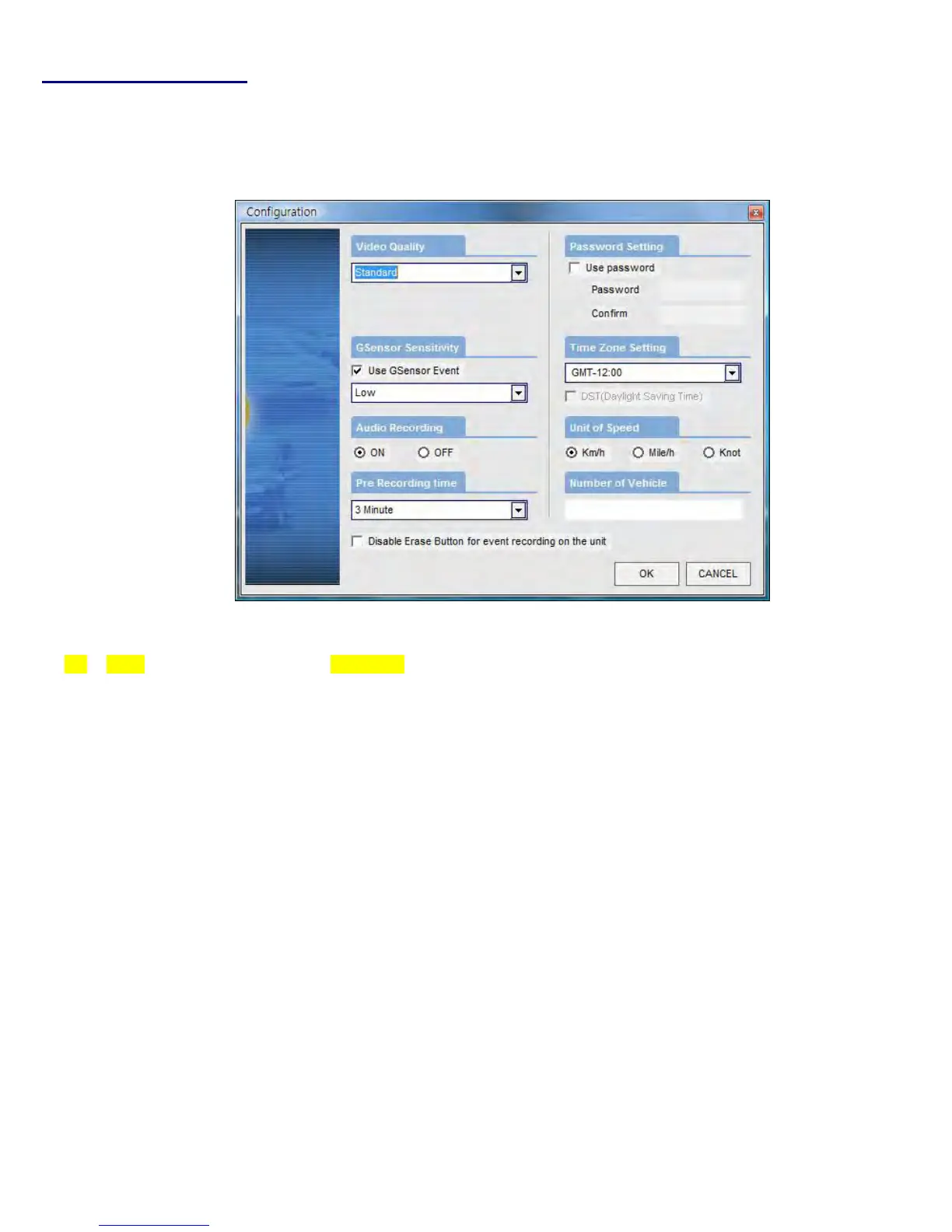
nappears,clickontheSystemSetupconfigurationicon()locatedatthelowerrightcorner.Thefollowing
windowwillthenappear.
No. Name Description
1 VideoQuality Setsthevideorecordingquality.(Default:Standard)
2 G‐SensorSensitivity SetsthesensitivityofG‐Sensor.(Default:Low)Byun‐checkingtheboxtheG‐sensors
willNOTwork.Thiswouldbenecessaryonanapplicationlikeamotorboat
3 AudioRecording EnablesorDis
ablestheaudiorecordfunction.
4 Pre‐EventRecordingTime Setsthetimetorecordthepreviousscenesbeforetheevent.
(Ex.incaseof3minutes,T‐eyerecordsscenesforprevious3minutesandnext1
minuteforamanualrecordevent.)
5 PasswordSetting SetsanyPassw
ordtobeusedtoaccesstherecordeddata.(Default:none)
6 TimeZoneSetting Setsthetimezonefortheuser.(Ex.EST=GMT+5:00)
7 UnitforSpeed Settheunitofthevehiclespeed(MPHorKPH).
8 VehicleIDNumber Setsthelicenseplatenumberorfleetvehi
cleIDnumberassociatedwiththevehicle
wheretheSDcardistobeinstalledin.


 To Next Page