8
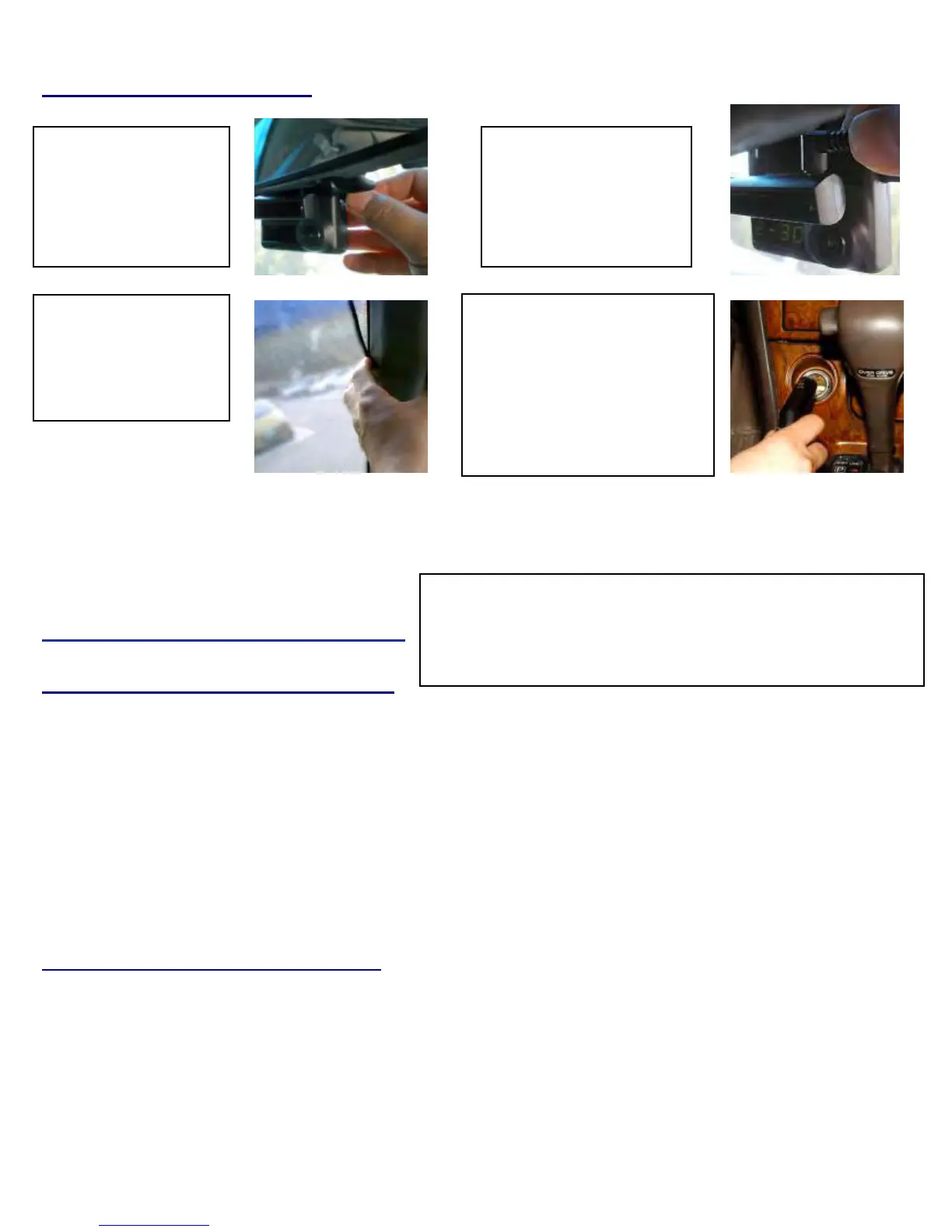
Connecting the power cord
Therecorderwillonlyrecordwhenthereispowertothecigarettelighter.
Note:To“hardwire”thedevicetovehiclepower,youwillneedouroptionalAWP‐2200moduleorJACK‐EXT
accessory.Gotoendofthismanualtoreviewtheirinstallation requirementsandcapabilities.
TipsbeforeUsingtheProduct
UnitPreparationforvideorecording
1.TaketheSDcardoutofyour
S
S
M
M
A
A
R
R
T
T
E
E
R
R
driverecorder.AccessthePlayer.exemenuandenterthesetupmode,settingtimezone,daylight
savingstimeandothersettings(asnotedintheprogrammingsectionofthemanual).Re‐inserttheSDcardintherecorder.Followingtheinstallation
instructions‐‐‐whenyouconnecttheunittopower,orturntheengi
neon,“dRInit”appearsontheLEDdisplayontheunit,indicatingthatthevideo
recorderisinitializing.TheLEDdisplaywindowwillshowaseriesofnumbers,thisindicatesthatGPSsatellitesarebeginningacquired.
2.Inabout25secondsafterpoweron,longerifonehasnotsetthelocaltimezoneontheSDcard,theunitcompletesinitializinganda“dingdong”
chimeisheardalongwiththewords
“Hello”.Theunitmaystillshowaseriesofnumbersfollowedbyand“GPSFINE”willappears.Thisadjuststheunit
furtherforincreasedaccuracy.
3.Afterthechime,theDriveRecorderstartscontinuous recordingwithoutGPSdata.Theunitisrecordingvideoandaudioaswellasvehiclespeed,
directionandlocation,when:a)whenthevehicleisstopped,theunitshowslocaltime;b)whenthevehicleisinmotion,itdisplaysthevehicle’sspeed.
Continuousrecordingwhiledriving
1.Your
S
S
M
M
A
A
R
R
T
T
E
E
R
R
driverecorderinformsyouofyourvehicle’sspeed,whenstopped,theunitdisplaysthetimeontheLCDfacingthedriver.
2.WhenthecapacityoftheSDcardhasbeenreached,theoldestfilesareoverwrittenforcontinuousrecording.Thedatarecordedbyeithertheunit’s
internalG‐Sensororexternalmanualrecordbuttonarenotoverwritten.(ThisalarmdatamustbeerasedbytheUserwiththeSDcardinsertedinthe
computer,erasi
ngeventdataintheDATAfolder.)
3.Whenyoustoptheengineorremovethepowercablefromthecigarettelighterplug,
S
S
M
M
A
A
R
R
T
T
E
E
R
R
stopsrecording.
1.Connectthe“Y”power
cabletothepower
connectionportonthe
rightsideoftheunit
2.Connecttheothersideof
“Y”powercabletothe
powerconnectionportofthe
attachedIRlightmoduleof
theunit
4.Insertthepowercordintothe
CigaretteLighterPlug.
Note:Cigarettelighterplugcan
onlybehardwiredto12‐24vehicle
powerwhenusingtheJACK‐EXT
option.UsingtheAWP‐22OO
optionalsoallowsdirecthardwiring
tovehiclepower
3.Arrangethepowercord
neatlyafterinsertingitin
thechinkofthedoornear
thedriverorpassenger
seat.
NOTE: Do NOT try to circumvent the “cigarette ligher plug” unless
you use the optional AWP-2200. This has a circuit that protects the
camera and provides power to the IR illuminator. If the “cigarette
lighter plug” is circumvented and wired direct to vehicle power---it will
“fr
” the camera and this is NOT covered under warrant


 To Next Page