6
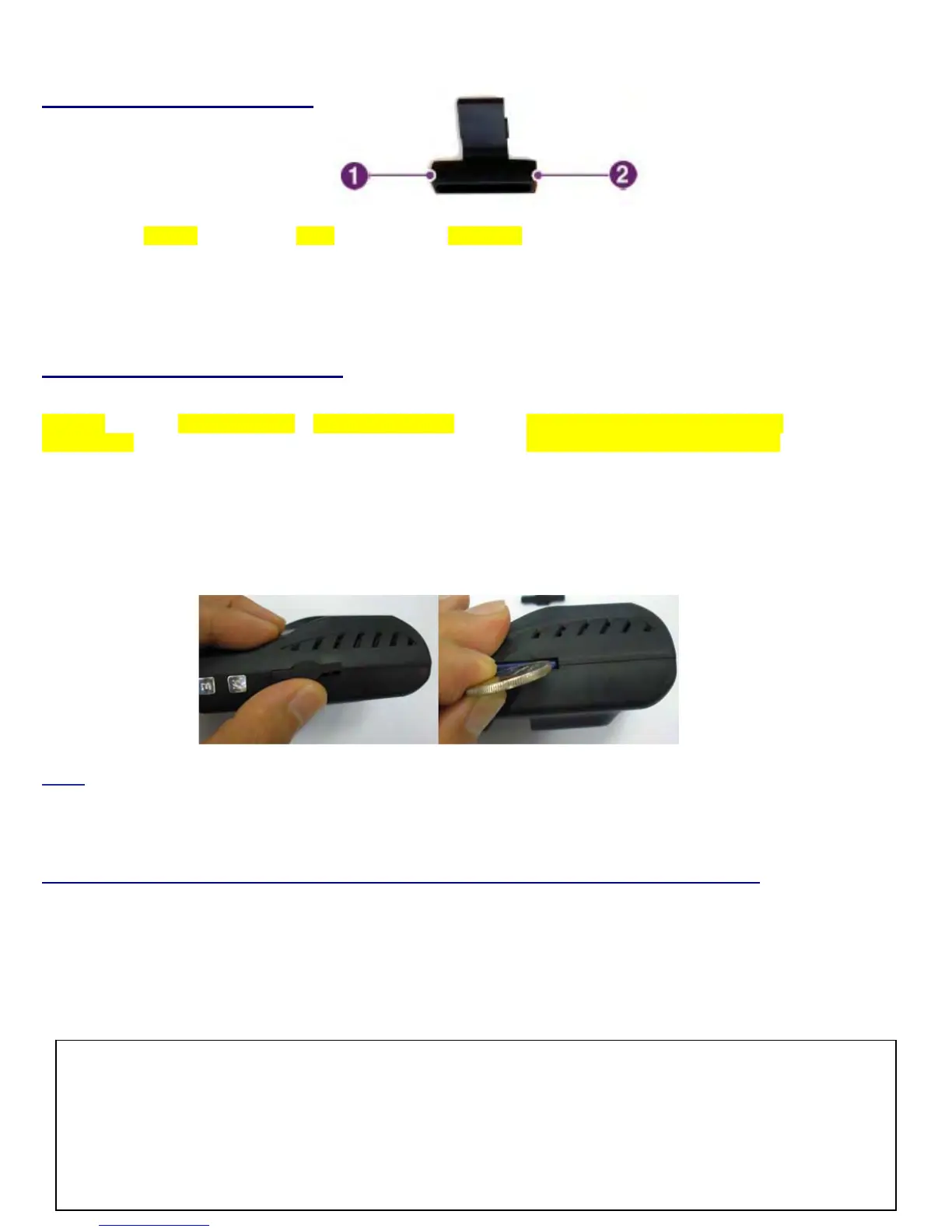
IR (Infra-red) light module
SDMemoryCardspecifications
*Denotesanaveragetime.
(Motionaffectsrecordingduration.Timesreflectedseerecordingsmadeduringthedaytimeintypicalcitydowntownareas.)
SizeofSD
MemoryCard
MaxStorageTime EventRecordingTime NumberofEventGeneratedRecordings
accordingtothePresetRecordingTime
1Min2Mins3Mins
2GB(included) 90 64 25 80 70
4GB 180 120 50 40 30
8GB 370 280 90 80 70
16GB 750 320 120 100 80
* Time varies depending on the amount of motion seen by the camera & lighting conditions.
Note: Use a thin object to remove SD card. Some customers drill small hole in the surface of the enclosure
next to slot and insert a wire tie. When removing the SD card, you must then cut the wire tie making
removal by the operator harder.
SDcard–OpeningSoftwareonyourPCandloadingvideofrom“Data”file
UseonlytheprovidedSDcardwiththeunittoensureproperoperation.ConsultyourResellerortheCompanywebsiteforSDcardcompatibility.Incase
wherethecomputerusedtoplaybackthevideodoesnotsupporttheSDcardandtheSDSDHC2.0memorycardstandard,useaseparateSDHC2.0USB
reader.(SDtoUSBadapter).Pe
riodicallyformattheSDcardsoastopreventSDcarderrorsoveralongperiodoftime.
To playback video, use the
S
S
M
M
A
A
R
R
T
T
E
E
R
R
exclusive viewer that is located on the SD card. With the SD card inserted in your computer, explore the SD card,
locate the “player .exe” file which is located on the SD card. Then open the “DATA” folder and double click the video file you wish to playback.
Number Name Description
1 CDS Usedtoilluminateinteriorwhilenighttimerecording.
2 PowerConnection UsedtoconnectthepowercordtotheIRlightmodule.
AfterformattingtheSDcardsetthetimezonein
S
S
M
M
A
A
R
R
T
T
E
E
R
R configuration.
Ifyoudonotconfigurethesettings,systeminitializationmaytakeupto10minutesandwherethetimeandtimezonemaynotmatch.
Whenre‐formattingtheSDcard,theexi
stingrecordedvideofilesarealldeleted,sobesuretoperformabackupforanyimportantfiles.
DoNotusethisSDcardforanyotherpurpose.
IfyouusethisSDcardforanyotherpurposeorcopyunrelatedfilescancauseafatalerror.
CAUTION!


 To Next Page