EasyManua.ls Logo

Kilotech Integrator C30 - Internal Code Setup; Communication Settings

Kilotech Integrator C30
26 pages
Print Icon
To Next Page IconTo Next Page
To Previous Page IconTo Previous Page
Loading...
16
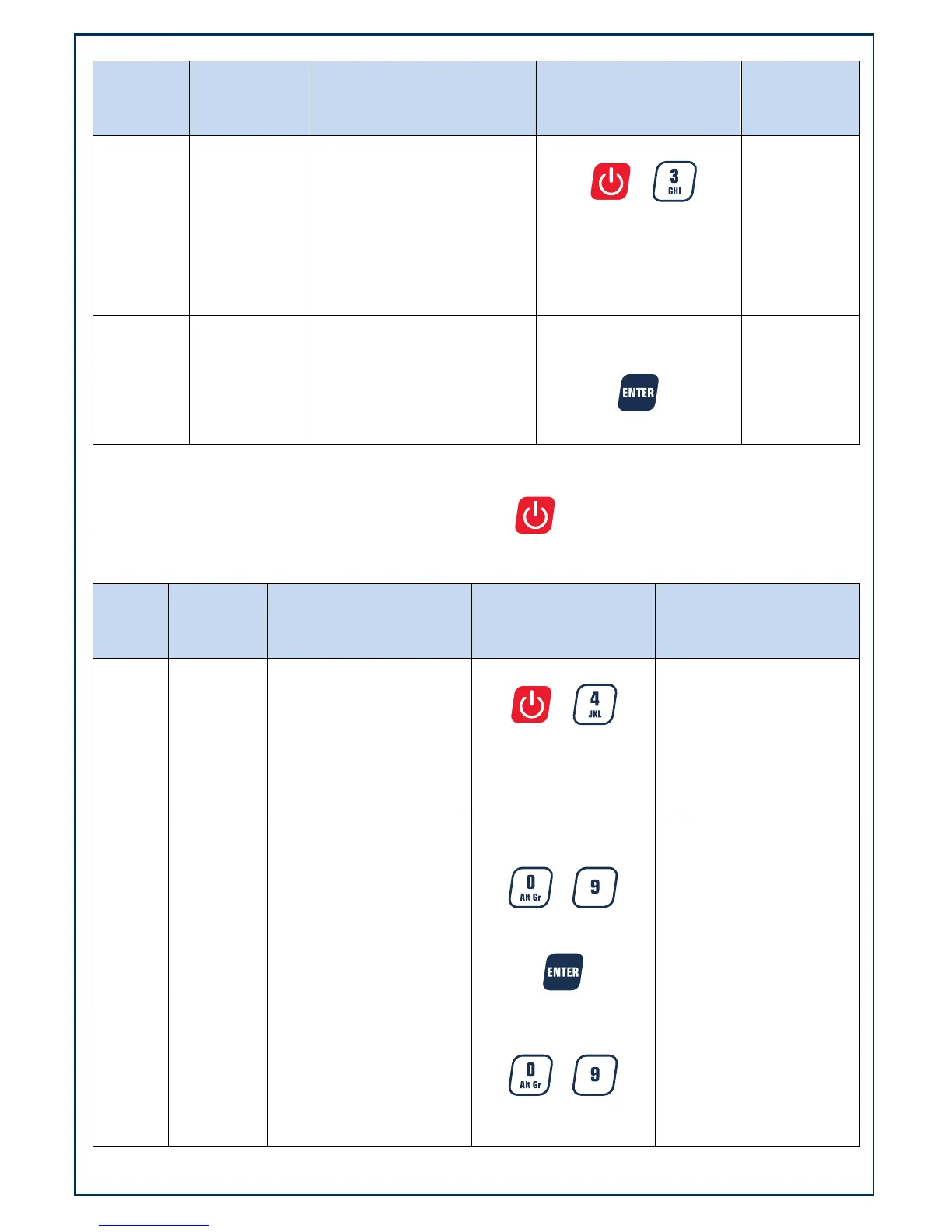
Internal code
Weight
Display
Unit Price
Display
Total Price Display
Keys used
Comment
0.00 0.00 0.00
Press both
+
simultaneously and hold
down for more than three
seconds
UoL.x.x CodE xxxxxx
To continue press
UoL.x.x =
working
voltage
Code = A/D
internal count
Communication settings
To cancel and return to normal mode at any time, press the key
The settings in bold are default
Weight
Display
Unit Price
Display
Total Price Display
Keys used
Comment
0.00 0.00 0.00
Press both
+
simultaneously and
hold down for more
than three seconds
Setup 232.out XXXXXX
Chose format using
numerical keys
~
To confirm press
Communication format
options.
0 = HOST:
1 = PRTd40
2 = PRTd60
3 = PRTNd4
4 = PRTNd6
(see appendix for details)
Setup 232.bps
XXXXXX
Choose baud rate using
numerical keys
~
To confirm press
baud rate options
1 = 1200bps
2 = 2400bps
3 = 4800bps
4 = 9600bps
5 = 19200bps

Related product manuals