Need help?
Do you have a question about the Kinco AX500 and is the answer not in the manual?
Details essential safety measures before and during product operation.
Explains the structure and meaning of the product's model name.
Explains the function and status of the PWR, RUN, ERR, and BUS indicator lights.
Details the three available network ports: EtherNET, EtherCAT A, and EtherCAT B.
Details the 24V and 5V power indicators for IO couplers and modules.
Explains the LINK and ERR indicators for module communication and errors.
Illustrates the NPN wiring method for digital input expansion modules.
Illustrates the PNP wiring method for digital input expansion modules.
Provides a detailed explanation of the status indicators (PWR, RUN, ERR, BUS).
Outlines hardware and software setup requirements for the programming environment.
Displays the physical dimensions of the AX500 controller in millimeters.
Provides instructions and considerations for the snap-fit installation of the AX500 controller.
Explains the process of installing the AX500 device package into the CODESYS software.
Form for recording customer, product, and repair information for warranty claims.
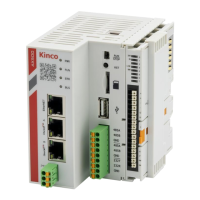
The AX500 Intelligent Controller is a sophisticated, medium-sized Programmable Logic Controller (PLC) designed by Kinco, built upon the CODESYS platform. It fully adheres to the IEC611131-3 programming standard and supports multiple real-time bus systems, making it a versatile solution for various industrial automation needs. This controller is particularly adept at synchronous movement control, including cam and CNC applications, and offers a wide array of interfaces to accommodate diverse project requirements.
The AX500 Intelligent Controller serves as the central processing unit for automation systems, executing user-defined programs to manage and coordinate industrial processes. Its core functionality revolves around real-time control, enabling precise and synchronized operation of connected devices. The controller's robust design supports complex programming logic, allowing for intricate automation sequences and responsive system behavior.
Key functions include:
The AX500 Intelligent Controller is designed for ease of use and robust performance in industrial environments.
Proper maintenance is crucial for the longevity and reliable operation of the AX500 Intelligent Controller.
The AX500 Intelligent Controller provides a comprehensive solution for industrial automation, combining powerful control capabilities with user-friendly features and robust design for reliable operation and straightforward maintenance.
 General
| Model | AX500 |
|---|---|
| Input Voltage | 24 VDC |
| Series | AX |
| Control axes | Up to 8 axes |
| Communication Ports | Ethernet, CAN, USB, Serial (RS232/RS485) |
| Communication | Modbus RTU, Modbus TCP |
| Programming Language | Ladder Diagram (LD), Structured Text (ST), Function Block Diagram (FBD) |
| Display | Optional HMI |

 To Next Page