Chapter 1 Before Use 1-8
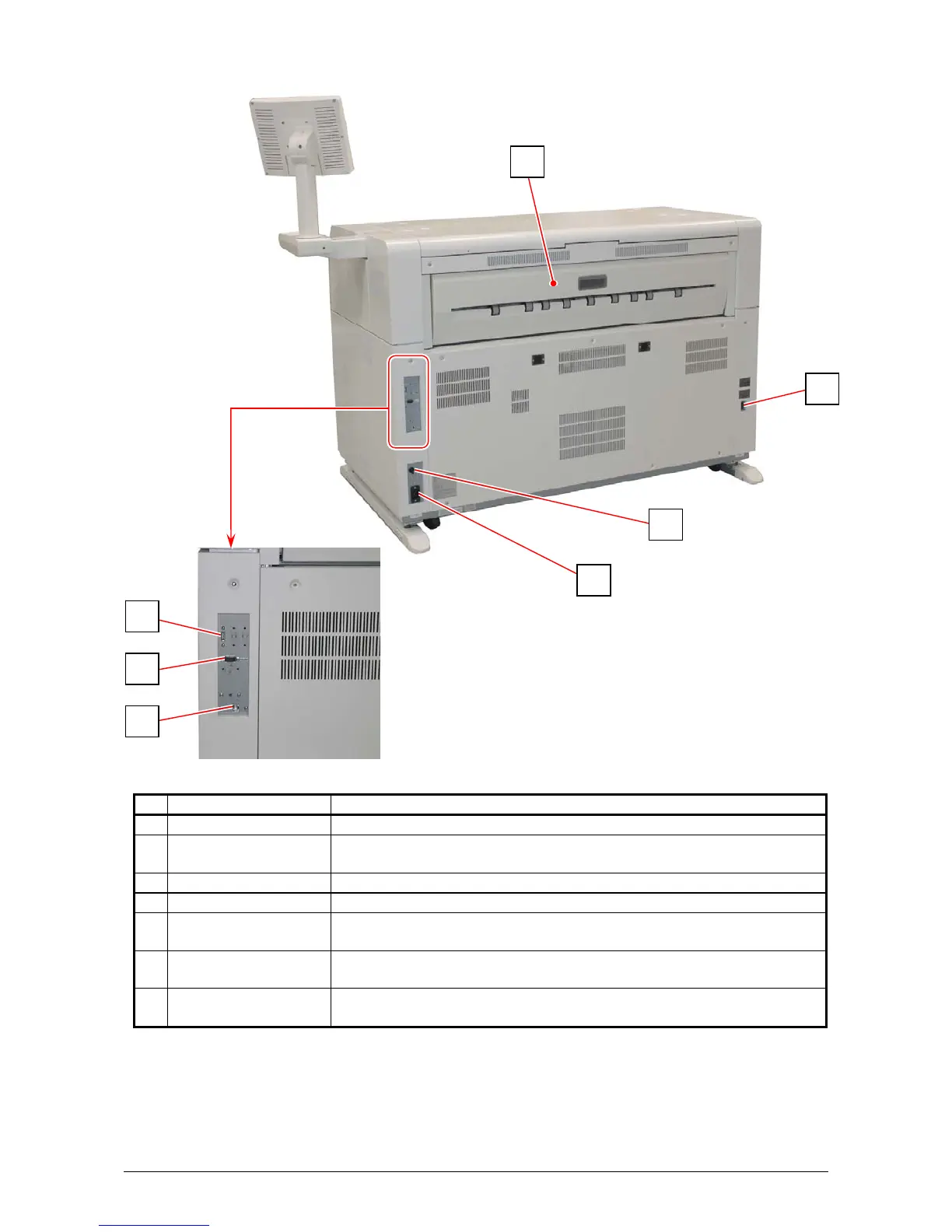
1. 5. 2 Rear
Name of part Function
1 Exit Cover Open the Exit Cover when you remove the mis-fed media.
2 Dehumidify Heater
Switch
Press “H” to turn on the Dehumidify Heater, and press “L” to turn it
off.
3 Inlet Socket Connect the power cord here.
4 Breaker It is possible to shut off supplying the AC power.
5 USB connector
(USB2.0)
Connect the cable to this terminal for a KIP Scanner (option).
(max.5Vdc)
6 COM Port Connect the cable from a finishing device (option).
(D-Sub Connector 9 pins: max.12Vdc (Small))
7 LAN Port Connect the LAN Cable to connect the KIP 7970 to the network.
(Do not connect a telephone line.)
5
6
7
1
2
4
3



 To Next Page