LabAmp network configuration guide
002-808e-07.20
Page 14
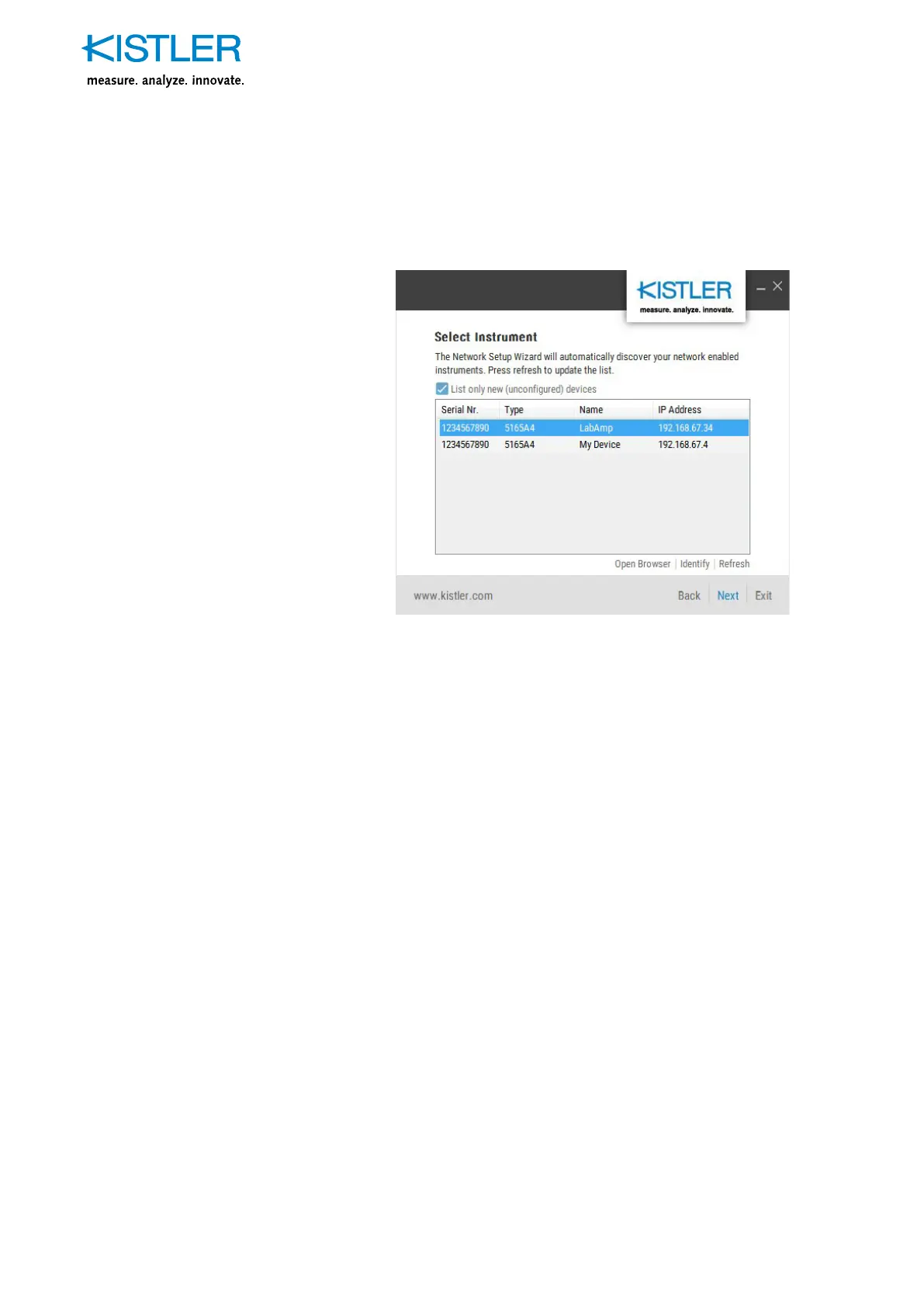
c) The table displays all, previously not configured Kistler
network devices.
Fig. 7: Network Setup Wizard, list with found devices
To see all devices, including the already configured ones,
deselect the «List only new (unconfigured) devices» checkbox.
It might take up to 2 minutes to have your device appear in
the list after connecting to the network.
3. Access to the device via web browser
Bottom right of the list field you see different options:
«Open browser»
Opens the web interface of the respective device in your
standard web browser. The Kistler LabAmp 5167A can
now be configured and operated via the web interface.
«Identify»
Permits an identification of the selected device. The identified
measuring amplifier signals this through the yellow flashing
of all LEDs for approx. 4 s. This function is very useful if
several measuring amplifiers are used in the same network.
«Refresh»
Repeats the search and refreshes the list of devices found
in the network.


 To Next Page