12
OPERATING THE TOASTER OPERATING THE TOASTER
Using the special toasting functions
1
2
3
4
5
6
7
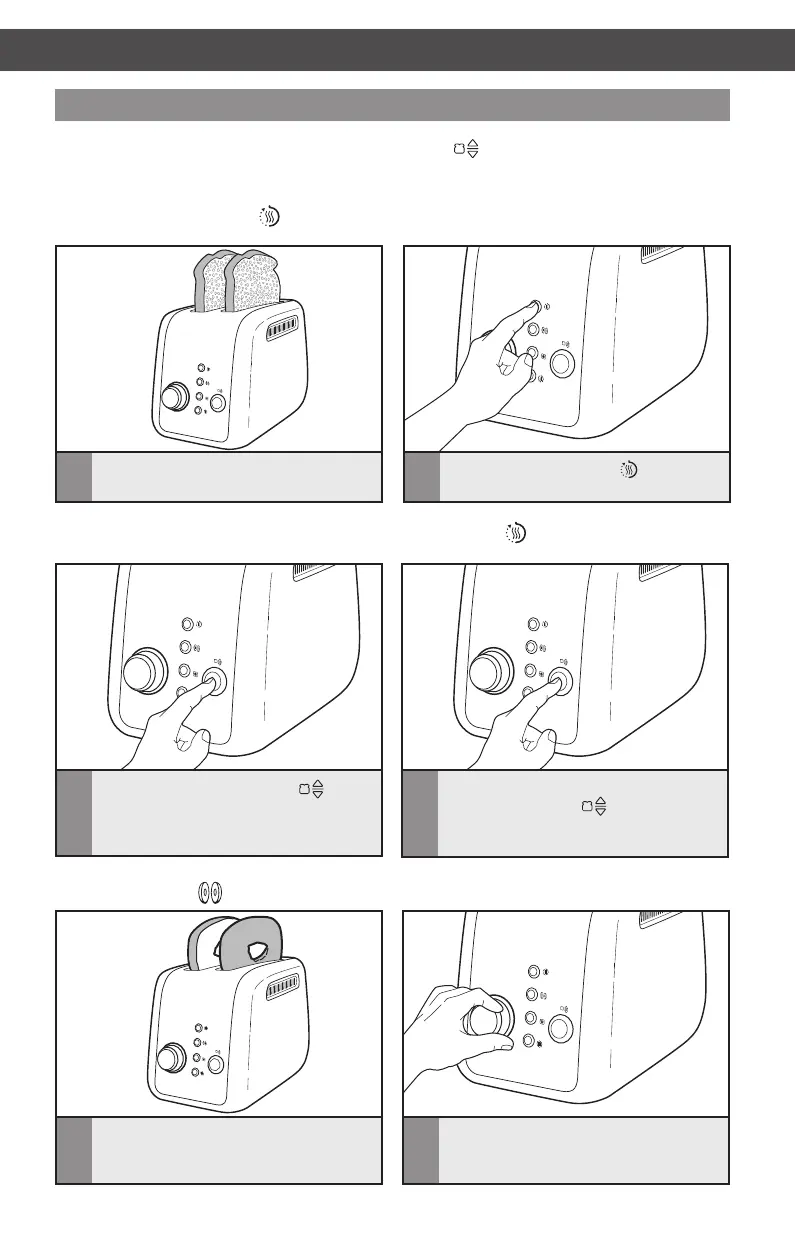
1
Make sure the just toasted food is still in
the slot, or place it back in the Toaster.
Either before, or just after pressing TOAST/CANCEL ( ) button to begin toasting, you can
select the special toasting functions by pressing the appropriate button. After a toasting
cycle is complete, all functions will be cleared.
Keep Warm function ( )
1
2
3
4
5
6
7
2
Press the KEEP WARM ( ) button.
1
2
3
4
5
6
7
3
Press the TOAST/CANCEL ( )
button to begin the warming cycle.
NOTE: No Shade adjustment is necessary – the Keep Warm ( ) function overrides
whatever Shade level you have set.
1
2
3
4
5
6
7
4
To cancel warming at any time, press
TOAST/CANCEL
( ) button again.
The Toaster will shut off after 3 minutes
and raise the toast.
1
2
3
4
5
6
7
1
Insert the halves of bagel (or of other
round breads) with the flat side facing
in, as shown.
Bagel function ( )
1
2
3
4
5
6
7
2
Set the Shade Control to the desired
level.
W10625929B_ENv1.indd 12 11/20/13 11:27 AM


 To Next Page
 Loading...