2-4
3-Wire Cable from Home Power Supply
- U.S. Only
IMPORTANT: Use the 3-wire cable from power
supply where local codes permit a 3-wire con-
n
ection.
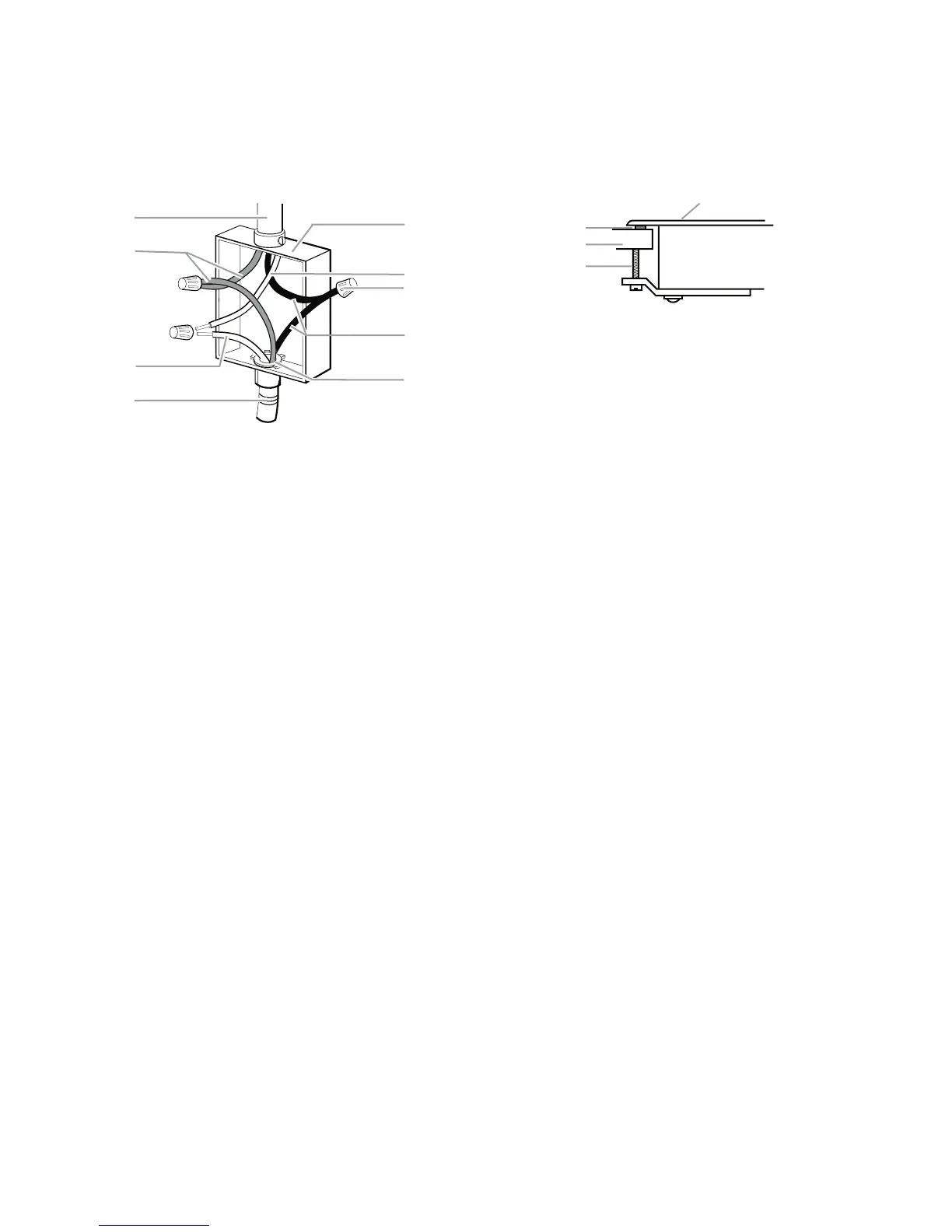
1. Connect the two red wires (B) together
using a UL listed wire connector.
2. Connect the green (or bare) cooktop cable
wire (C) to the white (neutral) wire (F) in
the junction box using a UL listed wire
connector.
3. Connect the two black wires (H) together
using a UL listed wire connector.
4. Install junction box cover.
A. Cable from home power supply
B. Red wires
C
. Gre
en (or bare) ground wire
from cooktop
D
. 3-wire cable (from cooktop)
E. Junction box
F
. White wire (from home
power
supply)
G. UL listed wire connector
H. Black wires
I. U
L listed or CSA approved
conduit connector w
ith wire
bushing
G
A
B
C
D
E
F
H
I
ATTACH COOKTOP TO
COUNTERTOP
NOTE: This section applies only if you are using
clamping brackets.
1. Place the 2-1/2˝ (6.4 cm) clamping screws
i
nto the brackets.
2. Check that the cooktop is level.
3. Use a flat-blade screwdriver to tighten the
screws against the countertop. Do not
overtighten.
A. Clamping screw
B. Countertop
C. Foam seal
D. Cooktop
A
B
D
C



 To Next Page