4-7
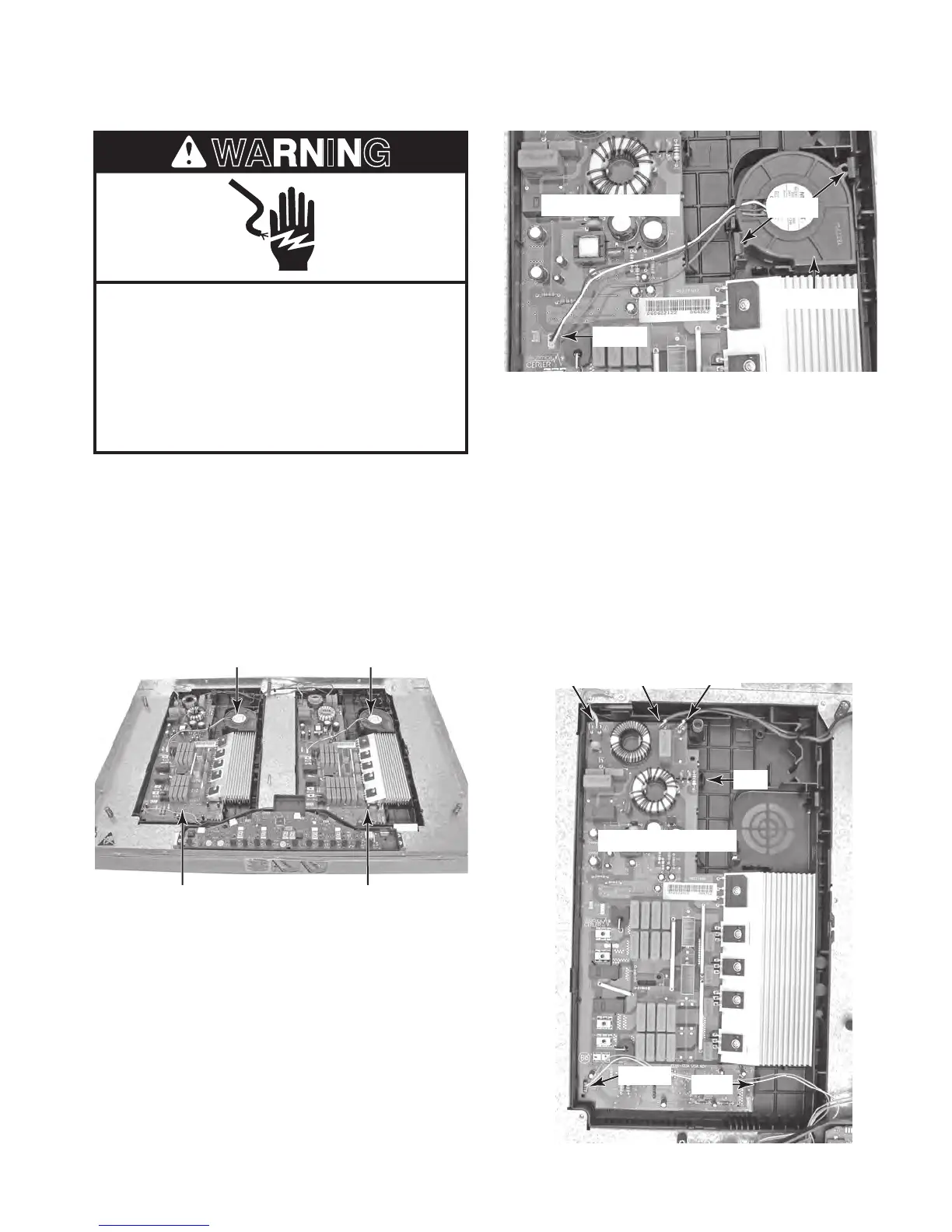
REMOVING A COOLING FAN AND AN ELECTRONIC BOARD
1. Unplug cooktop or disconnect power.
2. Remove the cooktop glass from the cooktop
(see page 4-2 for the procedure).
3. Remove the left or right induction element
assembly, depending on which cooling fan
or electronic board you are removing (see
page 4-4 for the procedure).
Electrical Shock Hazard
Disconnect power before servicing.
Replace all parts and panels before
operating.
Failure to do so can result in death or
electrical shock.
Left Electronic Board Right Electronic Board
Left Cooling Fan Right Cooling Fan
4. To remove a cooling fan (see the top
right photo):
a) Disconnect the 2-wire fan connector
from electronic board pins CNT5.
b) Press and unlock the two tabs from
the cooling fan and lift the fan from the
electronic board.
5. To remove an electronic board:
a) Remove the cooling fan (see step 4).
b) Disconnect the following wires from the
electronic board terminals:
Black at N.
Red at L.
Green at FST3
4-wire connector at CNT4.
c) Press and unlock the two tabs from
the right side of the board and lift the
electronic board from its holder.
CNT5
Cooling Fan
Tabs
BK (N)
CNT4
RD (L)GN (FST3)
Tab
Tab
Electronic Board
Electronic Board



 To Next Page