4-6
REMOVING THE ELECTRONIC OVEN CONTROL BOARD
AND THE TOUCH / CONTROL PANEL ASSEMBLY
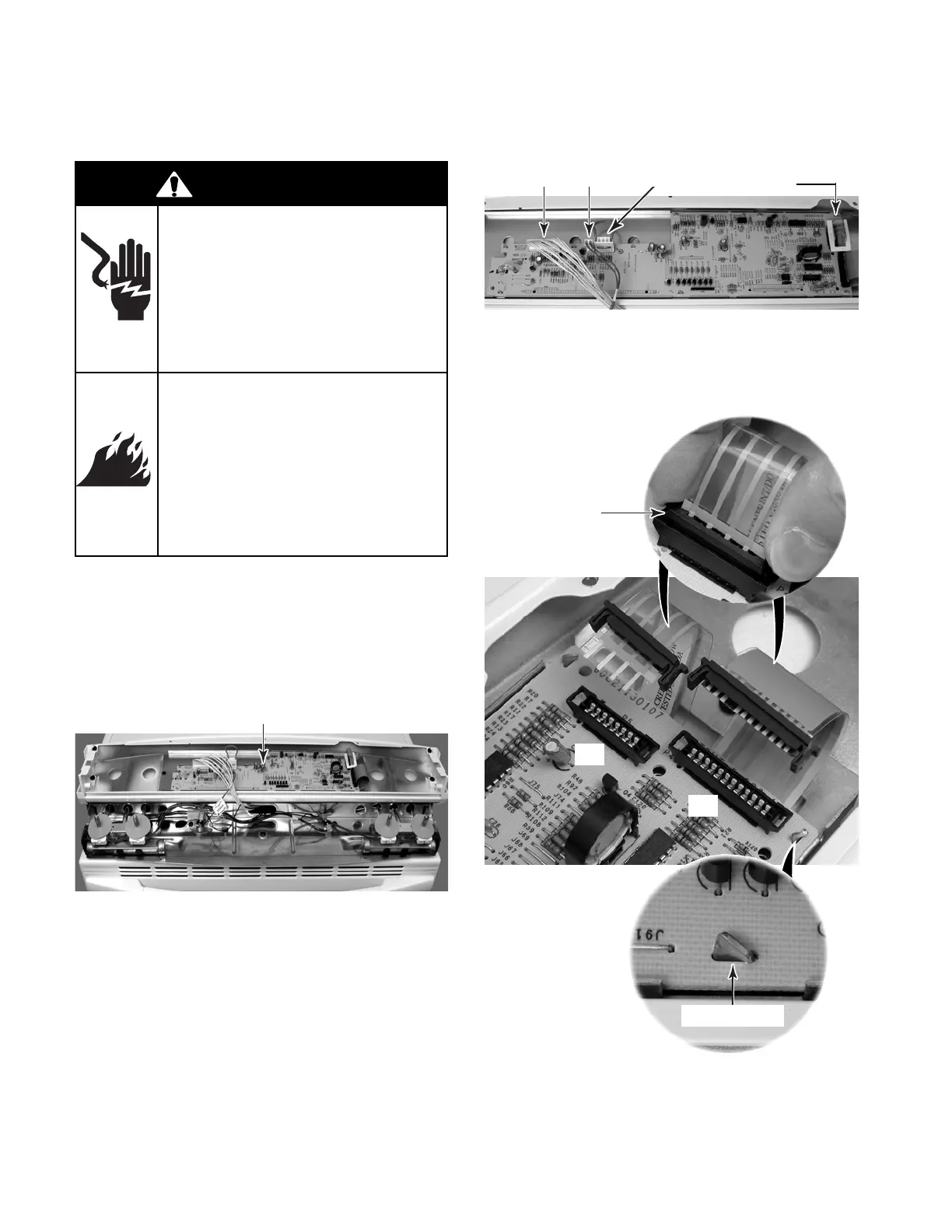
3. To remove the electronic oven control
board (see the photo at the top of the
next column):
a) Disconnect the wire connectors at P1,
P11, and P3.
b) Remove the paper support from the
ribbon cable at connector P5.
Electronic Oven Control
c) Squeeze the end tabs on the ribbon
cable locking ring and pull the locking
rings and ribbon cables out of their
connectors at P4 and P5.
1. Turn off gas supply and disconnect power
to the range.
2. Remove the control panel from its
subchassis, (see page 4-2 for the proce-
dure), and rotate it forward onto the cooktop
glass.
d) Straighten the nine bracket tabs so that
they fit through the board slots, and
remove the electronic oven control
board from the bracket.
P1 P11
P3
Paper Support
At P5
Bracket Tab
Ribbon Cable
Locking Ring
P5
P4
WARNING
Electrical Shock Hazard
Disconnect power before
servicing.
Replace all parts and panels
before operating.
Failure to do so can result in
death or electrical shock.
Fire Hazard
Shut off gas supply line valve
before servicing.
Check all gas line connec-
tions and replace all parts
and panels before operating.
Failure to do so can result in
explosion, fire or other injury.



 To Next Page