51
EN
Important notes
• The salt container must only be relled when the salt warning light ( ) in the
control panel comes on. Depending on how well the salt dissolves, the salt warning
light may still be on even though the salt container is lled.
• If there is no salt warning light in the control panel (for some Models), you can
estimate when to ll the salt into the softener by the cycles that the dishwasher has
run. If salt has spilled, run a soak or quick program to remove it.
Adjusting the salt consumption
Close the door, within 60 seconds after power on, press Start/Pause button and hold
for 5 seconds, the machine will enter setting mode.
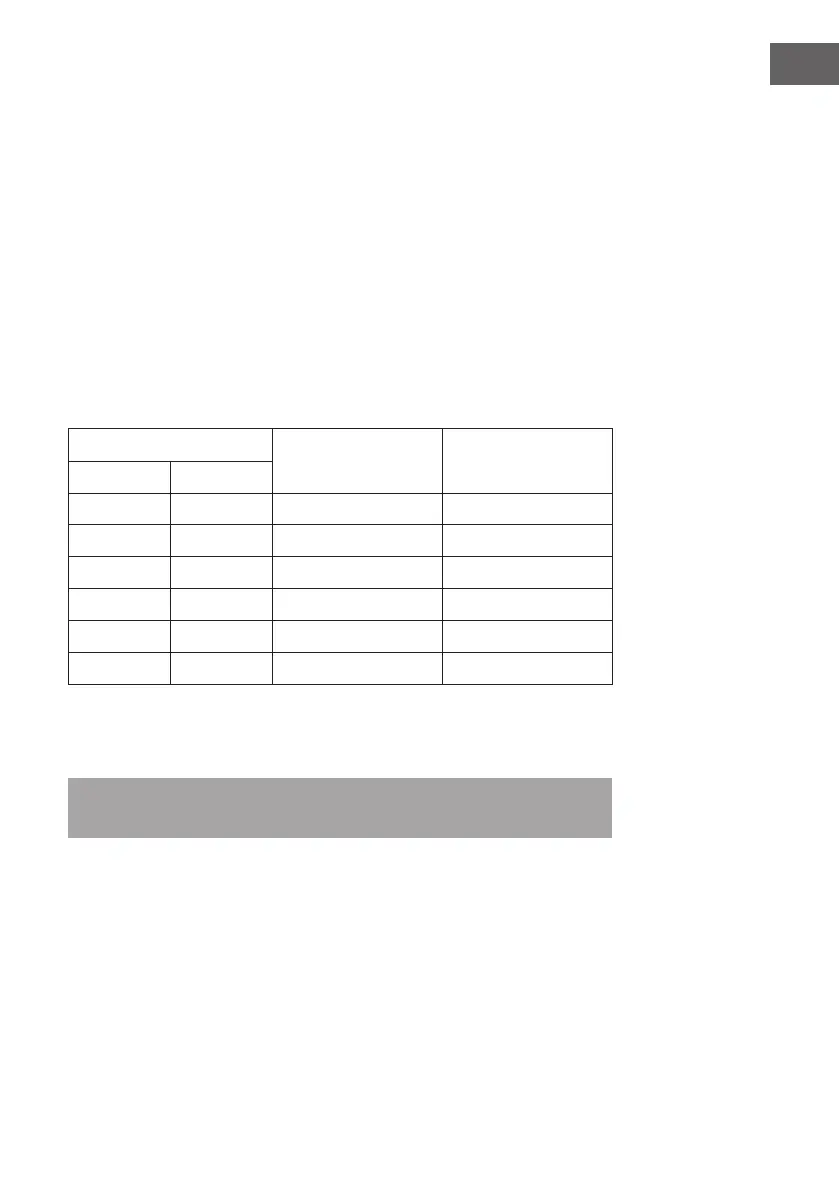
Press the Start/pause button to select the proper set according to your local environment,
the sets will change in the following sequence: H1 > H2 > H3 > H4 > H5 > H6.
Water hardness level
Setting on the
water softener
Digital Display stalls
°dH
1
mmol/l
2
0-5 0-0.9 1 H1
6-11 1.0-2.0 2 H2
12-17 2.1-3.0 3 H3
18-22 3.1-4.0 4
*
H4
23-34 4.1-6.1 5 H5
35-45 6.2-8.0 6 H6
¹ German degree of measurement for the water hardness
² International unit for water hardness
*
Factory setting
Note: Without any operation in ve seconds, the machine will exit from set mode, the
machine is into standby status.





 To Next Page